Join us on the Community Forums!
-
Community Guidelines
The Fitbit Community is a gathering place for real people who wish to exchange ideas, solutions, tips, techniques, and insight about the Fitbit products and services they love. By joining our Community, you agree to uphold these guidelines, so please take a moment to look them over. -
Learn the Basics
Check out our Frequently Asked Questions page for information on Community features, and tips to make the most of your time here. -
Join the Community!
Join an existing conversation, or start a new thread to ask your question. Creating your account is completely free, and takes about a minute.
Not finding your answer on the Community Forums?
- Community
- Product Help Forums
- Sense
- Re: Keep hitting the button accidentally during wo...
- Mark Topic as New
- Mark Topic as Read
- Float this Topic for Current User
- Bookmark
- Subscribe
- Mute
- Printer Friendly Page
- Community
- Product Help Forums
- Sense
- Re: Keep hitting the button accidentally during wo...
Sense button is pressed accidentally during exercise
- Mark Topic as New
- Mark Topic as Read
- Float this Topic for Current User
- Bookmark
- Subscribe
- Mute
- Printer Friendly Page
09-28-2020
07:26
- last edited on
11-01-2021
11:18
by
LizzyFitbit


09-28-2020
07:26
- last edited on
11-01-2021
11:18
by
LizzyFitbit
To my major disappointment, this watch is utterly unusable during my workouts. Any time I do push-ups, burpees, etc, my forearm triggers the button and the workout is paused or ended. How do I prevent this from happening and make the button less sensitive?
Moderator Edit: Clarified subject

I never had this issue with the Fitbit Inspire, whose physical button points outward. With the Sense, the button is on a slight angle facing my arm and it seems like less pressure is needed to trigger it. I’m surprised this issue wasn’t encountered by more people as they tested the design.
I do think that the placement of the button is bad... The probably ought to have simply broken the metal ECG portion around the edge for the button and then this wouldn't happen.
 Best Answer
Also on this topic: https://community.fitbit.com/t5/Sense/How-to-deactivate-the-Button-on-the-side/m-p/4500291#M1689

I wore my sense for the first time in the gym this morning and the button was constantly being activated while I was doing weights. Never had this issue with my original Versa. They really need to add a ‘lock during exercise’ function.

I'm in the same boat. Previously I used the Versa and then Versa 2 while kickboxing - never had issues. With the Sense, it is constantly pausing and ending exercise in the middle of the workout (I'm assuming my handwraps and gloves are causing this). It is a pain in the butt to check it constantly, since I have to take the gloves off and then undo the hand wraps. It would be great to be able to lock the watch feature while in the "exercise mode" - I can't believe they haven't thought of this.
On a separate note, my gym utilizes chest heart rate monitors and I wear one along with the Fitbit Sense - it irks me tremendously when I see my heart rate from the chest monitor in the 140s and 150s and yet the Sense is showing 110s and 120s. I expect some variance but really?!
Best Answer
11-18-2020
17:35
- last edited on
11-19-2020
12:59
by
LizzyFitbit

11-18-2020
17:35
- last edited on
11-19-2020
12:59
by
LizzyFitbit
Not sure if it’s me only or this happens to everyone. When i try to do exercises like push ups, the wake up button on my sense gets unintentionally pressed. Sometimes the device gets rebooted or sometimes the button press triggers the end workout screen.
I find this extremely annoying and am wondering if there’s a work-around for this.
Thanks!
Allan
Moderator Edit: Clarified subject

This can be an issue, I found if I wear it a little higher on my wrist and farther from my hand (so just proximal to my ulnar styloid process) I get far fewer accidental presses.
hope this helps


 Community Moderators ensure that conversations are friendly, factual, and on-topic. We're here to answer questions, escalate bugs, and make sure your voice is heard by the larger Fitbit team. Learn more
Hi @Apst, welcome to the Community Forums. @SPGmd, it's good to see you here and I appreciate your suggestions.
@Apst, thanks for bringing this to my attention and I'm sorry for the inconvenience experienced while tracking your workouts. As you notice, the button of your Sense might unintentionally be pressed when you bend your wrist and this may happen during activities such as a workout that require you to move your wrist a lot. As @SPGmd mentioned, I'd recommend wearing your watch higher on your wrist to avoid hitting the button. Be sure that your feedback won't be taken for granted as it'll help us to work and improve our products.
See you around.
Best Answer
Allan,
This kept happening to me too - I moved the watch much higher on my forearm and noticed that not only did it stop randomly deactivating my workout but also started showing a heart rate more in line with my chest heart rate monitor. Give it a try and I hope this helps.
Lexy
Best Answer
I also have this same problem when wearing this watch. It is really disappointing seeing that it is an expensive fitness tracking watch, yet when doing some fitness activities it may not track it.
Best Answer


Like Lablover said: Turn it around.
Also, you can Change wrist and change arm settings from dominant or non-dominant.
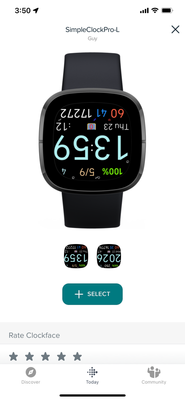
Lastly, there is a clock face out there which has an upside down face designed for this reason. It’s called SimpleClockPro-L.
The developer is “GUY” who is a community member and substantial contributor to the forum.
Add it as one of your 5 faces and switch to it during your workouts or use it strictly as your clock face.