
Join us on the Community Forums!
-
Community Guidelines
The Fitbit Community is a gathering place for real people who wish to exchange ideas, solutions, tips, techniques, and insight about the Fitbit products and services they love. By joining our Community, you agree to uphold these guidelines, so please take a moment to look them over. -
Learn the Basics
Check out our Frequently Asked Questions page for information on Community features, and tips to make the most of your time here. -
Join the Community!
Join an existing conversation, or start a new thread to ask your question. Creating your account is completely free, and takes about a minute.
Not finding your answer on the Community Forums?
- Community
- Features
- Third-Party Integrations
- Re: Fitbit is not syncing steps to Carrot Rewards ...
- Mark Topic as New
- Mark Topic as Read
- Float this Topic for Current User
- Bookmark
- Subscribe
- Mute
- Printer Friendly Page
- Community
- Features
- Third-Party Integrations
- Re: Fitbit is not syncing steps to Carrot Rewards ...
Fitbit is not syncing steps to Carrot Rewards App.
ANSWERED- Mark Topic as New
- Mark Topic as Read
- Float this Topic for Current User
- Bookmark
- Subscribe
- Mute
- Printer Friendly Page

My steps are not syncing to my Carrot Rewards App. Help states I should log into fitbit.com and under settings click applications and revoke Carrot Rewards rights then re-pair device - however when I log into fitbit.com I cannot locate this option. I have searched all settings etc. Help please 🙂
Answered! Go to the Best Answer.
Accepted Solutions


 Community Moderator Alumni are previous members of the Moderation Team, which ensures conversations are friendly, factual, and on-topic. Moderators are here to answer questions, escalate bugs, and make sure your voice is heard by the larger Fitbit team. Learn more
@Elabbs, @BigML Thanks for posting the email from Carrot rewards and reporting this issue. We are unable to reproduce this issue and it appears to only be happening with the Carrot Rewards app specifically.
The most standard troubleshoot across all integrations is to unlink the connection from both sides then link the accounts again. In the rare case that it's a Fitbit-side issue, more than just one particular app will be affected, which is why we would recommend contacting Carrot. However, we are reaching out to Carrot Rewards to see if there is a way to assist with this, as soon as I learn more, I will post an update. Thanks again for your report.
@RobertoME thanks for your input here as always!
Actively managing your weight? Find accountability buddies on the Manage Weight board

To revoke, go to www.fitbit.com
Click on the settings cog in the top right
Then click settings
On computer
Look at the menu on the left, click apps
On phone
Click the settings in top left
Click apps.
I also found those post.
https://community.fitbit.com/t5/Third-Party-Apps-Integrations/Carrot-Rewards/td-p/1935275
 Best Answer
My Fitbit is not syncing with my carrot app today either even after following all of the troubleshooting instructions.
Best Answer
Sent from my iPhone
Best Answer

I can`t even sinc with pc, or carrot..nothing. I did everything it asks...but still nothing. Been at it for 3 hours. Quite frustrating!
@Nfoster79wrote:Same issue here!! I clicked on revoke, but now I cant sync them back together but on my carrot app it does say it is synced to my Fitbit. Very frustrating
Best Answer
Hello @NanaLori if carrot doesn't show up in your connected applications, then it is not connected.
You will need to connect the two accounts.
Best Answer
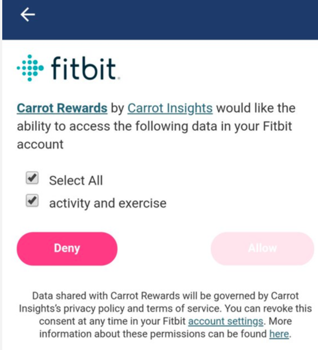
I have been trying to grant Carrot an access to my Fitbit account to no avail. The allow button is greyed out. All I can do is click DENY. I'm running Android Oreo and the latest version of Carrot app. Logging in to Fitbit account via carrot app works fine as well. Any ideas?
Thx!

Marrrmaduke | Canada
Charge HR, Blaze, Charge 2, Charge 3, Inspire HR, Versa Lite, Versa SE, Aria

It works fine on iOS. Might be an Android issue. I see this on Android Pixel after signing into Fitbit.
 Best Answer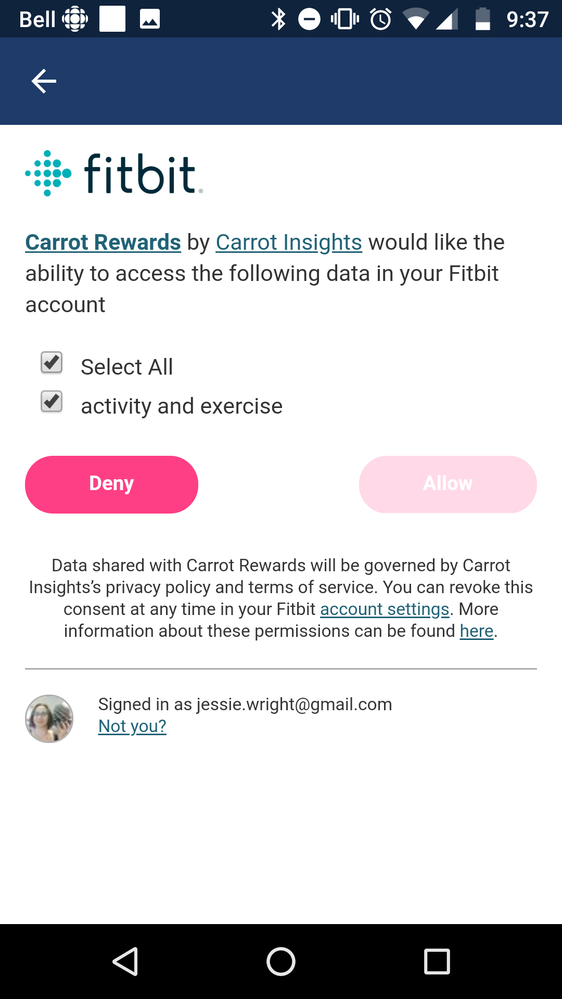
The fact that the allow is greyed out it should mean that the link to Carrot is already setup.
@alexkhor you say that it is fine in the iOS, what do you mean by that? Did you press allow in the iOS? If so then your all setup, thelink between the accounts only needs to be setup once from one device, since the link happened on the Internet, not the phone.
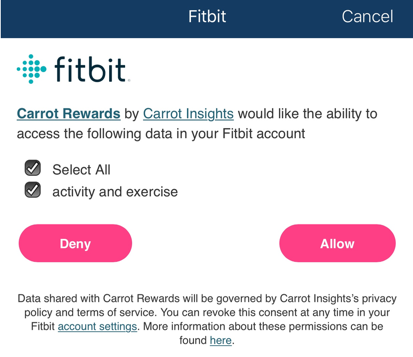
I tried to link using an iPhone and I am able to see the Allow button after signing in to Fitbit. The same process on Android yields a different result (greyed out Allow button) as shown in the earlier responses.
Any idea why Fitbit shows 2 different pages/controls for the same user based on device?
You do not need to press allow on both the android and iOS phone .You only need to, and will only be able to press allow once.
You want to press allow only once, this will then set up a connection through the Internet between Fitbit.com and carrotrewards.
Have you pressed the allow through iOS while your on the web page.
A web browser is a web browser, it doesn't matter what device you are using, you could do this through the computer if you wanted to.
My question :
Did you press the allow button on the ios device?
Best Answer
Nope, I am on Android Pixel, and I just happened to try it on my friend's iPhone. I need Fitbit to sync with my Android.
Best Answer
It does not sync to the phone the sync happens completely on the Internet.
Pressing the allow on the iOS device should set up the sync for you.
Best Answer
Fitbit and Carrot isn't yet authorized.
Best Answer
Yup, I tried on my friend's iPhone and I am able to link my Fitbit account to Carrot. Looks like this is an Android problem.
Best Answer