
Join us on the Community Forums!
-
Community Guidelines
The Fitbit Community is a gathering place for real people who wish to exchange ideas, solutions, tips, techniques, and insight about the Fitbit products and services they love. By joining our Community, you agree to uphold these guidelines, so please take a moment to look them over. -
Learn the Basics
Check out our Frequently Asked Questions page for information on Community features, and tips to make the most of your time here. -
Join the Community!
Join an existing conversation, or start a new thread to ask your question. Creating your account is completely free, and takes about a minute.
Not finding your answer on the Community Forums?
- Community
- Product Help Forums
- Other Versa Smartwatches
- Re: Heart Rate is not working
- Mark Topic as New
- Mark Topic as Read
- Float this Topic for Current User
- Bookmark
- Subscribe
- Mute
- Printer Friendly Page
- Community
- Product Help Forums
- Other Versa Smartwatches
- Re: Heart Rate is not working
HR not tracking/lights stopped flashing
- Mark Topic as New
- Mark Topic as Read
- Float this Topic for Current User
- Bookmark
- Subscribe
- Mute
- Printer Friendly Page

 Community Moderator Alumni are previous members of the Moderation Team, which ensures conversations are friendly, factual, and on-topic. Moderators are here to answer questions, escalate bugs, and make sure your voice is heard by the larger Fitbit team. Learn more
Fitbit Update: 2/19/19
Hi Versa Fam!
We're aware of an issue where some of you may be experiencing issues with your Versa no longer tracking heart rate (HR) and the lights below on the sensor don't flash.
If you come across this problem, please give the watch a restart. We suggest charging the watch to a full battery and monitoring the HR behavior afterward.
Just to make sure we have all the bases covered, double-check that you have Heart Rate turned "On" under the Settings app.
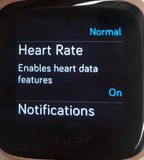
If your watch still isn't recording your HR, please let us know and we'll connect you with our Customer Support team.
Thanks for your troubleshooting efforts! We'll be around if you need us.
Want to get more steps? Visit Get Moving in the Health & Wellness Discussion Forum.


 Community Moderators ensure that conversations are friendly, factual, and on-topic. We're here to answer questions, escalate bugs, and make sure your voice is heard by the larger Fitbit team. Learn more
@Sheri1957 It's great to see you in our Fitbit Community! I'm sorry to hear that your Versa is not tracking your steps in challenges, nor hourly steps and heart rate. I would like to follow up on this issue and would like to know if the issues persist or if it got resolved after restarting it as advised my friend @WendyB.
Looking forward to your response! 
02-13-2019
08:43
- last edited on
04-02-2025
08:12
by
MarreFitbit

 Community Moderator Alumni are previous members of the Moderation Team, which ensures conversations are friendly, factual, and on-topic. Moderators are here to answer questions, escalate bugs, and make sure your voice is heard by the larger Fitbit team. Learn more
02-13-2019
08:43
- last edited on
04-02-2025
08:12
by
MarreFitbit
Hey guys, thanks for your reply!
@DAC1981 and @karma12, sounds good that your Versa is working fine now. Let me know if you have further questions or comments.
@Viv44, thanks for trying all the tips along this thread. Considering that the issue persists, I have escalated your case with our Support team so they can further assist you. Please keep an eye on your inbox.
I'll be around!
 Best Answer

No heartrate showing only 2 dashes
Reset 3 times didn't work
Only 1 gree light on back aometimes flashing no reed
Suggestions
Best Answer

Just noticed mine isn't tracking heart rate or steps throughout the date either. From my Fitbit App it started having issues yesterday. This is my second Fitbit since November.
Best Answer
Update your app
Reset your versa 3 times has been said
Reset your phone
Go to settings make sure bs is on
Call customer service
Good Luck
Sent from my Sprint Phone.
Best Answer Community Moderator Alumni are previous members of the Moderation Team, which ensures conversations are friendly, factual, and on-topic. Moderators are here to answer questions, escalate bugs, and make sure your voice is heard by the larger Fitbit team. Learn more
Thanks for getting back @Willy37 @Susanimal13! I'm very happy to hear that restarting your tracker helped! 😄
If you need anything else, I'm always around!
Help others by giving votes and marking helpful solutions as Accepted
Best Answer
Since I updated my Fitbit Versa yesterday, my watch has stopped reading my heart rate. On top of that the hourly activity that is recorded on my watch is not transferring to my app on my iPhone. More related to my heart rate but my active minutes also aren’t recording unless manually entered. And the icing on the cake I have a message that, no matter how many times I delete it, comes back.
I have tried resetting my app, my phone and my watch but it doesn’t seem to make a difference. Any suggestions??


02-14-2019
13:32
- last edited on
02-15-2019
07:39
by
AlejandraFitbit
02-14-2019
13:32
- last edited on
02-15-2019
07:39
by
AlejandraFitbit
My Fitbit Versa doesn't have a green light and is not tracking my heart rate.
Moderator edit: subject for clarity
Me neither!
and that means almost no calories burned!
anyone know what I’m doing wrong please?
Best Answer
I feel like this is an issue for many of us today.
Best Answer
SunsetRunner
Hi, this might mean that your HR sensor is not functioning (anymore). If you have tried restarting your Versa multiple times in a row by pressing and holding the left and right lower buttons together untill you see the Fitbit logo and this does not solve your problem, please contact Customer Support about it.
Best Answer