
Join us on the Community Forums!
-
Community Guidelines
The Fitbit Community is a gathering place for real people who wish to exchange ideas, solutions, tips, techniques, and insight about the Fitbit products and services they love. By joining our Community, you agree to uphold these guidelines, so please take a moment to look them over. -
Learn the Basics
Check out our Frequently Asked Questions page for information on Community features, and tips to make the most of your time here. -
Join the Community!
Join an existing conversation, or start a new thread to ask your question. Creating your account is completely free, and takes about a minute.
Not finding your answer on the Community Forums?
- Community
- Product Help Forums
- Zip
- Re: ZIP refuses to update firmware and I've tried ...
- Mark Topic as New
- Mark Topic as Read
- Float this Topic for Current User
- Bookmark
- Subscribe
- Mute
- Printer Friendly Page
- Community
- Product Help Forums
- Zip
- Re: ZIP refuses to update firmware and I've tried ...
Zip refuses to update firmware
- Mark Topic as New
- Mark Topic as Read
- Float this Topic for Current User
- Bookmark
- Subscribe
- Mute
- Printer Friendly Page
12-03-2017
12:24
- last edited on
12-05-2017
15:06
by
LucyAP


12-03-2017
12:24
- last edited on
12-05-2017
15:06
by
LucyAP
Can't install firmware update for ZIP; current version indicates that it's 5.64. I'm ready to take a hammer to my ZIP. There are times when the update actually starts, but then "crashes" during the first minute.
Any suggestions beyond the usual fitbit website suggestions?
Thanks.
Moderator edit: subject for clarity

I have the same problem. Additionally, since I tried to update, my zip will no longer sync at all. The ipad seems to "see" the zip and the sync starts, but no data is transferred. The error I get when trying to update is http error 400. I tried all the suggested remedies on the help page but nothing works. My wife has twin device and hers updated perfectly.



 Community Moderator Alumni are previous members of the Moderation Team, which ensures conversations are friendly, factual, and on-topic. Moderators are here to answer questions, escalate bugs, and make sure your voice is heard by the larger Fitbit team. Learn more
Welcome to the Forums @smithtrim, @scosta, @Debney and @kayjones! This sounds odd. The error 400 is usually due to an intermittent internet connection.
Also, if you are using a mobile device try updating your tracker using a computer or vice-versa. Remember to turn off the Bluetooth on the device you're not using so it doesn't interfere with the update. If this doesn't work, please check the Why can't I update my Fitbit device?
To make sure that your Zip is working correctly, please restart it.
Keep me posted with the outcome! 😉
 Best Answer
Community Moderator Alumni are previous members of the Moderation Team, which ensures conversations are friendly, factual, and on-topic. Moderators are here to answer questions, escalate bugs, and make sure your voice is heard by the larger Fitbit team. Learn more
Best Answer
Best Answer
Community Moderator Alumni are previous members of the Moderation Team, which ensures conversations are friendly, factual, and on-topic. Moderators are here to answer questions, escalate bugs, and make sure your voice is heard by the larger Fitbit team. Learn more
Best Answer
The device still is counting and can be discovered, just not syncing and it won’t accept any software download.
Ps. When I tried to re-link the device, the pairing numbers displayed, but the only reaction to typing in the numbers was to generate another set on the device. The battery is fresh.
Steve
Sent from my iPad
Community Moderator Alumni are previous members of the Moderation Team, which ensures conversations are friendly, factual, and on-topic. Moderators are here to answer questions, escalate bugs, and make sure your voice is heard by the larger Fitbit team. Learn more
Thanks for the update @scosta and @kayjones! I really appreciate the time and effort invested to solve this issue. To further assist you, I've created a Support Case on your behalf - you should receive an email from Customer Support at the email you used to register with the Community forums.
Keep me posted if you have any other question.
P.S. While you wait for Support to get back to you, please take a look to our Warranty Policies.
Best Answer
Will not load updates and will not sync
Best Answer Community Moderator Alumni are previous members of the Moderation Team, which ensures conversations are friendly, factual, and on-topic. Moderators are here to answer questions, escalate bugs, and make sure your voice is heard by the larger Fitbit team. Learn more
Nice to see you here @travelbird93 and @boxturtlelover! You can try to restart your Zip and these tips to fix your syncing issues. After this, follow these steps to update your tracker.
I hope this helps, keep me posted! 🙂
Best Answer
No idea why a moderator keeps posting things sending people in circles on troubleshooting. According to Fitbit phone customer support, the com.fitibt.http:400 error is a known bug with build 2.43.1 that was released a couple weeks ago. This is due to be fixed in 2.44 (release date 12/13/17.) Please ensure that your iOS or Andriod OS is up to date as well.
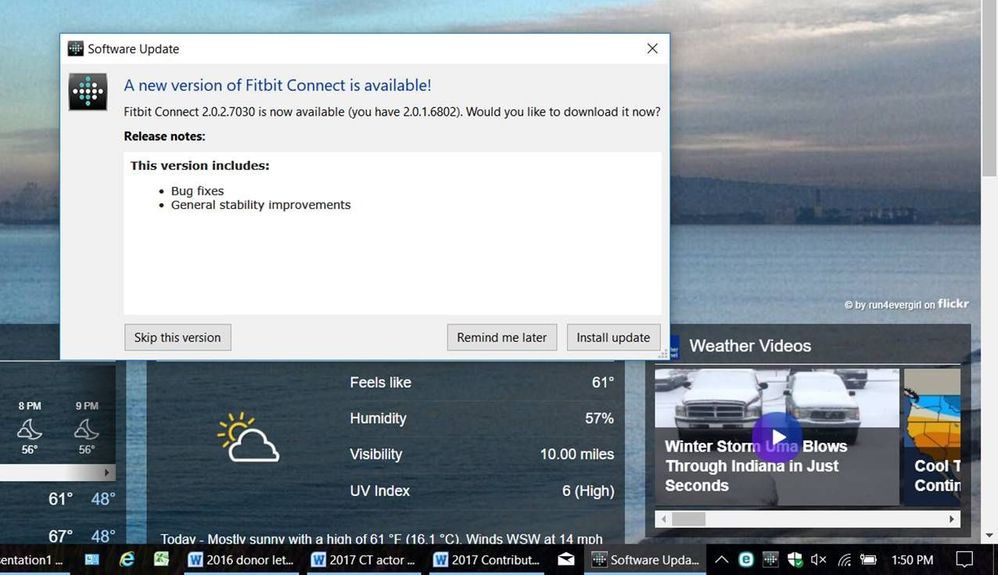
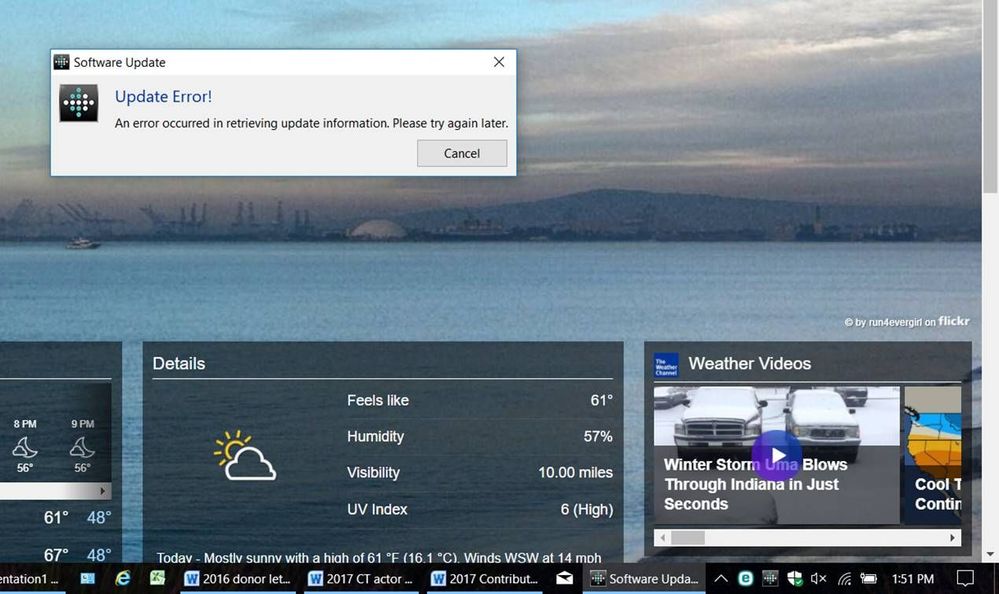
I keep getting a notification that there's an update available and to download and so I click to do that and then it says "error" try again later. This has happened EVERY SINGLE DAY for a couple of weeks. I've come to the conclusion that Fitbit is a sub-par product with sub-par customer support.
 Community Moderator Alumni are previous members of the Moderation Team, which ensures conversations are friendly, factual, and on-topic. Moderators are here to answer questions, escalate bugs, and make sure your voice is heard by the larger Fitbit team. Learn more
Thanks for stopping by @commname52! This sounds odd. I appreciate the pictures, it really help me to understand better the issue you are experiencing.
This issue may have an easy fix, you need to uninstall and re-install your Fitbit Connect. To uninstall the Fitbit Connect software from your PC, please do the following:
- Click the Start button
- Click Control Panel
- Under Programs, choose Uninstall a Program
- Highlight Fitbit Connect
- Click Uninstall/Change
- Click Uninstall
- Click Finish
Before reinstalling, we recommend you temporarily disable any antivirus or firewall software, as it may interfere with proper installation of Fitbit Connect. You can re-enable your antivirus once the installation is complete.
To reinstall Fitbit Connect, please do the following:
- Go to www.fitbit.com/setup and click download here beneath your device.
- Double-click the installer file from the download location.
- Follow the onscreen instructions to complete installation.
I hope this helps, keep me posted! 😉
Best Answer
Hello, i had various fitbits throughout the years.
currently i am travelling and therefore got a fitbit zip. It doesnt eant to update. Restarted the device, zip both tried on ipad and android and read alls teps above.
any help?
thank you,
ilja
