
Join us on the Community Forums!
-
Community Guidelines
The Fitbit Community is a gathering place for real people who wish to exchange ideas, solutions, tips, techniques, and insight about the Fitbit products and services they love. By joining our Community, you agree to uphold these guidelines, so please take a moment to look them over. -
Learn the Basics
Check out our Frequently Asked Questions page for information on Community features, and tips to make the most of your time here. -
Join the Community!
Join an existing conversation, or start a new thread to ask your question. Creating your account is completely free, and takes about a minute.
Not finding your answer on the Community Forums?
- Mark Topic as New
- Mark Topic as Read
- Float this Topic for Current User
- Bookmark
- Subscribe
- Mute
- Printer Friendly Page
Charge 2 doesn't receive text notifications
ANSWERED- Mark Topic as New
- Mark Topic as Read
- Float this Topic for Current User
- Bookmark
- Subscribe
- Mute
- Printer Friendly Page

Answered! Go to the Best Answer.
 Best Answer
Accepted Solutions

 Fitbit Product Experts Alumni are retired members of the Fitbit Product Expert Program. Learn more
@Maggie71 On the Iphone, make sure you have "Allow in notification center". "Show in Notification Center" and "Show on lock screen" all enabled.
Kelly | Oklahoma
Alta HR, Blaze, Flex 2, Charge 2, Charge, and Aria * IPhone 7+

You must have text notifications set to display in the iPhone notification center. On your iPhone go to Settings/Notifications/Messages then select Show In Notification Center!
Now texting notifications work!

Yes I would believe that the problem is the same, usually notifacation a are on the phone end. Insides barely I know nothing about iOS except that in the phones notification center there is sonnething that has to be enabled and that this frequently gets over looked.
Best Answer
Fitbit Product Experts Alumni are retired members of the Fitbit Product Expert Program. Learn more
@Maggie71 On the Iphone, make sure you have "Allow in notification center". "Show in Notification Center" and "Show on lock screen" all enabled.
Kelly | Oklahoma
Alta HR, Blaze, Flex 2, Charge 2, Charge, and Aria * IPhone 7+
You must have text notifications set to display in the iPhone notification center. On your iPhone go to Settings/Notifications/Messages then select Show In Notification Center!
Now texting notifications work!
Best Answer
How did you get it fixed. It worked when I got the charge 2 for Christmas but then it stopped.
Best Answer
What have you done so far?? Remember anything you change on the app for setting will only work after you sync it!
Best Answer
Bluetooth tap on charge2 and (forget this device) repair your charge. Then sync you change with the app.
-Setting,
- Notifications
- Fitbit, - allow notifications
- show in notification Centr
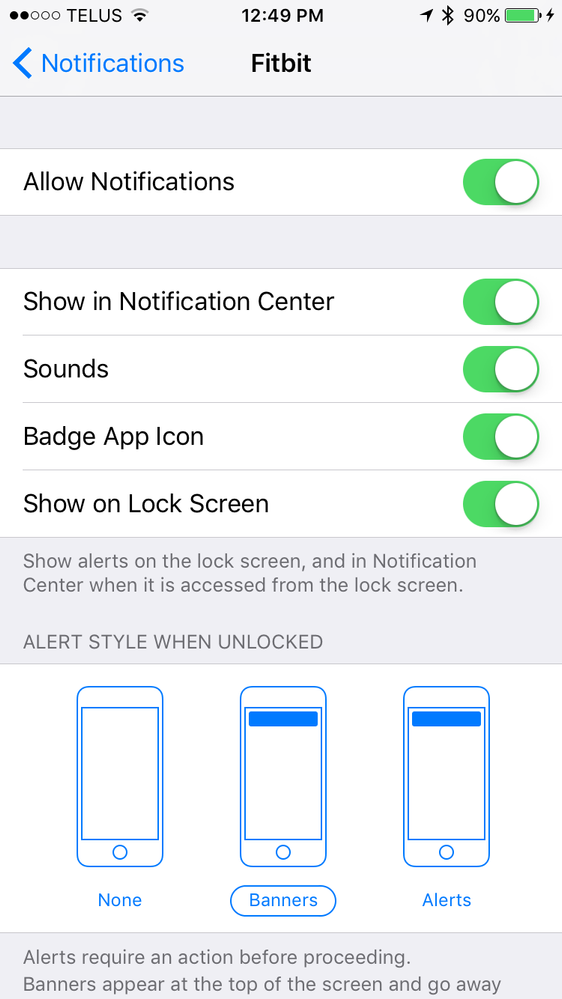

Let we know if it works !
Best Answer
You can turn on/off notifications on the charge 2 with the side button. Press and Hold the button for a few seconds,then you'll see notifications on or off press again to make the switch!
@Jen79 life sometimes it is a simple lock up of the drivers and a phone restart is needed.
Now if it is a hardware lockup then a phone Shutdown will be required.
Best Answer

You're a genius!! This is the solution!!! Thank you!!!!

yep, we had the same issue. I chatted with customer service for an hour to no avail and they sent me a new tracker. Got here today and had the same problem. Your "hack" allowed the text notifications to come right through. thanks a ton.


@Gunner7 wrote:You can turn on/off notifications on the charge 2 with the side button. Press and Hold the button for a few seconds,then you'll see notifications on or off press again to make the switch!
It worked! After going through deleting the app, forget device on Bluetooth etc. etc. This was after countless posts/articles Not one mentions that you can turn off/on notifications on the Charge 2 until I read your post. Thank you!

Thank you for your help! I finally have it fixed to where I can see my text messages. The one thing that must be done that was not mentioned when you go into Settings/Notifications/Messages you must enable all options. I did not have Show In History enabled. Now that I enabled Show In History, I am able to see my text messages on my Charge 2. Thanks for the tip!
Best Answer