
Join us on the Community Forums!
-
Community Guidelines
The Fitbit Community is a gathering place for real people who wish to exchange ideas, solutions, tips, techniques, and insight about the Fitbit products and services they love. By joining our Community, you agree to uphold these guidelines, so please take a moment to look them over. -
Learn the Basics
Check out our Frequently Asked Questions page for information on Community features, and tips to make the most of your time here. -
Join the Community!
Join an existing conversation, or start a new thread to ask your question. Creating your account is completely free, and takes about a minute.
Not finding your answer on the Community Forums?
- Mark Topic as New
- Mark Topic as Read
- Float this Topic for Current User
- Bookmark
- Subscribe
- Mute
- Printer Friendly Page
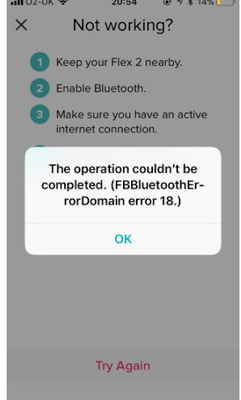
FBBluetoothErrorDomain error 18
ANSWERED- Mark Topic as New
- Mark Topic as Read
- Float this Topic for Current User
- Bookmark
- Subscribe
- Mute
- Printer Friendly Page


 Community Moderator Alumni are previous members of the Moderation Team, which ensures conversations are friendly, factual, and on-topic. Moderators are here to answer questions, escalate bugs, and make sure your voice is heard by the larger Fitbit team. Learn more
Update 1/23/2018: Thanks again everyone for your reports on this error message when updating firmware or setting up your tracker. To resolve this issue, please forget your device in Bluetooth settings. For complete instructions, please check out @Dawn126's post here. We are currently working with our team to update the error message to include the solution.
Update 10/31/2017: For those seeing this message while updating your tracker firmware, check out @Dawn126's post here on having Bluetooth forget your device. In addition, please check out this help article on troubleshooting firmware updates if you haven't already.
Hi Everyone- We're currently investigating user reports of receiving the following error: FBBluetoothErrorDomain error 18 which prevents them from updating their firmware.
Actively managing your weight? Find accountability buddies on the Manage Weight board
Answered! Go to the Best Answer.




I did try what they said. I unpaired both my Ipad and phone and then I was able to complete the download and repair. Try that and see if it fixes your Charge HR too.
 Best Answer
This solution worked perfectly to allow the update to complete! Thank you for sharing the solution.
Best Answer
Thank you. That worked for me. 🙂
Best Answer
I only received the update tonight, why are you still allowing the update to go through when the issue still exists. Now I have a Fitbit that is useless, doesn’t sync, won’t reset as it is stuck on the update. Fix it!
Best Answer
Please combine this thread or revise to include how to display your account icon within the Fitbit app. When my update locked up today and crashed my device, I was caught with 3 issues.
1. Frozen device with ! symbol which I couldn't clear
2. all the instructions to reset the device don't tell you that there is no way to know if it works until it does
none of them tell you how to display the -now missing - Account symbol icon within the app and you are half way to resetting your device and get hung up again.
3. Firm up the proper order. should we go into settings - Bluetooth - forget the device first or remove device from the app first.
I am a fairly advanced user being an analyst and yet I bounced around between several forums and instructions, repeating several steps and holding down the stupid button until I had a blister. then magically it all worked at once.
Best Answer
I was so excited that this seemed like this was going to work: I had already tried multiple times to get the update to run, but it would stop half-way and then show me an exclamation mark. I told my iPhone 6S to "forget this device" and the other steps to shut off Bluetooth, and watched the bar on the update run up to the end, and I thought, "Yay, it worked", then the image on the Fitbit went dark and now it won't come on. Guess I will try something else. Thanks for putting out this solution, it seems it has worked for a lot of people!
Best Answer
Best Answer
Thanks for the quick reply, Janelle83!
I tried that while on the phone with Customer Service, unfortunately, it seems the unit is fried. So they've already sent me the email to choose the same replacement unit or 50% off a different one. A great offer, but dang it..........didn't want to be without it! Trying to get my old Flex unit going in the meantime, but it doesn't seem to want to charge.....sigh.......funny how we get attached to these little electronics!
Best Answer
I had the same problem with my chargeHR. DOMAIN ERROR 18 bla bla bla. I solved the issue by connecting the usb fitbit base in one port on my computer and the charge HR on other usb port on the computer. i open the dashboard on fitbit base and update from there. it worked
Best Answer

I have a charge HR and am still getting this error after upgrading my app today 12/3/17. I deleted the app off my iphone 6s and re-added it and still get the same . My Fitbit is dead in the water. It started the upgrade yesterday and failed . Internet good Bluetooth on but says not connected and wont connect. Ideas ??
Best Answer
Sent from my iPhone
Best Answer