
Join us on the Community Forums!
-
Community Guidelines
The Fitbit Community is a gathering place for real people who wish to exchange ideas, solutions, tips, techniques, and insight about the Fitbit products and services they love. By joining our Community, you agree to uphold these guidelines, so please take a moment to look them over. -
Learn the Basics
Check out our Frequently Asked Questions page for information on Community features, and tips to make the most of your time here. -
Join the Community!
Join an existing conversation, or start a new thread to ask your question. Creating your account is completely free, and takes about a minute.
Not finding your answer on the Community Forums?
- Mark Topic as New
- Mark Topic as Read
- Float this Topic for Current User
- Bookmark
- Subscribe
- Mute
- Printer Friendly Page
New Dashboard
- Mark Topic as New
- Mark Topic as Read
- Float this Topic for Current User
- Bookmark
- Subscribe
- Mute
- Printer Friendly Page
05-25-2016
08:34
- last edited on
05-25-2017
14:37
by
KateFitbit


 Community Moderator Alumni are previous members of the Moderation Team, which ensures conversations are friendly, factual, and on-topic. Moderators are here to answer questions, escalate bugs, and make sure your voice is heard by the larger Fitbit team. Learn more
05-25-2016
08:34
- last edited on
05-25-2017
14:37
by
KateFitbit
Fitbit Update 5/25/2017
Thank you for taking the time to share feedback. I can assure you the comments have been and continued to be reviewed and shared with our iOS team.
As a reminder, I'm including our help article on the Fitbit app here.
Overwhelmingly, recent posts share the sentiment of no longer being able to revert back to the original dashboard and not having the option to choose. At this time there are no plans to revert access to the old Dashboard, but we always appreciate feedback on how to improve our app.
As a reminder, Please remember to keep your posts respectful and on-topic, per our Community Guidelines. This thread will be better for everyone as a constructive conversation.
Fitbit Update 8/17/2016
Beginning with version 2.26 of the Fitbit app for iOS, the new Fitbit app dashboard with an updated look is now fully implemented. You can no longer return to the old design. We're constantly striving to improve Fitbit products and services, and we appreciate all of the feedback we receive from our customers.
You can find information about the new app dashboard and how to start using it by clicking here.
Fitbit Update 5/25/2016
I'm very pleased to announce that iOS users who have updated to version 2.23 of the Fitbit iOS App are now able to opt-in to use a preview of a new design of the Fitbit iOS dashboard!
One of my favorite features for this new dashboard preview is the quick log button in the bottom-center of the iOS App. This feature allows users to quickly: track an exercise, log food, log sleep, log water, send a friend request, scan a food barcode (if you are using the US food database), log their weight, or set an alarm.
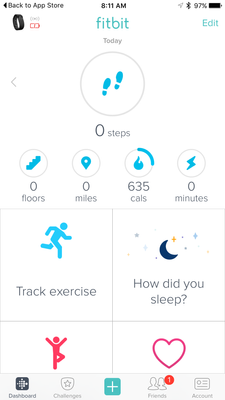
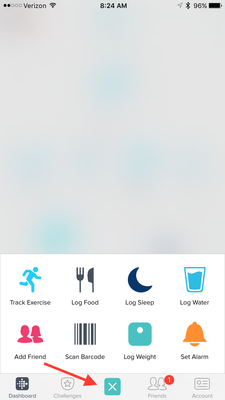
Users can opt-in to use the new iOS dashboard design by:
1. Updating to version 2.23 of the Fitbit iOS App, click here to be redirected to the iOS App Store.
2. Click the Account button in the bottom right-hand corner.
3. Scroll down and click the Advanced Settings button.
4. Toggle the Preview New Dashboard button at the top of the page on.
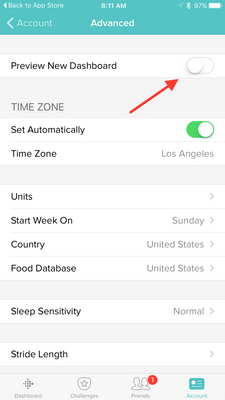
Click here for more details and let me know if you have any questions!
Moderator Edit: Edited thread title.

You're lucky, Brenring!
There's no longer an option on my app to change the dashboard back from this ugly mess. Just let us have the ORIGINAL, CLEAR, informative Dashboard. What's wrong with giving paying customers the option that they want?
 Best Answer
Recently I lost the option to change between new and old dashboard. I now find myself with the new dashboard and no way to change back in Advanced Settings. Am I stuck with this?

 Fitbit Product Experts Alumni are retired members of the Fitbit Product Expert Program. Learn more
@CSTURM Correct - the newest versions of the mobile app no longer have the setting to revert back to the old dashboard.
Kelly | Oklahoma
Alta HR, Blaze, Flex 2, Charge 2, Charge, and Aria * IPhone 7+
Best Answer
Well I just lost my second fitbit due to their defective wristbands. I won't buy another one. They not only lost me but any referrals I have/will give. They have known for several years that the bands were crap for the flex...and have done nothing about it.
Best Answer
I'm not sure why the choice was made for me instead of by me. I do not like
the new dashboard but they decided I would have to live with it.

Please bring back the previous dashboard. I liked it better for logging food. The new one is confusing. I am not happy that I don't have a choice.

Seems I can no longer change mine back.. I've always hated the new screen so reverted to the old but now I have no option - I simply have new dashboard 😠 using charge hr and Android
 Best Answer
Sent from my Sprint Samsung Galaxy S6 edge+.



My Account button is in the upper right hand corner what do you see in the lower corner
Best Answer
When I go to my advanced settings there's no tabs for a new dashboard
Best Answer
@Irachernes the tab was to revert back to the old dashboard and has been removed. You should be seeing the new dashboard now.
Best Answer
The problem is I wanted to keep the old that or. I don't like the new one
