
Join us on the Community Forums!
-
Community Guidelines
The Fitbit Community is a gathering place for real people who wish to exchange ideas, solutions, tips, techniques, and insight about the Fitbit products and services they love. By joining our Community, you agree to uphold these guidelines, so please take a moment to look them over. -
Learn the Basics
Check out our Frequently Asked Questions page for information on Community features, and tips to make the most of your time here. -
Join the Community!
Join an existing conversation, or start a new thread to ask your question. Creating your account is completely free, and takes about a minute.
Not finding your answer on the Community Forums?
- Community
- Product Help Forums
- Alta & Alta HR
- Re: Interacting with Alta
- Mark Topic as New
- Mark Topic as Read
- Float this Topic for Current User
- Bookmark
- Subscribe
- Mute
- Printer Friendly Page
- Community
- Product Help Forums
- Alta & Alta HR
- Re: Interacting with Alta
Interacting with Alta
- Mark Topic as New
- Mark Topic as Read
- Float this Topic for Current User
- Bookmark
- Subscribe
- Mute
- Printer Friendly Page
03-10-2016
10:23
- last edited on
08-20-2020
18:43
by
MatthewFitbit


 Community Moderator Alumni are previous members of the Moderation Team, which ensures conversations are friendly, factual, and on-topic. Moderators are here to answer questions, escalate bugs, and make sure your voice is heard by the larger Fitbit team. Learn more
03-10-2016
10:23
- last edited on
08-20-2020
18:43
by
MatthewFitbit
So you've got yourself an Alta and are wondering "where's the button?" Check out how to interact with Alta!
- How do I view the time on my Alta?
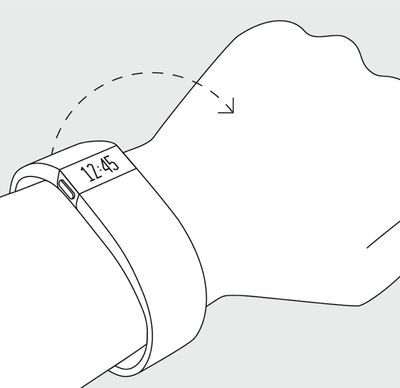
You have 2 options to view the time on your Alta.
- You can use Quick View to wake up your Alta's screen without touching the tracker. Just turn your wrist towards you and the time will appear for a few seconds.
- The other option is to double-tap your Alta where the band and tracker meet. This will illuminate the Alta and display the time and date (depending on the clock face that you've selected as default).
- How do I view my daily stats?
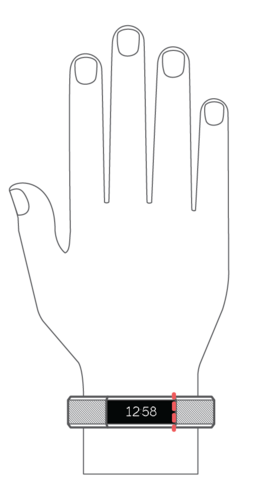
To view your daily stats just use Quick View to bring up your clock and then single tap the Alta where the band and tracker meet (as seen in image below) to toggle between your steps, distance, calories burned and Active Minutes stats.
Alother way to do this is to double tap on the Alta to bring up the clock and then single tap the Alta where the band and tracker meet to toggle between stats.
- What's the best way to tap on my Alta?
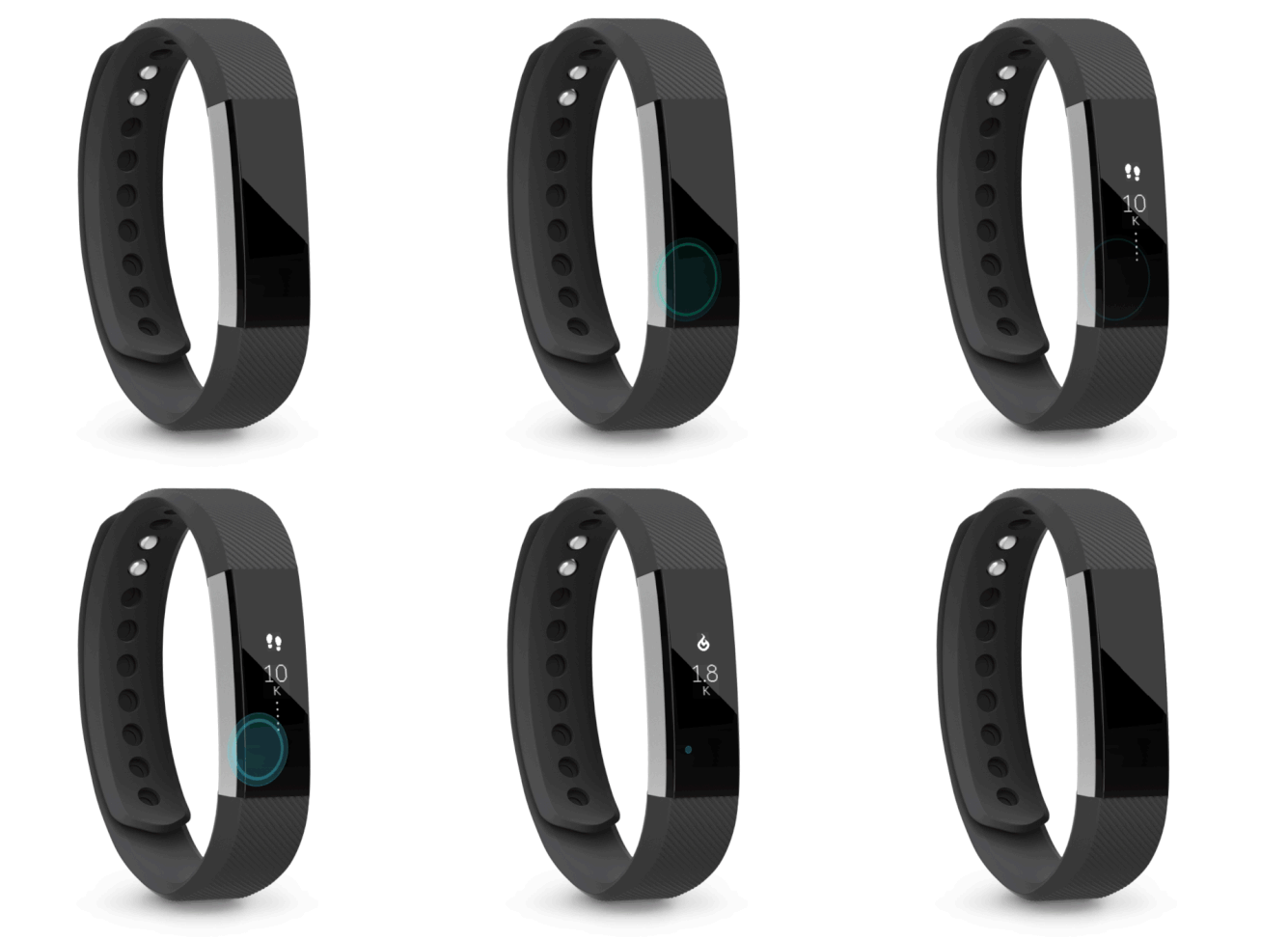
Make sure to give your device time to react - you shouldn't ever be tapping more than once or twice per second, and may need to pause a moment after your tap before you see the device react. If you're having trouble, try slowing down your taps.
Video below:
Community Moderator Alumni are previous members of the Moderation Team, which ensures conversations are friendly, factual, and on-topic. Moderators are here to answer questions, escalate bugs, and make sure your voice is heard by the larger Fitbit team. Learn more
@Bridget41 Tapping where the band meets the tracker, as shown here, is the ideal location when interacting with the Alta. I promise that standing on your head is not a requirement. 
Community Moderator Alumni are previous members of the Moderation Team, which ensures conversations are friendly, factual, and on-topic. Moderators are here to answer questions, escalate bugs, and make sure your voice is heard by the larger Fitbit team. Learn more
@Saaaypants21 If your Alta is unresponsive to taps or charging, I recommend getting in touch with our Support Team and letting them know of your experience. I am confident that our team will be able to help provide you with further options for getting you back on track.
 Best Answer
 Community Moderator Alumni are previous members of the Moderation Team, which ensures conversations are friendly, factual, and on-topic. Moderators are here to answer questions, escalate bugs, and make sure your voice is heard by the larger Fitbit team. Learn more
@Pamaseeta Have you attempted to interact with the Alta with the recommended tips here? Let me know if the display lights back up.
Best Answer Community Moderator Alumni are previous members of the Moderation Team, which ensures conversations are friendly, factual, and on-topic. Moderators are here to answer questions, escalate bugs, and make sure your voice is heard by the larger Fitbit team. Learn more
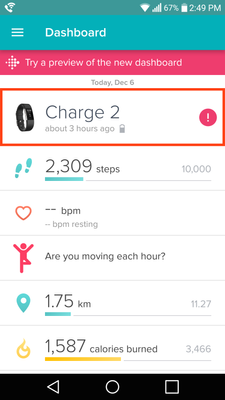
@KaylaCTK The tracker button is at the top of the Fitbit app Dashboard. I recommend trying out the official setup instructions as well.
Check out my screenshot with the tracker tile outlined in red below. Hope that helps to clarify.
 Best Answer
I have the exact same problem. Tap works fine when plugged in but no response when not. FRUSTRATED!!
Best Answer
Community Moderator Alumni are previous members of the Moderation Team, which ensures conversations are friendly, factual, and on-topic. Moderators are here to answer questions, escalate bugs, and make sure your voice is heard by the larger Fitbit team. Learn more
@RoxanneK Let's try restarting the Alta and then giving the tap interactions as explained here another try. Let me know if that helps.
Best Answer
What do I do to set my alta up to recognize incoming texts and phone calls? It said to go into setting's in the app and I did with no luck.
Best Answer
my Alta fit bit only shows the time, nothing else. also it does not respond to taps, I only get the time when I turn my wrist.
is it me or is the fit bit not working correctly?
Best Answer
I feel the same way as this is the most frustrating item I have had in a long time. Does not seem worth the time and trouble. Good luck. I am ready to throw in the towel
Best Answer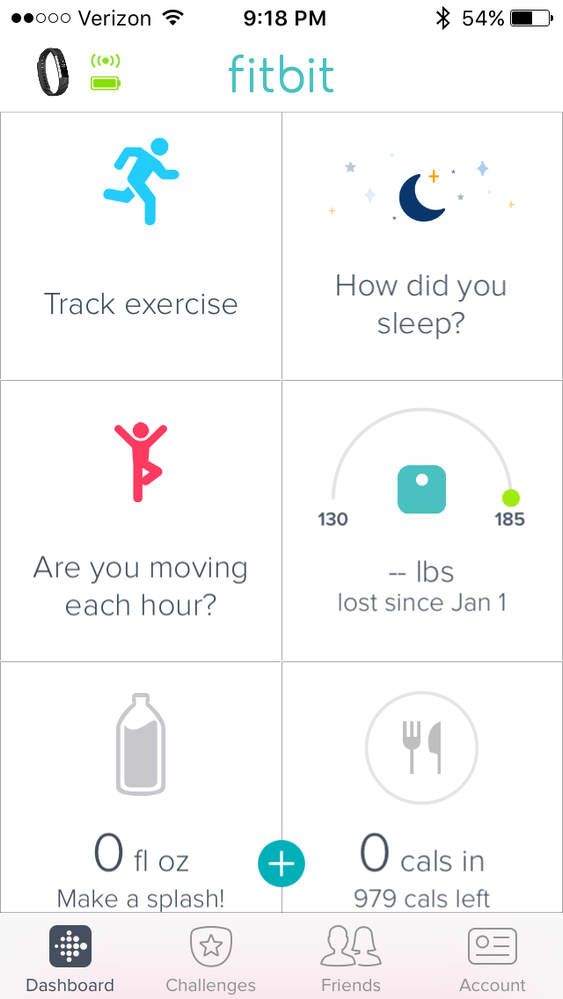
Ditto
it may as well be completely in a foreign language. Impossible to navigate and understand. Such a shame. Looks like a good product if it worked.
Best Answer
Community Moderator Alumni are previous members of the Moderation Team, which ensures conversations are friendly, factual, and on-topic. Moderators are here to answer questions, escalate bugs, and make sure your voice is heard by the larger Fitbit team. Learn more
@Jenjen81 Check out the full instructions for setup of notifications for mobile devices here.
@TuckiesMom I recommend restarting the Alta with the instructions here. Once you've completed the restart process, I recommend attempting to tap and interact with the Alta again once you completed the restart. Let me know if that helps.
Best Answer Community Moderator Alumni are previous members of the Moderation Team, which ensures conversations are friendly, factual, and on-topic. Moderators are here to answer questions, escalate bugs, and make sure your voice is heard by the larger Fitbit team. Learn more
@Profit I recommend restarting the Alta and then giving it another try. Let me know if these tips help get you back on track.
Best Answer