
Join us on the Community Forums!
-
Community Guidelines
The Fitbit Community is a gathering place for real people who wish to exchange ideas, solutions, tips, techniques, and insight about the Fitbit products and services they love. By joining our Community, you agree to uphold these guidelines, so please take a moment to look them over. -
Learn the Basics
Check out our Frequently Asked Questions page for information on Community features, and tips to make the most of your time here. -
Join the Community!
Join an existing conversation, or start a new thread to ask your question. Creating your account is completely free, and takes about a minute.
Not finding your answer on the Community Forums?
- Community
- Platform
- Android App
- Can't edit the exercise type on new Fitbit app
- Mark Topic as New
- Mark Topic as Read
- Float this Topic for Current User
- Bookmark
- Subscribe
- Mute
- Printer Friendly Page
- Community
- Platform
- Android App
- Can't edit the exercise type on new Fitbit app
Can't edit the exercise type on new Fitbit app
ANSWERED- Mark Topic as New
- Mark Topic as Read
- Float this Topic for Current User
- Bookmark
- Subscribe
- Mute
- Printer Friendly Page
09-21-2023
11:48
- last edited on
09-28-2023
13:41
by
LizzyFitbit


09-21-2023
11:48
- last edited on
09-28-2023
13:41
by
LizzyFitbit
On the new app, on Android on a pixel 7.
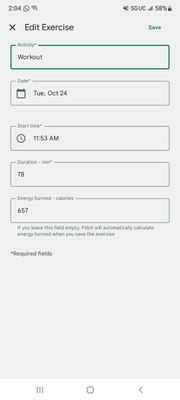
The Edit Exercise panel allows me to properly edit Date, Start time and Duration, but the keyboard is not showing up when I try to update the Activity.
Moderator Edit: Clarified subject
Answered! Go to the Best Answer.


Look forward to having it fixed asap 🤞🏻🤞🏻🤞🏻
 Best Answer




Galaxy S21 FE 5G
Android Version 13
Version 4.02.1.fitbit-mobile
Keyboard doesn't appear when editing activity. Also the website only allows you to edit exercise once, if you accidentally click update and chose the wrong exercise, you can't go back to edit. The desktop windows app no longer works since accts are migrated to google now.
Did you ever get this resolved on your S21? I have the same issue.


Hi Lizzy. Good to know that this is being investigated. It's been over a month since your latest post about this issue and many people have commented on the inability to edit since your post. The latest update appears to have broken something that previously worked before the update. Do you have any further information on how this is going or when we might expect a fix?

Any update?



As of today the issue is still there. I was scrubbing walls in my apartment and it autodetected mountain bike, and I can't change it to something more appropriate. I don't want to delete it because it was an intense 17-minute session, but it certainly shouldn't be credited as outdoor bike.



Yep just install the latest update 4.03 on my Samsung galaxy s21 and still can't edit exercise.
