
Join us on the Community Forums!
-
Community Guidelines
The Fitbit Community is a gathering place for real people who wish to exchange ideas, solutions, tips, techniques, and insight about the Fitbit products and services they love. By joining our Community, you agree to uphold these guidelines, so please take a moment to look them over. -
Learn the Basics
Check out our Frequently Asked Questions page for information on Community features, and tips to make the most of your time here. -
Join the Community!
Join an existing conversation, or start a new thread to ask your question. Creating your account is completely free, and takes about a minute.
Not finding your answer on the Community Forums?
- Community
- Platform
- Android App
- Re: Sleep tile on dashboard shoing 0 mins awake
- Mark Topic as New
- Mark Topic as Read
- Float this Topic for Current User
- Bookmark
- Subscribe
- Mute
- Printer Friendly Page
- Community
- Platform
- Android App
- Re: Sleep tile on dashboard shoing 0 mins awake
RESOLVED: Sleep tile on dashboard showing 0 mins awake
- Mark Topic as New
- Mark Topic as Read
- Float this Topic for Current User
- Bookmark
- Subscribe
- Mute
- Printer Friendly Page


 Community Moderator Alumni are previous members of the Moderation Team, which ensures conversations are friendly, factual, and on-topic. Moderators are here to answer questions, escalate bugs, and make sure your voice is heard by the larger Fitbit team. Learn more
Fitbit Update: 9/10
Hey, everyone!
Thanks for confirming that this bug has been fixed and you're no longer seeing "0" minutes for your awake time on the sleep tile. There were some improvements that were made that in the process also fixed this bug.
Since we've confirmed the issue has been resolved since 8/31, I'm now going to close this thread. If you encounter any new issues with sleep logs, please start a new discussion.
Fitbit Update: 7/31
Hi, everybody!
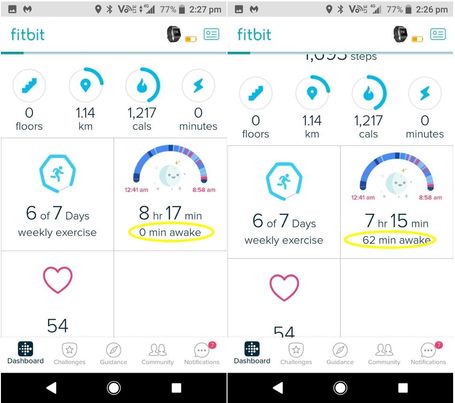
I wanted to check in with you all that had previously reported this bug with the sleep tile. There were some recent improvements made, and I was wondering if you were all still experiencing this with the sleep tile. To sum up the issue, the sleep time in the dashboard was reflecting "0 mins awake" and would later refresh and change it to another number. Basically, the sleep tile was showing a different number from the actual sleep log.
If anyone could please let me know if they are still experiencing this, it would be super helpful!
Fitbit Update: 7/24
Hi, Android users!
Many of you are reporting since the last Fitbit for Android app release, version 2.74.2 that your sleep tile is reflecting "0 min awake" on the dashboard after syncing your watch/tracker. After it refreshes or your tracker syncs again, you will see the actual time you were awake for. In the sleep details, your sleep reflects correctly, it is only the sleep tile on the dashboard that is showing discrepancies for the sleep log.
We have reported this issue to our team for investigation. When I hear of any new information, this thread will be updated. Thanks for all your help and cooperation!
Want to get more steps? Visit Get Moving in the Health & Wellness Discussion Forum.

This has just started happening. sleep tile on dashboard shows 0 mins awake even though it is obvious there are awake periods. go into the sleep detail and correct figures are shown. go back to dasboard and correct figures are shown for a couple of seconds, then revert to 0 mins awake! android7.0 samsung galaxy.
 Best Answer
I have the same issue. Dashboard tile displays total time including awake time. Detail shows total sleep time. Like others, the dashboard tile reverts to correct time when I sync, but then flips back a few seconds later. Issue started a couple of weeks ago. I have a HR charge 2 and a Samsung note 8.


 Community Moderators ensure that conversations are friendly, factual, and on-topic. We're here to answer questions, escalate bugs, and make sure your voice is heard by the larger Fitbit team. Learn more
Hello @Shufflerking. Welcome to the Forums @Kimpossiblenow and @Kaisee.
@Shufflerking Thanks for letting me know. Hopefully you can consider Fitbit again in the future.
@Kimpossiblenow and @Kaisee, Thanks for sharing your experience. I'll be passing all this to the rest of the team. Whenever I get any news I'll be sure to let everyone know.
Feel free to reach out with any further questions.
Best Answer
Community Moderators ensure that conversations are friendly, factual, and on-topic. We're here to answer questions, escalate bugs, and make sure your voice is heard by the larger Fitbit team. Learn more
Welcome to the Forums @Jka. Hello @JaiaB.
@JaiaB Thanks for answering my questions!
I'd like to let both of you know that our team is aware of the situation and it is being looked into. We do not have any news at the time but we will be sure to let everyone know as soon as we receive any updates.
Let me know if you have any questions.
Best Answer
This is happening to me too. It happens every time I open the Fitbit app on my android device or when the app syncs. It has been happening for weeks at least...
Best Answer
Hello I am using an Android Samsung Galaxy S 7
It is so happening as of now it will show the Sleep awake time and then automatically turn it all to sleep time.
The Fitbit version that I'm using is 2.74.2
Best Answer
Community Moderator Alumni are previous members of the Moderation Team, which ensures conversations are friendly, factual, and on-topic. Moderators are here to answer questions, escalate bugs, and make sure your voice is heard by the larger Fitbit team. Learn more
Hi, everybody!
I wanted to check in with you all that had previously reported this bug with the sleep tile. There were some recent improvements made, and I was wondering if you were all still experiencing this with the sleep tile. To sum up the issue, the sleep time in the dashboard was reflecting "0 mins awake" and would later refresh and change it to another number. Basically, the sleep tile was showing a different number from the actual sleep log.
If anyone could please let me know if they are still experiencing this, it would be super helpful!
Want to get more steps? Visit Get Moving in the Health & Wellness Discussion Forum.
Best Answer
On fitbit alta, my sleep tile still shows 0 mins awake/restless on dashboard. When I tap it will show these stats & show on dashboard tile for a few seconds,but then reverts back to 0.
Best Answer
As of today, August 1st..the issue is still there on the sleep tile.
The tile changes back and forth between 0 min awake (9 hr 31 min) and 53 min awake (8 hr 38 min)
Obviously, the second is correct.
I am using the current Android version 2.75 on an approved phone Samsung Galaxy S8


Yes I am still experiencing this problem as of 2 August 2018.
It does show the correct numbers after a sync is done but the when going back to the dashboard after accessing one of the dashboard tiles it reverts to 0 awake time.
Community Moderator Alumni are previous members of the Moderation Team, which ensures conversations are friendly, factual, and on-topic. Moderators are here to answer questions, escalate bugs, and make sure your voice is heard by the larger Fitbit team. Learn more
@Alleri @Buzzsaw @Kelly6music @ecl6gb Thank you all for posting in here! I really appreciate your responses to let me know this is still ongoing. I'm going to relay this information to the team, so it can continue to be investigated.
Please stay tuned for any updates.
Want to get more steps? Visit Get Moving in the Health & Wellness Discussion Forum.

I have also been having the same issue for the last couple of weeks, with the dashboard tile showing 0 times awake but drilling down shows the correct information. Then the dashboard tile corrects itself but fluctuates back to 0 times awake when the next sync occurs.
Charge 2 Ver. 22.22.55.2
Samsung Galaxy S7
Android Ver. 8.0.0
App Ver. 2.75
Mine is doing the same thing. I never had any problems with the old one.

I have notice this on my Samsung Tab S3 and Ionic - I believe this is because of horrible troubles of syncing sleep information by Bluetooth - I usually have to turn off Ionic and event restart the S3. It seems to take the sync a while and extremely frustrating.
Best Answer
Sent from Mail for Windows 10
