
Join us on the Community Forums!
-
Community Guidelines
The Fitbit Community is a gathering place for real people who wish to exchange ideas, solutions, tips, techniques, and insight about the Fitbit products and services they love. By joining our Community, you agree to uphold these guidelines, so please take a moment to look them over. -
Learn the Basics
Check out our Frequently Asked Questions page for information on Community features, and tips to make the most of your time here. -
Join the Community!
Join an existing conversation, or start a new thread to ask your question. Creating your account is completely free, and takes about a minute.
Not finding your answer on the Community Forums?
- Community
- Platform
- Android App
- Samsung Galaxy S8/S8+ Compatibility
- Mark Topic as New
- Mark Topic as Read
- Float this Topic for Current User
- Bookmark
- Subscribe
- Mute
- Printer Friendly Page
- Community
- Platform
- Android App
- Samsung Galaxy S8/S8+ Compatibility
Samsung Galaxy S8/S8+ Compatibility
ANSWERED- Mark Topic as New
- Mark Topic as Read
- Float this Topic for Current User
- Bookmark
- Subscribe
- Mute
- Printer Friendly Page
04-19-2017
23:54
- last edited on
06-14-2017
15:50
by
ErickFitbit


04-19-2017
23:54
- last edited on
06-14-2017
15:50
by
ErickFitbit
Just got the S8+ yesterday, but my Blaze no longer receives notifications from my device. I've reset the Blaze, removed it from my account, gone through setup, restarted the phone and Blaze, uninstalled the app, and every other troubleshooting recommendation on the forums. All permissions are granted. No luck. Everything else syncs. Is this just a compatibility issue?
Moderator edit: title for clarity
Answered! Go to the Best Answer.

phone paired, last night I decided to try again. It was a struggle but
finally 4 numbers popped up and after what seemed like an eternity we were
all hooked up again. So far, so good. Maybe FitBit updated their
software?? My Charge 2 seems to be holding a charge again. I hope I am
not jinxing it!!
 Best Answer

@KevCoady i get about a day and a half. Depending on how many notifications I get. Which are working perfectly. Now its the battery life that will be an issue. I just charge while im sitting at my computer. I guess I could make that a once a day habit, but it was better when I didn't have to. Hope fitbit fixes this. Especially with there new device coming this fall.
Best Answer
I purchased my S8 3 days ago. I can pair the S8 and Surge in Bluetooth and it will sinc when updating exercise updates but I cannot receive notifications of texts or calls. This is the first time I have gone from and Apple to a Samsung and I am very disappointed.
I have rebooted Phone and Watchand re-installed the App but to no success.
Best Answer
I have just seen that my S8 is not yet supported. Never had this trouble with IOS. The S8 is going back to the shop tomorrow.
Best Answer
 Fitbit Product Experts Alumni are retired members of the Fitbit Product Expert Program. Learn more
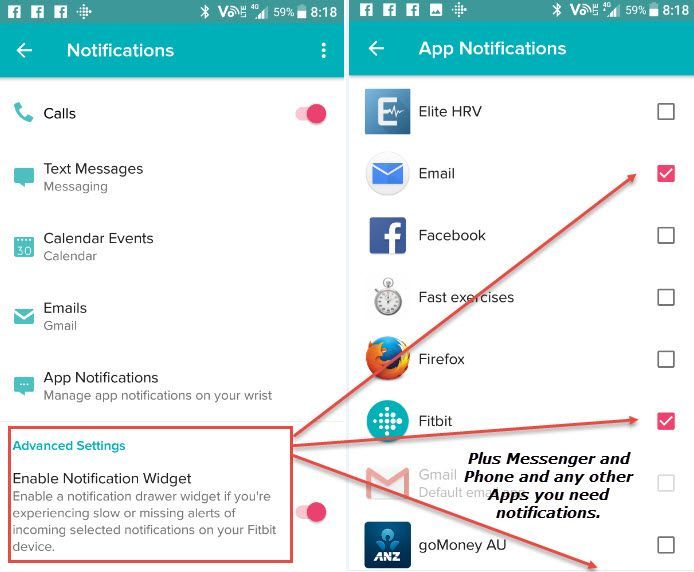
@TerryJ.I have an unsupported Android which performs all of my Notifications that I have ticked in my App Notifications..
I don't use gmail so my email account is linked and the Blaze notifies me when the phone rings in my pocket... All other Apps work
Have you gone into the Notifications area in the Dashboard...?
Ionic (OS 4.2.1, 27.72.1.15), Android App 3.45.1, Premium, Phone Sony Xperia XA2, Android 9.0
HI Colin,
Thanks for trying to help but I have enabled the widget and still no way forward. I have sent an email to Fitbit and hopefully they will respond and I'll keep you updated.
Best Answer
Fitbit Product Experts Alumni are retired members of the Fitbit Product Expert Program. Learn more
@TerryJ.Thanks for the quick reply.. At least they have your Phone etc.. because ... many of us are trying to ensure Fitbit have the base info at least to try and solve these annoying issues...
We have even had some users testing and realizing they need their phone and tracker on the same side of their body because the Bluetooth signal doesn't go through their body.
Some have also found that having WiFi on at the same causes interference and dropout of Bluetooth when they use Connect GPS.
There are a few other issues in the link. See this link
Ionic (OS 4.2.1, 27.72.1.15), Android App 3.45.1, Premium, Phone Sony Xperia XA2, Android 9.0

Sent from my T-Mobile 4G LTE Device

I'm having the same issue. I've had my S8 since the day it came out and have yet to receive one notification and I can't figure it out! I've tried everything...uninstalling and reinstalling, unpairing, restarting my fitbit, etc... and still not getting any notifications. My steps, heart rate, etc ..are syncing with no issues
Best Answer
hand corner touch your fitbit icon. Then touch Notifications, from there
select what notifications you would like to receive. Make sure your
Notification Widget is turned to on. Then push the back button on your
phone. I also have mines set to All-Day Sync. Hope this helps. 🙂
Best Answer
Also at the very bottom, of the page after you have clicked on you fitbit device inside the app, i have Always Connected on as well.
Best Answer
I did. I also read a post that took me through getting it to sync with through Bluetooth via "Blaze (classic)". I was able to get that to work and people said that they started getting notifications within the next few hours after doing that. So now I just wait! This is ridiculous...it shouldn't be that hard to add a compatible device. I think Fitbit is being lazy! But then again I don't really know anything about the 'science' behind phones 😛
Best Answer
Yeah this is ridiculous. I have been using mine for a week now with no notifications at all other than the reminder to move which makes no sense. I haven't had an issue with any of my other Samsung devices and my Fitbit until I got the S8+
Best Answer
I was able to pair it that way, now I haven't received any notifications yet but no one has texted me either  people said that it took a few hours for it to go through but I'll keep ya posted!
Best Answer
Here are the instructions that were on a post I found. I don't know if it will actually work or not but at least I was finally able to get my fitbit to pair with my phone and it wasn't rejected...also this is for a Blaze, which I have, so I am not sure how to go about it with other devices.
04-26-2017 07:15
For those who don't yet have this working, do you have the Blaze (Classic) pairing configured (for music/volume control) too?
I use this for controlling music from my wrist and found that since I re-enabled this following the security update installation and device re-pairing that notifications and GPS have been working fine.
The order in which I did things was:
- Update to latest software (only a security update I believe but this seems to be the catalyst for fixing many S8 owners' issues)
- Remove any pairings for Blaze and Blaze (Classic) from the phone
- Add Blaze to phone via Fitbit app - DO NOT use the Bluetooth menu on the phone for this
- Add Blaze (Classic) to phone via Bluetooth menu
- Go to Settings on the Fitbit
- Change Bluetooth Classic to Pair
- Scan for the device in the phone's Bluetooth menu
- Complete pairing by following instructions on Fitbit and phone
- Switch WiFi off
- Test notifications and/or GPS - these now started working for me
- Switch WiFi on
Note that I this did not initially allow notifications through until WiFi was turned off. Once notifications were successfully working, WiFi could be then re-enabled without issue. Not sure why, but hope it helps some of you.
Mine has been working flawlessly since Sunday morning. Good luck with the instructions above but remember that while this is still not an officially supported device, notification support could stop without warning.
Best Answer