Join us on the Community Forums!
-
Community Guidelines
The Fitbit Community is a gathering place for real people who wish to exchange ideas, solutions, tips, techniques, and insight about the Fitbit products and services they love. By joining our Community, you agree to uphold these guidelines, so please take a moment to look them over. -
Learn the Basics
Check out our Frequently Asked Questions page for information on Community features, and tips to make the most of your time here. -
Join the Community!
Join an existing conversation, or start a new thread to ask your question. Creating your account is completely free, and takes about a minute.
Not finding your answer on the Community Forums?
- Community
- Product Help Forums
- Ionic
- Re: How to clear all notifications?
- Mark Topic as New
- Mark Topic as Read
- Float this Topic for Current User
- Bookmark
- Subscribe
- Mute
- Printer Friendly Page
- Community
- Product Help Forums
- Ionic
- Re: How to clear all notifications?
How to clear all notifications?
ANSWERED- Mark Topic as New
- Mark Topic as Read
- Float this Topic for Current User
- Bookmark
- Subscribe
- Mute
- Printer Friendly Page

Is the only way to clear all notifications to scroll all the way down to the bottom of notifications? If I haven't done this in a while it can take quite some time, there has to be a faster way. Any help here?
Answered! Go to the Best Answer.

09-09-2018
17:06
- last edited on
02-22-2026
08:07
by
MarreFitbit


 Fitbit Product Experts Alumni are retired members of the Fitbit Product Expert Program. Learn more
09-09-2018
17:06
- last edited on
02-22-2026
08:07
by
MarreFitbit
I scroll from top to bottom and the "Clear All" option shows..as the first entry. That works.. and most times I get the error message that delete didn't work.. But, the watch is cleared of all notifications
But, sometimes that Clear All doesn't appear..... scrolling up and down it eventually appears.
I can also get a group at the bottom of Delete, Clear and Open.
Ionic (OS 4.2.1, 27.72.1.15), Android App 3.45.1, Premium, Phone Sony Xperia XA2, Android 9.0

The only way to clear these is to totally sign out of the app on your computer/phone. When you sign back in and have to re-sync your devises, the notifications box will clear.
 Best Answer
09-10-2018
08:39
- last edited on
10-23-2018
11:32
by
AndreaFitbit

09-10-2018
08:39
- last edited on
10-23-2018
11:32
by
AndreaFitbit
this didn't help me. I still see all my notifications from 9 months ago when i got the fitbit, and it won't let any new ones come across.
This did not work. I cannot see a delete all button...
Moderator edit: updated post.

Me too: in the iPod Fitbit app there are notifications from end of May to middle of June that cannot be deleted and that appear to be filling up some fixed storage space allocation, so no new notifications can be added. I went so far as to completely delete the iPod application and all its data, reinstall the app, and re-attach the re-installed app to my Fitbit account. It came back exactly the same! So it is **obvious** that the problem is at the Fitbit server end, not at the iPod end. It's a bug that Fitbit is pretending they don't know anything about, and is diverting our attention with these bogus "solutions".
Sent from my iPhone

I have notifications that end in June 2018. Nothing after that. Stinks that there is no way to clear them especially since my Fitbit flex buzzed at 5:30 am

10-23-2018
11:55
- last edited on
02-22-2026
08:06
by
MarreFitbit


 Community Moderators ensure that conversations are friendly, factual, and on-topic. We're here to answer questions, escalate bugs, and make sure your voice is heard by the larger Fitbit team. Learn more
10-23-2018
11:55
- last edited on
02-22-2026
08:06
by
MarreFitbit
Hello to all, it's nice to see you in here! I apologize for the delayed response and will be glad to assist you with your how to delete notifications on your Fitbit Ionic inquiry.
When a notification appears you'll get it scrolling your Ionic down. If you want to delete it inmediately just scroll your screen to the left. If you have more than one notification and you would like to delete all, scroll your screen down until you get the Delete all message and select it.
I hope this helps and thank you or visiting the forums! 
Best Answer
I have a Fitbit Alta HR not an Iconic.
I want to delete the Notifications in the Fitbit app on my iPod, not
on the wrist device.
There is no left-right swiping and there is no delete button at the
bottom of the Notifications screen (or anywhere else that I can see).
10-23-2018
12:14
- last edited on
02-22-2026
08:06
by
MarreFitbit
Community Moderators ensure that conversations are friendly, factual, and on-topic. We're here to answer questions, escalate bugs, and make sure your voice is heard by the larger Fitbit team. Learn more
10-23-2018
12:14
- last edited on
02-22-2026
08:06
by
MarreFitbit
Thank you for getting back to us @slippyclutch. I'll be glad to assist you with your question. Notifications you get on your phone will be automatically deleted one month after you receive them.
There's no way to manually delete those notifications.
Keep on visiting the Fitbit Community!
Best Answer
My Fitbit 2 does not have a clear all button at the bottom of the notifications. Also swiping right on any of the notifications does not work. How do I remove all the notifications.
10-31-2018
11:48
- last edited on
02-22-2026
08:06
by
MarreFitbit
Community Moderators ensure that conversations are friendly, factual, and on-topic. We're here to answer questions, escalate bugs, and make sure your voice is heard by the larger Fitbit team. Learn more
10-31-2018
11:48
- last edited on
02-22-2026
08:06
by
MarreFitbit
I apologize for my delayed response and will be glad to continue assisting you with your notifications inquiry.
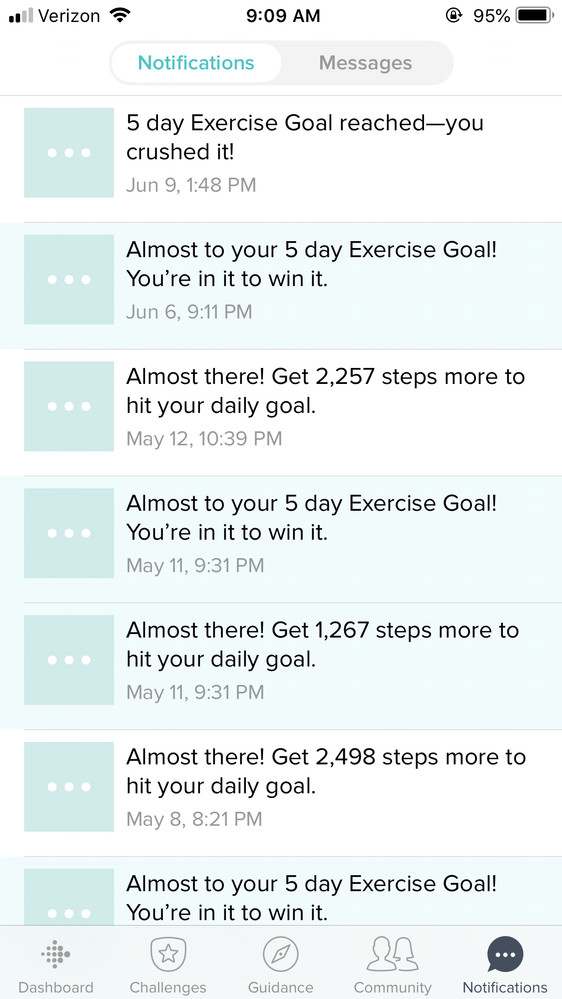
@debgorden, could you please confirm that you have the latest version of the Fitbit App and send me a screen shot showing your notifications date.
@Lisaz123, there's no way to delete notifications on the phone.
Welcome to the forums @JosephTwitchel. In order to remove the red number on the app icon, please watch the notifications.
It's nice to see you around @2pjb. This the Ionic board. Please let me know which tracker do you have and if you would like to remove the notifications on your phone.
Let me know if you have more questions.
Best Answer
11-03-2018
08:45
- last edited on
02-22-2026
08:06
by
MarreFitbit
Community Moderators ensure that conversations are friendly, factual, and on-topic. We're here to answer questions, escalate bugs, and make sure your voice is heard by the larger Fitbit team. Learn more
11-03-2018
08:45
- last edited on
02-22-2026
08:06
by
MarreFitbit
Thanks for getting back to us @debgorden. Could you please try to resend your screen shot with the instructions of How To: Add An Image To Your Post
I'll be waiting for your response.
Best Answer