
Join us on the Community Forums!
-
Community Guidelines
The Fitbit Community is a gathering place for real people who wish to exchange ideas, solutions, tips, techniques, and insight about the Fitbit products and services they love. By joining our Community, you agree to uphold these guidelines, so please take a moment to look them over. -
Learn the Basics
Check out our Frequently Asked Questions page for information on Community features, and tips to make the most of your time here. -
Join the Community!
Join an existing conversation, or start a new thread to ask your question. Creating your account is completely free, and takes about a minute.
Not finding your answer on the Community Forums?
- Community
- Product Help Forums
- Other Charge Trackers
- Re: Charge 2 issues with notifications
- Mark Topic as New
- Mark Topic as Read
- Float this Topic for Current User
- Bookmark
- Subscribe
- Mute
- Printer Friendly Page
- Community
- Product Help Forums
- Other Charge Trackers
- Re: Charge 2 issues with notifications
Charge 2 issues with notifications
ANSWERED- Mark Topic as New
- Mark Topic as Read
- Float this Topic for Current User
- Bookmark
- Subscribe
- Mute
- Printer Friendly Page
01-19-2017
22:44
- last edited on
09-09-2020
10:13
by
MatthewFitbit


SunsetRunner
01-19-2017
22:44
- last edited on
09-09-2020
10:13
by
MatthewFitbit
Since last week my charge 2 is not showing me any notification (calls, text, 250 steps reminder, etc.). I have all notifications turned on.
I restarted the device once but still no luck.
Please find screenshots for my charge 2 notifications and my iPhone settings.
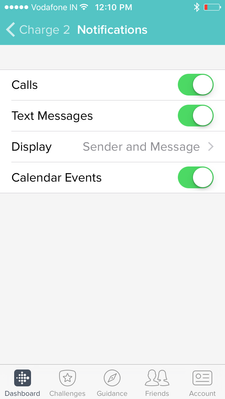


Any help would be highly appreciated.
Thanks,
Nirav Patel
Answered! Go to the Best Answer.
Accepted Solutions
SunsetRunner
Ok, so I found the solution to my problem. It seems like you can turn off the notification by pressing the button on your tracker for few seconds and I might have pressed that button accidently while trying to attach the charging clip.
I turned the notification on by pressing the button for 4 seconds on home screen while the tracker was disconnected from charging. And now I am receiving all the notifications as before.
Fitbit should display some message in app or on tracker if the notification is off from tracker. No one can guess if someone has accidently turned it off from tracker.

THe Charge 2 does have a DND setting, on the watch face hold the buttin in.
For me i find restarting the phone, after checjing that the fitbit app points to the right apps, always works.
Are you able to send a test message through the Fitbit app?
SunsetRunner
Hello Rich_Laue,
Thanks for your quick reply. But I couldn't get you when you say "Are you able to send a test message through the Fitbit app?" How to send test message through fitbit app?
 Best Answer
SunsetRunner
Rich_Laue,
I don't have such three dots in my iPhone app. It seems like, it is just in android app.
Best Answer
SunsetRunner
Ok, so I found the solution to my problem. It seems like you can turn off the notification by pressing the button on your tracker for few seconds and I might have pressed that button accidently while trying to attach the charging clip.
I turned the notification on by pressing the button for 4 seconds on home screen while the tracker was disconnected from charging. And now I am receiving all the notifications as before.
Fitbit should display some message in app or on tracker if the notification is off from tracker. No one can guess if someone has accidently turned it off from tracker.

Thanks so much for posting the solution to hold the button down!! That was my issue! When connecting it to charge it would change my notifications on/off. All the other posts just talked about changing notifications within the app.
Best Answer

Thanks so much for this information. The only time I've been experiencing difficulty receiving notifications is when my phone is on silent. Is there a way to still get the notification on my Charge 2 when my phone is set to silent? It would be very beneficial during the work day. Thank you!

I'm encountering this same issue with my iPhone 6s and now my iPhone. If my phone is silent/screen not awake, the notifications (texts/calls) do not alert my Fitbit Charge 2. I've tried everything I've read about so far and it will not notify me unless the screen is awake.
Best Answer
We have 3 family members that use a charge 2 and currently none of us are able to get notifications. Very odd and feel like we have tried everything.
Best Answer