
Join us on the Community Forums!
-
Community Guidelines
The Fitbit Community is a gathering place for real people who wish to exchange ideas, solutions, tips, techniques, and insight about the Fitbit products and services they love. By joining our Community, you agree to uphold these guidelines, so please take a moment to look them over. -
Learn the Basics
Check out our Frequently Asked Questions page for information on Community features, and tips to make the most of your time here. -
Join the Community!
Join an existing conversation, or start a new thread to ask your question. Creating your account is completely free, and takes about a minute.
Not finding your answer on the Community Forums?
- Community
- Product Help Forums
- Other Charge Trackers
- Re: Button stuck
- Mark Topic as New
- Mark Topic as Read
- Float this Topic for Current User
- Bookmark
- Subscribe
- Mute
- Printer Friendly Page
- Community
- Product Help Forums
- Other Charge Trackers
- Re: Button stuck
Charge 3 - Button is stuck
- Mark Topic as New
- Mark Topic as Read
- Float this Topic for Current User
- Bookmark
- Subscribe
- Mute
- Printer Friendly Page
05-30-2019
05:04
- last edited on
11-17-2020
10:58
by
MatthewFitbit


05-30-2019
05:04
- last edited on
11-17-2020
10:58
by
MatthewFitbit
The button on my Fitbit is stuck in and I can’t get it to pop back out. Consequently I have a blank screen. It still vibrates and counts my steps.
Moderator edit: updated subject for clarity

 Fitbit Product Experts Alumni are retired members of the Fitbit Product Expert Program. Learn more
It might not be a problem with the button as there's an ongoing issue with some Charge 3 trackers getting a blank screen. Usually, one of the following fixes it:
- restart the fitbit using this procedure: Help article: How do I restart my tracker?
- change the clockface via the app. If this works then it's safe to change it back to what it was
 Best Answer

 Community Moderators ensure that conversations are friendly, factual, and on-topic. We're here to answer questions, escalate bugs, and make sure your voice is heard by the larger Fitbit team. Learn more
Welcome to the Community Forums @Libbymary! In regards to the button, it's a "flat button" which means it's not a physical button.
I'd recommend trying the restart recommended by @SteveH. If that does not work, please check that your Charge 3 is syncing (you can verify this in your Fitbit app) so you can change the clock face. Don't worry if the screen is blank, this process is done through the Fitbit app.
Give this a go and let us know the outcome, we'll be glad to further assist you. 
Was my post helpful? Give it a thumbs up to show your appreciation! Of course, if this was the answer you were looking for, don't forget to make it the Best Answer! Als...
Community Moderators ensure that conversations are friendly, factual, and on-topic. We're here to answer questions, escalate bugs, and make sure your voice is heard by the larger Fitbit team. Learn more
Hey there @Libbymary, thanks for coming back!
Can you please share showing how the button on your Charge 3 looks like? It should look like my image below:
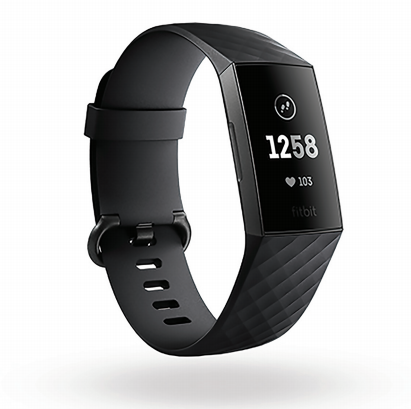
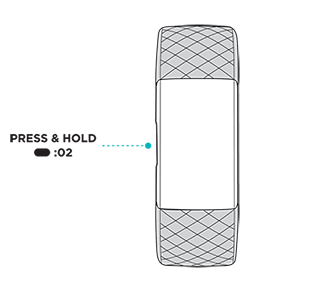
If you had another Fitbit like Charge 2 the button is quite different on Charge 3.
We are looking forward to your reply. 
Was my post helpful? Give it a thumbs up to show your appreciation! Of course, if this was the answer you were looking for, don't forget to make it the Best Answer! Als...
Community Moderators ensure that conversations are friendly, factual, and on-topic. We're here to answer questions, escalate bugs, and make sure your voice is heard by the larger Fitbit team. Learn more
Hello @Libbymary! The image you tried to attach didn't go through. Can you please try once again to upload the image by following these instructions?
I'm looking forward to your response.
Was my post helpful? Give it a thumbs up to show your appreciation! Of course, if this was the answer you were looking for, don't forget to make it the Best Answer! Als...
Best Answer Community Moderators ensure that conversations are friendly, factual, and on-topic. We're here to answer questions, escalate bugs, and make sure your voice is heard by the larger Fitbit team. Learn more
Hello there @Libbymary, thanks for coming back and the image provided.
I've created a case to get you in contact with our Support Team about this. They will be able to work with you and review your options. Please keep a lookout in your inbox to the email address associated with this Fitbit account. Someone will be in contact with you soon!
Let me know if there's anything else I may do to assist you with.
Was my post helpful? Give it a thumbs up to show your appreciation! Of course, if this was the answer you were looking for, don't forget to make it the Best Answer! Als...
Community Moderators ensure that conversations are friendly, factual, and on-topic. We're here to answer questions, escalate bugs, and make sure your voice is heard by the larger Fitbit team. Learn more
Welcome on board @Pacampos! I'm sorry to hear that your Charge 3's button is stuck too.
I've seen you contacted our Support Team after posting here and that they have helped you with this. Please keep an eye on you inbox for updates on your case.
Hey there @Libbymary! I'm glad to hear that our team sent you a replacement. 
Let me know if you both have any questions present, I'll be around.
Was my post helpful? Give it a thumbs up to show your appreciation! Of course, if this was the answer you were looking for, don't forget to make it the Best Answer! Als...
Best Answer
Hey,
have the exact same problem.
I have the ability to control the watch through the Fitbit app, but the “flat” button does not respond to any kind of pressing.
hope to get help as soon as possible.
Best Answer
Community Moderators ensure that conversations are friendly, factual, and on-topic. We're here to answer questions, escalate bugs, and make sure your voice is heard by the larger Fitbit team. Learn more
Welcome on board @Nadavbr4. If the button on your Charge 3 is not responding, I'd recommend to perform a long restart by following the steps below:
- Connect the device to the charging cable.
- While the device is plugged into the charging cable, press and hold the button down for 15 seconds.
- The device turns on and shows a battery icon. Two vibrations occur: first a short vibration, then a medium vibration.
- The device turns off.
- The device turns on and shows a progress bar and short vibrations occur. The progress bar completes. Note: A total of 7 short vibrations occur.
- Remove the device from the charging cable. The device shuts down.
- Important: Plug the device into the charging cable again.
Give this a go and let me know the outcome.
Was my post helpful? Give it a thumbs up to show your appreciation! Of course, if this was the answer you were looking for, don't forget to make it the Best Answer! Als...
Community Moderators ensure that conversations are friendly, factual, and on-topic. We're here to answer questions, escalate bugs, and make sure your voice is heard by the larger Fitbit team. Learn more
Thanks for getting back and trying the long restart I've recommended @Nadavbr4.
I went ahead and created a case for you with our Support Team. Someone will reach out to you soon to offer their assistance. Please keep a lookout in your inbox to the email address associated with this account.
Let me know if you have any questions present.
Was my post helpful? Give it a thumbs up to show your appreciation! Of course, if this was the answer you were looking for, don't forget to make it the Best Answer! Als...
Best Answer
Sent from my iPhone
Best Answer
Community Moderators ensure that conversations are friendly, factual, and on-topic. We're here to answer questions, escalate bugs, and make sure your voice is heard by the larger Fitbit team. Learn more
Great news @Libbymary! I'm very glad to hear that your new device is working as expected.
I would like to invite you to visit our Discussions board where you will find great tips and encouragement from other members and if there's anything else I can do for you, please keep me posted!
Was my post helpful? Give it a thumbs up to show your appreciation! Of course, if this was the answer you were looking for, don't forget to make it the Best Answer! Als...
