
Join us on the Community Forums!
-
Community Guidelines
The Fitbit Community is a gathering place for real people who wish to exchange ideas, solutions, tips, techniques, and insight about the Fitbit products and services they love. By joining our Community, you agree to uphold these guidelines, so please take a moment to look them over. -
Learn the Basics
Check out our Frequently Asked Questions page for information on Community features, and tips to make the most of your time here. -
Join the Community!
Join an existing conversation, or start a new thread to ask your question. Creating your account is completely free, and takes about a minute.
Not finding your answer on the Community Forums?
- Community
- Product Help Forums
- Other Charge Trackers
- Re: Not getting text notifications from IOS
- Mark Topic as New
- Mark Topic as Read
- Float this Topic for Current User
- Bookmark
- Subscribe
- Mute
- Printer Friendly Page
- Community
- Product Help Forums
- Other Charge Trackers
- Re: Not getting text notifications from IOS
Not getting text notifications from IOS
- Mark Topic as New
- Mark Topic as Read
- Float this Topic for Current User
- Bookmark
- Subscribe
- Mute
- Printer Friendly Page
09-11-2016
06:20
- last edited on
09-09-2020
10:26
by
MatthewFitbit


SunsetRunner
09-11-2016
06:20
- last edited on
09-09-2020
10:26
by
MatthewFitbit

 Fitbit Product Experts Alumni are retired members of the Fitbit Product Expert Program. Learn more
@SunsetRunner Be sure under settings on your IPhone, that you have "Show in Notification Center" and Allow in Notification Center turned on.
Hopefully that may help~
Kelly | Oklahoma
Alta HR, Blaze, Flex 2, Charge 2, Charge, and Aria * IPhone 7+
SunsetRunner
Fitbit Product Experts Alumni are retired members of the Fitbit Product Expert Program. Learn more
Only other thing I can think of at the moment is to be sure you don't have "do not disturb" on?
Kelly | Oklahoma
Alta HR, Blaze, Flex 2, Charge 2, Charge, and Aria * IPhone 7+

While you can in pair the tracker from the phone, only the app through a sync can pair it back up, I'm not sure what is referred to by I've paired it several times.
Now if you have tried all the standard things, made sure the settings are correct, and confirmed the Charge 2 shows up in the BT settings, then i would do an add tracker with the replace current tracker option.

I ran into this same problem with mine. I tried everything and even called Fitbit for help. They sent me an email and it solved it. Heres how to fix it.
1-Go to settings
2-Select notifications
3-Select messages
4-All this options have to be ON
a-Allow notifications
b-Show in Notification Center
c-badge App Icon
d-Show on Lock Screen
5-Alert Style when unlocked has to be "Alerts"
6-On messages Options you will see Show Previews, Has to be ON

1-Go to settings
2-Select notifications
3-Select messages
4-All this options have to be ON
a-Allow notifications
b-Show in Notification Center
c-badge App Icon
d-Show on Lock Screen
5-Alert Style when unlocked has to be "Alerts"
6-On messages Options you will see Show Previews, Has to be ON
The last step is the most important. This is the step everyone forgets to tell you. Once I did that, it worked great!


 Community Moderator Alumni are previous members of the Moderation Team, which ensures conversations are friendly, factual, and on-topic. Moderators are here to answer questions, escalate bugs, and make sure your voice is heard by the larger Fitbit team. Learn more
Hey guys! It is great to see you in the Community!
@SunsetRunner, did you already contact Support? what was the response you got from them?
@Plutoman and @marietuttle, thank you so much for posting those steps. They will definitely will be very helpful for some users that are experiencing the same issues.
@Rich_Laue and @Kmransom123 I really appreciate your help!
I'll be around!

11-21-2016
04:48
- last edited on
02-26-2026
10:49
by
MarreFitbit
Community Moderator Alumni are previous members of the Moderation Team, which ensures conversations are friendly, factual, and on-topic. Moderators are here to answer questions, escalate bugs, and make sure your voice is heard by the larger Fitbit team. Learn more


Hi,
Thank you for these steps, im not sure I understand Step 6, can you be more clear please. Thank you.
 Best Answer
I've done all of these things multiple times. Nothing is working. And I don't understand step 6 either. I don't have an option under messages that says "show previews". Please help or I'm going to return my Fitbit.
Best Answer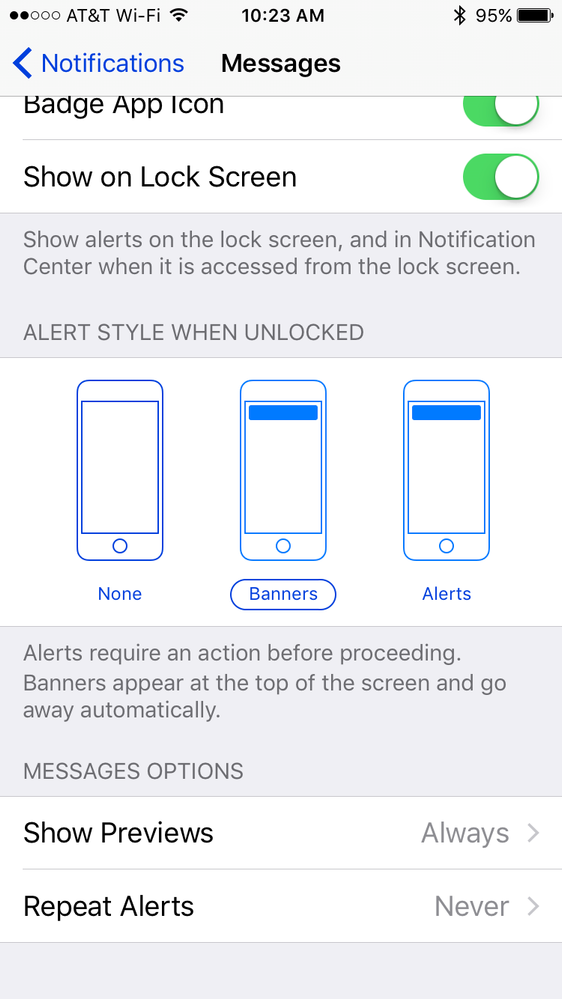
I had same problem when I first got mine. Hold the button on the watch at the notification section of watch and it should turn on. I had accidentally turned notifications off on watch but not the Fitbit settings. Make sure text notifications are on in settings before also. Hope that helps.🙂
Thank you it's been on. It was working since Xmas and then suddenly stopped yesterday. Don't know what else to try
thanks for your help
Best Answer
My Fitbit did same thing and I had also somehow turned off notifications on my Fitbit. Holding side button down on notification turns it back on. Thanks for the suggestion.
