
Join us on the Community Forums!
-
Community Guidelines
The Fitbit Community is a gathering place for real people who wish to exchange ideas, solutions, tips, techniques, and insight about the Fitbit products and services they love. By joining our Community, you agree to uphold these guidelines, so please take a moment to look them over. -
Learn the Basics
Check out our Frequently Asked Questions page for information on Community features, and tips to make the most of your time here. -
Join the Community!
Join an existing conversation, or start a new thread to ask your question. Creating your account is completely free, and takes about a minute.
Not finding your answer on the Community Forums?
- Community
- Product Help Forums
- Other Charge Trackers
- Re: Not getting text notifications from IOS
- Mark Topic as New
- Mark Topic as Read
- Float this Topic for Current User
- Bookmark
- Subscribe
- Mute
- Printer Friendly Page
- Community
- Product Help Forums
- Other Charge Trackers
- Re: Not getting text notifications from IOS
Not getting text notifications from IOS
- Mark Topic as New
- Mark Topic as Read
- Float this Topic for Current User
- Bookmark
- Subscribe
- Mute
- Printer Friendly Page
09-11-2016
06:20
- last edited on
09-09-2020
10:26
by
MatthewFitbit


SunsetRunner
09-11-2016
06:20
- last edited on
09-09-2020
10:26
by
MatthewFitbit

I hope you can help. I have followed so many steps that have been posted throughout the forum. Every single one says that you have to enable "show in notification center". ios 11 does not have that option.
There really has to be a way to fix this. This is very important to me and I am beyond upset.
 Best Answer
The ios 11 update does not have a "show in notification center" I guess that means it will never work. Beyond frustrated.
Best Answer
I have been posting on many of these forum questions with no solution to the problem.
I cannot get text and call notifications to work since updating my iphone to ios11.
Every solution posted says that the widget for "show noticiations in the Notification Center".
On the ios11 update, there is no longer a widget for this, therefore there is no solution to the problem.
I really need help with this. I am sure that I am not the only person with the Charge 2 and ios11 that is experiencing this problem. If there is no solution at this time, and it doesn't work for anyone, then Fitbit needs to step up, admit there is a problem and work on finding a fix to it. Posting the same instructions time and time again that say to show in Notification Center, will not work! They need to look at an iphone with the ios11 update and see that there is no option for this anymore. I am losing patience and faith because no one can figure this out, and no one can admit that it can't be figured out.
If anyone can seriously help without telling me to turn on the notice in the notification center (which isn't there), I would greatly appreciate it.
Please help.
Best Answer
I have been posting on many of these forum questions with no solution to the problem.
I cannot get text and call notifications to work since updating my iphone to ios11.
Every solution posted says that the widget for "show noticiations in the Notification Center".
On the ios11 update, there is no longer a widget for this, therefore there is no solution to the problem.
I really need help with this. I am sure that I am not the only person with the Charge 2 and ios11 that is experiencing this problem. If there is no solution at this time, and it doesn't work for anyone, then Fitbit needs to step up, admit there is a problem and work on finding a fix to it. Posting the same instructions time and time again that say to show in Notification Center, will not work! They need to look at an iphone with the ios11 update and see that there is no option for this anymore. I am losing patience and faith because no one can figure this out, and no one can admit that it can't be figured out.
If anyone can seriously help without telling me to turn on the notice in the notification center (which isn't there), I would greatly appreciate it.
Please help.


since my latest upgrade, there is no longer a way to receive text
notifications or call notifications - this needs to be fixed!
Best Answer
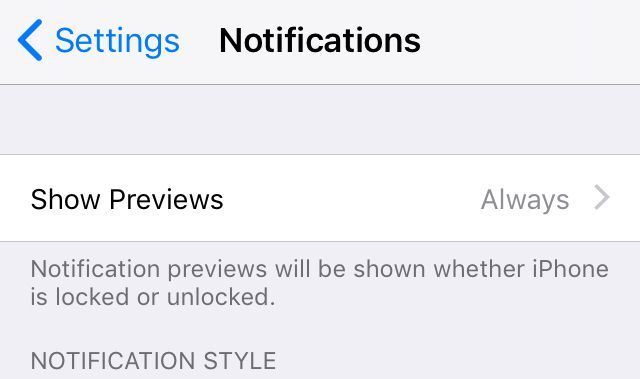
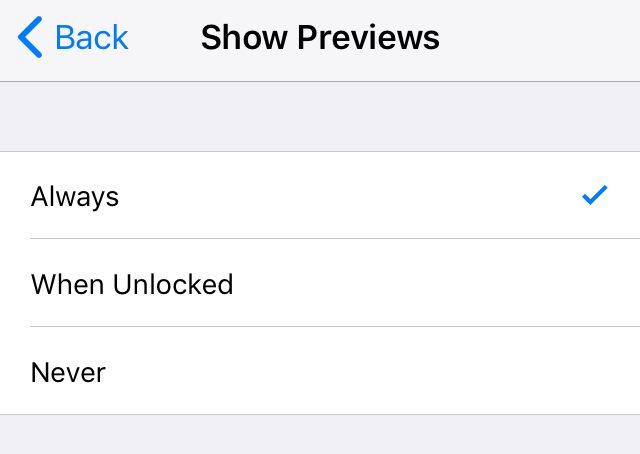
I also have updated to iOS 11 but I have had no issues with the notifications on my charge 2 since the update.... one thing I would think could make a difference is with the new default setting for notifications ( I will attach a picture) you need to make sure previews are always on.
Hope this helps!
Best Answer
@LisaFC A number of users have commented about notification problems with iOS 11. There engineers are aware. I don't have any details on a fix.
Laurie | Maryland
Sense 2, Luxe, Aria 2 | iOS | Mac OS
Take a look at the Fitbit help site for further assistance and information.
Best Answer
Sent from my iPhone
Best Answer
Thank you so much for this post! I tried EVERYTHING else but the steps in this post has my issue resolved! Great input! Thanks again! 🙂
Best Answer
the notifications at the bottom is what fixed mine too I been trying this for weeks got it now thank you
Best Answer
Omg! I have been struggling with not getting text for 3 months. I have contacted customer service. We went through all the settings.
Turns out in notifications you really have have to turn everything on. Including show in history. I was about to give up on Fitbit. They really should have the customer service managers read this thread.
Best Answer
I have always loved Fitbit products but now I am so frustrated with Fitbit. I tried everything mentioned to receive notifications from my iPhone and nothing is working. I gave up and bought an Apple Watch. That works with my phone. Shame on Fitbit for not fixing this issue
Best Answer
watch. What do you think of it?
Best Answer