Join us on the Community Forums!
-
Community Guidelines
The Fitbit Community is a gathering place for real people who wish to exchange ideas, solutions, tips, techniques, and insight about the Fitbit products and services they love. By joining our Community, you agree to uphold these guidelines, so please take a moment to look them over. -
Learn the Basics
Check out our Frequently Asked Questions page for information on Community features, and tips to make the most of your time here. -
Join the Community!
Join an existing conversation, or start a new thread to ask your question. Creating your account is completely free, and takes about a minute.
Not finding your answer on the Community Forums?
- Community
- Product Help Forums
- Other Charge Trackers
- Re: Phone app dashboard changed today
- Mark Topic as New
- Mark Topic as Read
- Float this Topic for Current User
- Bookmark
- Subscribe
- Mute
- Printer Friendly Page
- Community
- Product Help Forums
- Other Charge Trackers
- Re: Phone app dashboard changed today
Phone app dashboard changed today
ANSWERED- Mark Topic as New
- Mark Topic as Read
- Float this Topic for Current User
- Bookmark
- Subscribe
- Mute
- Printer Friendly Page
07-11-2017
13:49
- last edited on
09-09-2020
09:26
by
MatthewFitbit


07-11-2017
13:49
- last edited on
09-09-2020
09:26
by
MatthewFitbit
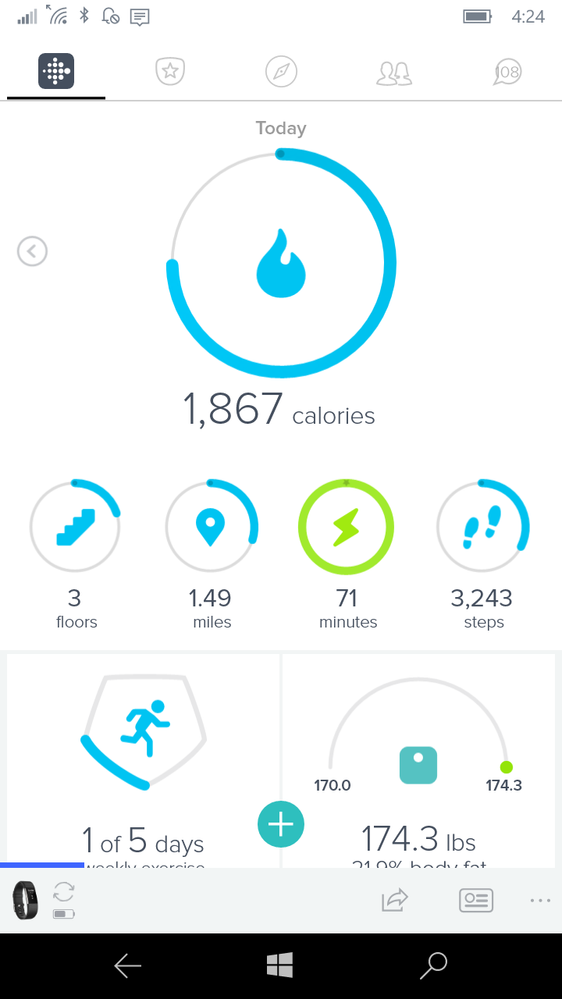
For some reason, the Fitbit dashboard changed today on my Windows phone. It used to show steps as the main display on the top, and then went on down from there to other statistics. Today, it started showing calories as the main display on the top. Calories are probably the last thing I care about. If I do my steps, calories take care of themselves.
Try as I might, I can't figure out what happened or how to change it back. Any ideas? I'm attaching a picture of what it looks like now.
Answered! Go to the Best Answer.
Accepted Solutions

Thats an easy fix just press and hold on the main one and then just move the steps back into the center Ive but never really changed anything

Mine, on android does this everytime i start up the app. It may take up to 4 minutes to straighten out, but today i noticed.that i can edit the dashboard.
Just press the red plus sign.
 Best Answer
Sent from my Windows 10 phone
Best Answer
I tried it again. The first time, it changed and then reverted to calories on top the next time in. But I tried it again, and this time I saw the "Done" link at the bottom. After clicking that, it remained as set the next time in.
Best Answer
I have the exact same problem, I like to see my steps as I know like you the calories take care of themselves. I have deleted the app, disconnected the Bluetooth - forget device, rebooted my phone, there is no option to even find the steps counter on my dashboard as hidden. So using the home button to find it doesn't help, I know how to customerise the screen. Help....



I have also had my dashboard all messed up today. My steps don’t even show up and other items are missing. I’ve managed to “fix” it a couple times then it goes back to messed up. I am hoping Fitbit will fix it overnight. I have got to stop looking at it before I go crazy.
Best Answer
03-18-2021
04:22
- last edited on
11-04-2025
08:43
by
MarreFitbit


 Community Moderators ensure that conversations are friendly, factual, and on-topic. We're here to answer questions, escalate bugs, and make sure your voice is heard by the larger Fitbit team. Learn more
03-18-2021
04:22
- last edited on
11-04-2025
08:43
by
MarreFitbit
@stephen.h It's great to see you in the Community!
If you can try logging out from the app, restart your phone and log back in and make sure it is up to date. If you can't and are on an Android device the go to Settings > Apps > Fitbit and clear the data. If the issue persists then uninstall and reinstall the app.
Hope this helps.
If a post helped you try voting and selecting it as a solution so other members benefit from it. Select it as Best Solution!
Best Answer
03-18-2021
10:16
- last edited on
11-04-2025
08:40
by
MarreFitbit
Community Moderators ensure that conversations are friendly, factual, and on-topic. We're here to answer questions, escalate bugs, and make sure your voice is heard by the larger Fitbit team. Learn more
03-18-2021
10:16
- last edited on
11-04-2025
08:40
by
MarreFitbit
@stephen.h happy to hear that! And thank you for letting me know as this does help monitor the problem and any possible fixes applied to it.
Happy stepping and stay safe!
If a post helped you try voting and selecting it as a solution so other members benefit from it. Select it as Best Solution!
Best Answer