
Join us on the Community Forums!
-
Community Guidelines
The Fitbit Community is a gathering place for real people who wish to exchange ideas, solutions, tips, techniques, and insight about the Fitbit products and services they love. By joining our Community, you agree to uphold these guidelines, so please take a moment to look them over. -
Learn the Basics
Check out our Frequently Asked Questions page for information on Community features, and tips to make the most of your time here. -
Join the Community!
Join an existing conversation, or start a new thread to ask your question. Creating your account is completely free, and takes about a minute.
Not finding your answer on the Community Forums?
- Community
- Product Help Forums
- Other Charge Trackers
- Re: Stuck Progress Bar
- Mark Topic as New
- Mark Topic as Read
- Float this Topic for Current User
- Bookmark
- Subscribe
- Mute
- Printer Friendly Page
- Community
- Product Help Forums
- Other Charge Trackers
- Re: Stuck Progress Bar
Stuck Progress Bar
- Mark Topic as New
- Mark Topic as Read
- Float this Topic for Current User
- Bookmark
- Subscribe
- Mute
- Printer Friendly Page
01-06-2016
19:49
- last edited on
09-06-2020
20:42
by
MatthewFitbit


01-06-2016
19:49
- last edited on
09-06-2020
20:42
by
MatthewFitbit
Last night, my fitbit got stuck with the dreaded "progress bar". That's been the only image on my Fitbit charge HR for almost 24 hours. I called to get help with this matter, and the bottom line is that this is a known issue with the firmware/software. That's it. Problem NOT solved and I'm stuck with a $150 hunk of junk. Anyone else having this issue?
I feel bad for the customer service people who are clearly following prompts and walk frustrated customers through a bunch of steps that end up not working. It's not their fault that the product is poorly made.
Moderator edit: title for clarification


 Best Answer
@Joanne is your tracker in the middle of a firmware update. If so I would restart the phone then try again, or try through a different device.
Best Answer
it could be the end but i would try all the fixes mentioned in the
community support forum....you might have to try a factory reset as the
last resort.
try them all several times....if none work, i suggest you make the call to
tech support and tell them the issue.
if after all that and it remains stuck in the progress bar....it is likely
a dead device and then i suggest you ask fitbit to replace it.
good luck!
Best Answer
I'm simply trying to figure out where this progress bar is and what it is in the progress of doing?
This is the only progress bar on the Charge that I'm aware of.

Best Answer
I am back in business
Sent from my iPhone
Best Answer
Don't bother contacting support my hr is stuck and the computer and Phone can't discover it via bluetooth or even plugged into the usb port of the computer. so I cannot do anything in regards to restarting rebooting or seting up the device again! I have tried everything that has been posted about this issue . with the various button pressing to get it to reboot but alas, nudda! Also spent 1 hr on live chat going over everything again to find out That there is no center or shop, fitbit have that manually fixes any device omg!!! so now I awaiting a another fix that is being sent to me via email by the next level of support that the live chat people no nothing about and as I said to them is this the fix when your so fed up with your time being wasted that you give up and throw it in the bin!!!! So I await with anticipation about what this magical next level of help will be other than making go through all the same **ahem** again!!!!
Best Answer
Like she said I was already up to date and it wouldn't do anything. My button is gone as well although I tried a pencil in its place to hold down for the time period etc but nothing happens. Probably a bad idea but I deleted it from my app in attempt to restart but of course I can't get it to display a number only the little Fitbit symbol and then goes back to the progress bar .
Best Answer

how do you 'restart the download'??
Best Answer
@kevinreed17 kill the app.
Start up app
Start up the download of the firmware.
Unless what is already downloaded is corrupt it will resume.
Best Answer
I am also facing this "progress bar" issue from last 3 days. Restarted the system 2 times
Still it is showing same progress bar. Is there any resolution for this issue? Or simply do we need throw this product into dustbin?
reply soon.
Best Answer
I was having the same issue. I was just about to give up but I tried one more thing and it worked! The issue I was having was a progress bar stuck at 50% and/or progress bar with ! after trying to do an update. I kept trying to restart the update from my iPhone, but it kept giving me a bluetooth error. Here's what I did to fix it:
- Delete the tracker from your phone settings. On an iOS device go to Settings - Bluetooth, tap the "i" then tap "Forget this device". On Android the process should be similar.
- Go back to the Fitbit app, tap on the tracker in the upper left hand corner, then start the update again. It will then restart the update and it should complete.
Hope this helps the other folks on this thread! Otherwise, Christmas is just around the corner! 

 Fitbit Product Experts Alumni are retired members of the Fitbit Product Expert Program. Learn more
@p_visone Said it perfectly.
Here is what my screen looked like
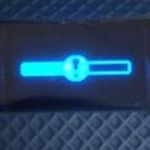
Here is how I fixed it exactly like @p_visone
Go to your Bluetooth settings on your iPhone and find your tracker, tap the (!) exclamation point and select "Forget this device".
To pair your tracker's Bluetooth from the Fitbit app do the following:
From your mobile Dashboard tap the Account icon
Tap your tracker's picture on the left side
Tap Notifications; move the slide over till it turns green, then a pop-up message should appear requesting permission to set up your tracker to your iPhone's Bluetooth
Tap Pair when prompted too
Let the download complete, be patience.
Now do a sync
More info on how I got it to complete the download
https://help.fitbit.com/articles/en_US/Help_article/2047
Forget your device video
https://www.imore.com/how-to-fix-bluetooth-iphone-ipad

ALAN | VAN,B.C. Canada Community Council Member
Versa, Charge, Charge HR, Ionic, Ace, Aria 2 scale, Flyer headphones - iOS
Click here Fitbit help for more solutions
>Contact

I had this problem - complete with Charge HR going dead overnight several times from being locked up, exclamation point across half bar, my application showing that my Charge HR was currently running version “0”. Not good. I read the forums and saw it that it looks to be unsolvable, with replacement as the only option, etc. It tried a bunch of the basics, but in the end, this worked for me:
- ensured updates were flush on phone.
- tried to restart Charge HR (didn’t work).
- forgot Charge HR on Bluetooth
- began the factory reset:
- plug in Charge HR to power
- press button for two seconds
- remove from power while holding button for additional 7-9 seconds
- while waiting for the screen to change to what it should change to, I instead saw the “half bar of death” advance past half, incrementally while I held the button. After approximately 1 minute, the bar completed, and my watch was back.
Dunno if this was just lucky, but thought my watch was hatched - now it’s back.
Best Answer