
Join us on the Community Forums!
-
Community Guidelines
The Fitbit Community is a gathering place for real people who wish to exchange ideas, solutions, tips, techniques, and insight about the Fitbit products and services they love. By joining our Community, you agree to uphold these guidelines, so please take a moment to look them over. -
Learn the Basics
Check out our Frequently Asked Questions page for information on Community features, and tips to make the most of your time here. -
Join the Community!
Join an existing conversation, or start a new thread to ask your question. Creating your account is completely free, and takes about a minute.
Not finding your answer on the Community Forums?
- Community
- Product Help Forums
- Other Inspire Trackers
- Re: "Connected GPS is running" constant notificati...
- Mark Topic as New
- Mark Topic as Read
- Float this Topic for Current User
- Bookmark
- Subscribe
- Mute
- Printer Friendly Page
- Community
- Product Help Forums
- Other Inspire Trackers
- Re: "Connected GPS is running" constant notificati...
"Connected GPS is running" constant notification
ANSWERED- Mark Topic as New
- Mark Topic as Read
- Float this Topic for Current User
- Bookmark
- Subscribe
- Mute
- Printer Friendly Page
08-23-2019 18:52
- Mark as New
- Bookmark
- Subscribe
- Permalink
- Report this post

08-23-2019 18:52
- Mark as New
- Bookmark
- Subscribe
- Permalink
- Report this post
"Connected GPS is running" notification is constantly sitting in my notification tray unless I have the Fitbit app open, otherwise I can't get this notification message to go away. I've tried:
Restarting phone.
Un/reinstall fitbit app to newest app store.
Turned off all auto recognise exercises.
-The notification is impossible to dismiss even for a second.
I don't want to turn off all notifications as I use some, so this is not a solution. Nor is turning off Bluetooth, or not using GPS at all - otherwise what is the point of having the Fitbit..
Anyone know how to get rid of it? It's extremely annoying....
Fitbit Inspire HR.
Pixel 2xl.
Latest app store app as of 24/8/19. (V3.3.1).
Thanks!
Answered! Go to the Best Answer.
 Best Answer
- Labels:
-
Inspire HR
Accepted Solutions
08-25-2019
12:13
- last edited on
12-25-2024
11:00
by
MarreFitbit

- Mark as New
- Bookmark
- Subscribe
- Permalink
- Report this post


 Community Moderators ensure that conversations are friendly, factual, and on-topic. We're here to answer questions, escalate bugs, and make sure your voice is heard by the larger Fitbit team. Learn more
08-25-2019
12:13
- last edited on
12-25-2024
11:00
by
MarreFitbit
- Mark as New
- Bookmark
- Subscribe
- Permalink
- Report this post
@TBassle Welcome! Thanks for being part of our Community! Sorry for the delay in my reply.
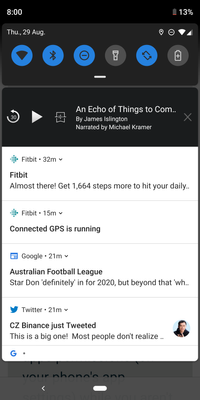
Let me help you with the message you see on your phone. Could you please share a screenshot of what you are seeing? Also try restricting the apps permissions (on your phone's app settings) while you aren't using the GPS feature on your Inspire HR.
Let me know how it goes.
If a post helped you try voting and selecting it as a solution so other members benefit from it. Select it as Best Solution!
Best Answer
08-25-2019
12:13
- last edited on
12-25-2024
11:00
by
MarreFitbit
- Mark as New
- Bookmark
- Subscribe
- Permalink
- Report this post
Community Moderators ensure that conversations are friendly, factual, and on-topic. We're here to answer questions, escalate bugs, and make sure your voice is heard by the larger Fitbit team. Learn more
08-25-2019
12:13
- last edited on
12-25-2024
11:00
by
MarreFitbit
- Mark as New
- Bookmark
- Subscribe
- Permalink
- Report this post
@TBassle Welcome! Thanks for being part of our Community! Sorry for the delay in my reply.
Let me help you with the message you see on your phone. Could you please share a screenshot of what you are seeing? Also try restricting the apps permissions (on your phone's app settings) while you aren't using the GPS feature on your Inspire HR.
Let me know how it goes.
If a post helped you try voting and selecting it as a solution so other members benefit from it. Select it as Best Solution!
Best Answer08-29-2019 03:06
- Mark as New
- Bookmark
- Subscribe
- Permalink
- Report this post
08-29-2019 03:06
- Mark as New
- Bookmark
- Subscribe
- Permalink
- Report this post
Hi, thanks for actually replying. I did manage to get rid of the constant notification... However having to manually go into settings and change permissions every single time I was to actually use the Fitbit for it's primary use - IE to track exercise - is not a solution...
Here is the screenshot of the notification:back again as I wanted to sync my Fitbit and had to reallow location services.
Best Answer08-29-2019 03:07
- Mark as New
- Bookmark
- Subscribe
- Permalink
- Report this post
08-29-2019 03:07
- Mark as New
- Bookmark
- Subscribe
- Permalink
- Report this post
Apologies - I accidentally accepted this as a solution when I do not think it is.
Best Answer09-11-2019 10:38
- Mark as New
- Bookmark
- Subscribe
- Permalink
- Report this post
09-11-2019 10:38
- Mark as New
- Bookmark
- Subscribe
- Permalink
- Report this post
Did you get it resolved? I'm having the same issue.
Best Answer09-16-2019 11:35
- Mark as New
- Bookmark
- Subscribe
- Permalink
- Report this post

09-16-2019 11:35
- Mark as New
- Bookmark
- Subscribe
- Permalink
- Report this post
This is still an issue for me as well. The suggested "fix" did not work.
Galaxy S8
Fitbit App Version 3.5
10-19-2019 00:17
- Mark as New
- Bookmark
- Subscribe
- Permalink
- Report this post

10-19-2019 00:17
- Mark as New
- Bookmark
- Subscribe
- Permalink
- Report this post
This is so annoying ! Never happened before so I dont why I'm experiencing this now?! Nonone seems to have a clear straight forward answer on how to stop this .
Best Answer11-13-2019 10:35
- Mark as New
- Bookmark
- Subscribe
- Permalink
- Report this post
11-13-2019 10:35
- Mark as New
- Bookmark
- Subscribe
- Permalink
- Report this post
I had the same issue yesterday, it started after my Charge 3 "recognized" a run and asked me to start tracking it. There was no way to stop the message (clearing data, cache, restarting my watch) and it drains my phone battery like hell.
I solved the issue by starting to track an exercise, and stopping it immediately.
This evening the same issue occurred; a recognized exercise (run), the issue was solved (again) by starting an exercise manually and stopping it.
I'm not sure if this will fix the issue for the Inspire.
Best Answer11-14-2019 08:43
- Mark as New
- Bookmark
- Subscribe
- Permalink
- Report this post

11-14-2019 08:43
- Mark as New
- Bookmark
- Subscribe
- Permalink
- Report this post
same thing for me, this is simply unacceptable having the mess with the settings just to sync.
Best Answer01-18-2020 19:10
- Mark as New
- Bookmark
- Subscribe
- Permalink
- Report this post

01-18-2020 19:10
- Mark as New
- Bookmark
- Subscribe
- Permalink
- Report this post
Has anyone found a solution for this yet? I've tried all of the solutions on the forum and nothing is working + my phone battery is draining... Thanks in advance!
Best Answer01-20-2020 04:51
- Mark as New
- Bookmark
- Subscribe
- Permalink
- Report this post
01-20-2020 04:51
- Mark as New
- Bookmark
- Subscribe
- Permalink
- Report this post
Best Answer01-21-2020 17:32
- Mark as New
- Bookmark
- Subscribe
- Permalink
- Report this post

01-21-2020 17:32
- Mark as New
- Bookmark
- Subscribe
- Permalink
- Report this post
I am having the same issue with getting notifications of GPS Connected. This just started the last few days. When I push the button on my fitbit I dont see anything regarding the settings. How do I shut off the GPS?
Best Answer01-21-2020 17:33
- Mark as New
- Bookmark
- Subscribe
- Permalink
- Report this post
01-21-2020 17:33
- Mark as New
- Bookmark
- Subscribe
- Permalink
- Report this post
This just started happening to me this week. Does anyone know how to fix this issue?
Best Answer01-23-2020 05:55
- Mark as New
- Bookmark
- Subscribe
- Permalink
- Report this post
01-23-2020 05:55
- Mark as New
- Bookmark
- Subscribe
- Permalink
- Report this post
Best Answer01-23-2020 10:18
- Mark as New
- Bookmark
- Subscribe
- Permalink
- Report this post
01-23-2020 10:18
- Mark as New
- Bookmark
- Subscribe
- Permalink
- Report this post
Best Answer01-23-2020 10:18
- Mark as New
- Bookmark
- Subscribe
- Permalink
- Report this post
01-23-2020 10:18
- Mark as New
- Bookmark
- Subscribe
- Permalink
- Report this post
Best Answer11-15-2020 16:31
- Mark as New
- Bookmark
- Subscribe
- Permalink
- Report this post

11-15-2020 16:31
- Mark as New
- Bookmark
- Subscribe
- Permalink
- Report this post
I see you were able to fix your constant HR notification. When you want to track your exercise, do you have to go back in to turn it back on or is it tracking without any further action.
Best Answer