
Join us on the Community Forums!
-
Community Guidelines
The Fitbit Community is a gathering place for real people who wish to exchange ideas, solutions, tips, techniques, and insight about the Fitbit products and services they love. By joining our Community, you agree to uphold these guidelines, so please take a moment to look them over. -
Learn the Basics
Check out our Frequently Asked Questions page for information on Community features, and tips to make the most of your time here. -
Join the Community!
Join an existing conversation, or start a new thread to ask your question. Creating your account is completely free, and takes about a minute.
Not finding your answer on the Community Forums?
- Community
- Features
- Third-Party Integrations
- Re: FitBit not linking with myfitnesspal
- Mark Topic as New
- Mark Topic as Read
- Float this Topic for Current User
- Bookmark
- Subscribe
- Mute
- Printer Friendly Page
- Community
- Features
- Third-Party Integrations
- Re: FitBit not linking with myfitnesspal
FitBit not linking with myfitnesspal
- Mark Topic as New
- Mark Topic as Read
- Float this Topic for Current User
- Bookmark
- Subscribe
- Mute
- Printer Friendly Page






 Community Moderators ensure that conversations are friendly, factual, and on-topic. We're here to answer questions, escalate bugs, and make sure your voice is heard by the larger Fitbit team. Learn more
@Soniacarta A warm welcome to the Community! MyFitnessPal has been having issues with the website lately and some users haven't been able to link both websites. One of our moderator reach out to MyFitnessPal as you can see here and they mentioned that they are already working on a fix.
Thank you for your understanding.
Want to get more active? Visit Get Moving in the Lifestyle Discussion Forum.
 Best Answer
Community Moderators ensure that conversations are friendly, factual, and on-topic. We're here to answer questions, escalate bugs, and make sure your voice is heard by the larger Fitbit team. Learn more
Best Answer
Community Moderators ensure that conversations are friendly, factual, and on-topic. We're here to answer questions, escalate bugs, and make sure your voice is heard by the larger Fitbit team. Learn more
@KimmiK A warm welcome to the Community! You may want to check this thread because MyFitnessPal has been having issues with the website. They mentioned that they are aware of the issue and working on a solution.
Thanks for your understanding.
Want to get more active? Visit Get Moving in the Lifestyle Discussion Forum.
Best Answer Best Answer
 Best Answer
 Best Answer
 Best Answer
Best Answer
Best Answer
Welcome to the forums @Finonae @SusanWork @Jenniferinlv @Marika2
I merged your posts into one thread and put them in the Third Party Integrations forum area.
Have you checked with MFP?
One of the moderators from Fitbit will probably stop by to address this issue.
Best Answer
It then took me to a screen where I put my email address and password and it went to MFP and said I'd successfully linked the two.
Weird.
Anyway, now I'm back to them not syncing.
It says my Fitbit tracker is what I've chosen for my steps but nothing syncs
 Best Answer
SunsetRunner
Hi @Hltatar
Have moved this thread from the Charge to the Third-Party Integrations section to increase the chance of getting a solution.
Your post will get more attention here.
Best Answer
 Community Moderator Alumni are previous members of the Moderation Team, which ensures conversations are friendly, factual, and on-topic. Moderators are here to answer questions, escalate bugs, and make sure your voice is heard by the larger Fitbit team. Learn more
If you're having trouble with Fitbit steps syncing to MyFitnessPal, then you might want to try this:
- Unlink the connection between MyFitnessPal and Fitbit from both sides.
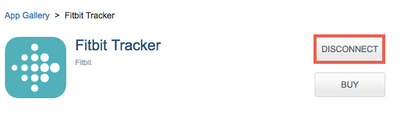
- Go to MyFitnessPal's "App Gallery" and disconnect Fitbit.
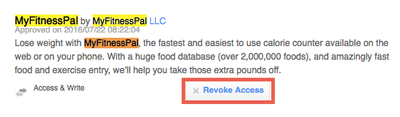
- Then go to "Applications" in your Fitbit.com dashboard settings, find MyFitnessPal, and click "Revoke Access".
2. Once it's disconnected from both sides, go back to MyFitnessPal's App Gallery and connect Fitbit.
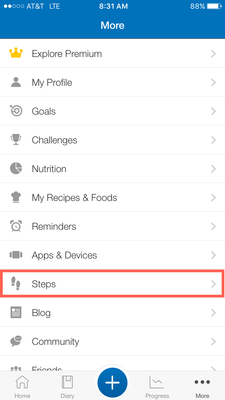
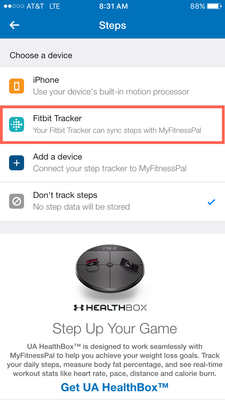
3. In MyFitnessPal's mobile app, go into the "Steps" settings in the "More" tab, then reselect Fitbit as your step counter.
- You can also do this through MyFitnessPal's site by going here.
4. If you do this through the mobile app, make sure you scroll to the bottom of the "More" tab and tap "Sync".
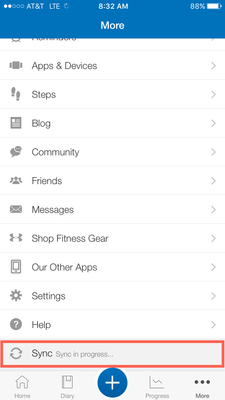
After you sync, you should (hopefully) see your steps again on the "Home" tab in the app, or in the "Check-In" section on myfitnesspal.com. 
Community Moderator Alumni are previous members of the Moderation Team, which ensures conversations are friendly, factual, and on-topic. Moderators are here to answer questions, escalate bugs, and make sure your voice is heard by the larger Fitbit team. Learn more
Hey everyone,
I moved a few of your guys' posts to this thread, if your steps still aren't syncing then make sure to check out my previous post!
 Community Moderator Alumni are previous members of the Moderation Team, which ensures conversations are friendly, factual, and on-topic. Moderators are here to answer questions, escalate bugs, and make sure your voice is heard by the larger Fitbit team. Learn more
@NHmommy Can I see a screenshot of the error? It also would be good to know what the URL is when you see that error.
@Soniacarta Are you getting the same error or is your data just not syncing?
Best Answer
Once they linked then I was back to the not syncing issues.
Which I've just now discovered as decided to randomly correct itself.
Go figure
Best Answer