
Join us on the Community Forums!
-
Community Guidelines
The Fitbit Community is a gathering place for real people who wish to exchange ideas, solutions, tips, techniques, and insight about the Fitbit products and services they love. By joining our Community, you agree to uphold these guidelines, so please take a moment to look them over. -
Learn the Basics
Check out our Frequently Asked Questions page for information on Community features, and tips to make the most of your time here. -
Join the Community!
Join an existing conversation, or start a new thread to ask your question. Creating your account is completely free, and takes about a minute.
Not finding your answer on the Community Forums?
- Community
- Features
- Third-Party Integrations
- MyFitnessPal Syncing Issues (06/03/19) - SOLVED
- Mark Topic as New
- Mark Topic as Read
- Float this Topic for Current User
- Bookmark
- Subscribe
- Mute
- Printer Friendly Page
- Community
- Features
- Third-Party Integrations
- MyFitnessPal Syncing Issues (06/03/19) - SOLVED
MyFitnessPal Syncing Issues (06/03/19) - SOLVED
ANSWERED- Mark Topic as New
- Mark Topic as Read
- Float this Topic for Current User
- Bookmark
- Subscribe
- Mute
- Printer Friendly Page



 Community Moderators ensure that conversations are friendly, factual, and on-topic. We're here to answer questions, escalate bugs, and make sure your voice is heard by the larger Fitbit team. Learn more
UPDATE 06/11/2019
Hello everyone!
Thank you all for sharing your details and experiences with MFP.
I'd like to share some wording on the latest update posted by MFP. You can click here to see their full statement.
"It's possible you have an expired access token. This means that the authentication between MyFitnessPal and Fitbit has expired, and you need to re-authenticate using your Fitbit credentials for sync to resume. This is not directly related to this incident, but is a top reason why some members do not see data sync. However, it should be easy to fix if you follow the exact steps outlined below. Once re-authenticated, sync will resume from the date of relink forward; Past data will not sync.
- First, log into your Fitbit account at Fitbit.com.
- Click the gear icon and choose Settings.
- Once in your settings, select the Applications tab, and locate MyFitnessPal.
- Once you find MyFitnessPal click Revoke access.
- Once revoked, return to MyFitnessPal, and relink Fitbit."
I hope you find this useful. Let us know if there are any other questions on the matter.
_________________________________________________________________________________________
UPDATE 06/06/19:
Hello everyone.
As it has been mentioned and shared already, the issue appears to have been resolved by MFP already and now they are waiting for the backlog of sync requests to be completed.
You can read about it by clicking here.
Thank you all for your patience.
_________________________________________________________________________________________
Hello everyone!
We'd like to let you all know that we are aware of a syncing issue between Fitbit and MyFitnessPal (MFP) that has been going on since June 3rd. MFP is aware of this and they are investigating the issue. You can see what they have to say about the whole situation by clicking here.
Below you can see an extract of what MFP has said:
"Our team continues to investigate to isolate the root cause of the issue. At this time some users will see no data syncing, while some may see some data syncing sporadically. We are working on resolving this for all members."
For the time being we do not recommend disconnecting and reconnecting the apps. We recommend waiting for MFP to identify a solution.
We'll keep you all updated on this as it develops.
Remember to vote for posts that helped you out! Tired of the same workout music? Try a Podcast! 🙂
Answered! Go to the Best Answer.
 Best Answer
- Labels:
-
MyFitnessPal
Accepted Solutions
Community Moderators ensure that conversations are friendly, factual, and on-topic. We're here to answer questions, escalate bugs, and make sure your voice is heard by the larger Fitbit team. Learn more
Hello everyone!
Thank you all for sharing your details and experiences with MFP.
I'd like to share some wording on the latest update posted by MFP. You can click here to see their full statement.
"It's possible you have an expired access token. This means that the authentication between MyFitnessPal and Fitbit has expired, and you need to re-authenticate using your Fitbit credentials for sync to resume. This is not directly related to this incident, but is a top reason why some members do not see data sync. However, it should be easy to fix if you follow the exact steps outlined below. Once re-authenticated, sync will resume from the date of relink forward; Past data will not sync.
- First, log into your Fitbit account at Fitbit.com.
- Click the gear icon and choose Settings.
- Once in your settings, select the Applications tab, and locate MyFitnessPal.
- Once you find MyFitnessPal click Revoke access.
- Once revoked, return to MyFitnessPal, and relink Fitbit."
I hope you find this useful. Let us know if there are any other questions on the matter.


I've the same problem none of my activity tracked on fitbit charge 2 makes it across to myfitnesspal even though it says its linked.
 Community Moderators ensure that conversations are friendly, factual, and on-topic. We're here to answer questions, escalate bugs, and make sure your voice is heard by the larger Fitbit team. Learn more
It's nice to see you around the forums guys @BuckeyeSam @Elisebeth! I recommend to unlink the accounts and them link them again. Doing this should be able to resolve any issues between the account.
To do that, follow these steps:
1. Sign into your Fitbit dashboard.
2. Go to the Applications settings on your account.
4. Under MyFitnessPal, click "Revoke Access."
5. You can then re-link the two accounts.
Let me know if this works guys!
Was my post helpful? Give it a thumbs up to show your appreciation! Of course, if this was the answer you were looking for, don't forget to make it the Best Answer! Als...

@BuckeyeSam, @Elisebeth, and @Dpupeza00, please see this post in what data,syncs between your Fitbit and MFP accounts. It will help explain some of what your seeing.
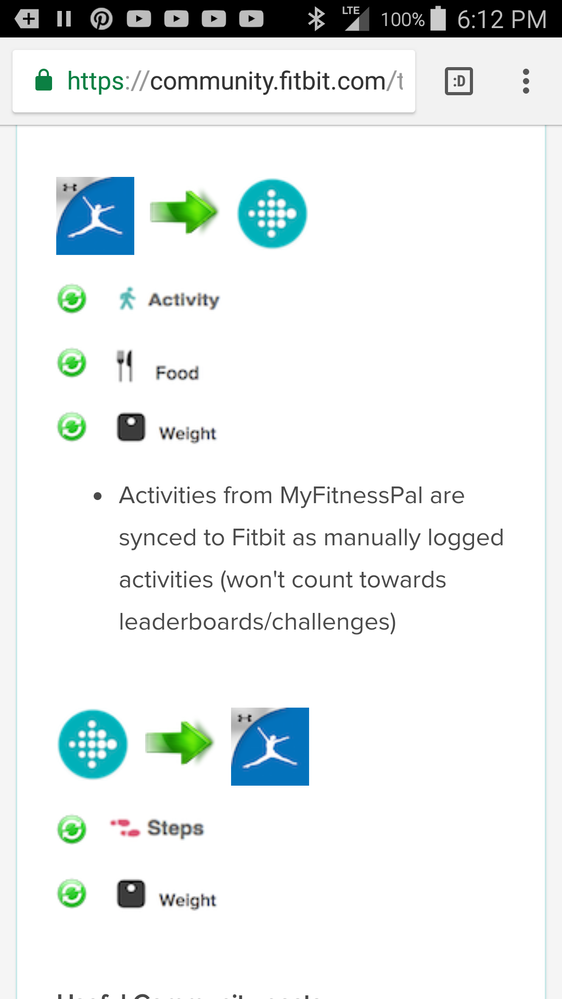
@Dpupeza00 i believe a sync is required before any data will sync after a reconnect.
I did sync and still no info transferring:( everything was fine up until July 26 and then nothing. Steps aren't going to mfp and food logged is not going to Fitbit. Even deleted them and that didn't work. I'm just wondering if it has something to do updates. I'm missing using these apps together.
Can'tsay @Dpupeza00, i don't see how any updates to the app or tracker dhould affect this, but i also don't know everything that happens behind the scene so i can't be positive.
In theory all syncing between MFP and Fitbit happens on the internet between the two servers. The apps should not even needed for this sync to occur.
For years people have synced to the PC, then used MFP's Website to enter their food.
Community Moderators ensure that conversations are friendly, factual, and on-topic. We're here to answer questions, escalate bugs, and make sure your voice is heard by the larger Fitbit team. Learn more
Thanks for trying the suggestions @Elisebeth @Dpupeza00! Our team is aware of it and it seems the issue has also been acknowledged by MyFinessPal as well. Please keep an eye on this thread where we will update once we have more information about this issue.
Thanks for sharing that good information my friend @Rich_Laue. 
Thank you for your patience and understanding, if there's anything else I can do for you, please feel free to reply!
Was my post helpful? Give it a thumbs up to show your appreciation! Of course, if this was the answer you were looking for, don't forget to make it the Best Answer! Als...
Best Answer
I'm giving up too......... unless someone finds out the solution please let me know. I've tried every suggestion.
Best Answer
@NaeFit, @Elisebeth, and @mcats, please keep an eye on the main thread @MarreFitbit, mentions above.
Best Answer
What do you mean by Application settings? I can't find that on my iPhone6+ on my Fitbit dashboard anywhere? Do I have to go on the computer for this? I haven't been able to sync fir quite awhile, and my reminders just quit coming, too, after using MyFitnessPal and Fitbit together for over a year on this phone?

for past 2 days not getting sync between 2 programs... steps don't show in my fitness pal and exercise in my fitness pal doesn't show in fitbit my fitness pal says its not their issue
Best Answer
@Ghu the application setting metioned above are one of the entries in your Fitbit settings. Go back up to the post, you will notice the words Application Settings are in a different color. This color means it is a hyperlink simply click/tap on one of these words and the next page viewed will be the application settings.
Best Answer