
Join us on the Community Forums!
-
Community Guidelines
The Fitbit Community is a gathering place for real people who wish to exchange ideas, solutions, tips, techniques, and insight about the Fitbit products and services they love. By joining our Community, you agree to uphold these guidelines, so please take a moment to look them over. -
Learn the Basics
Check out our Frequently Asked Questions page for information on Community features, and tips to make the most of your time here. -
Join the Community!
Join an existing conversation, or start a new thread to ask your question. Creating your account is completely free, and takes about a minute.
Not finding your answer on the Community Forums?
- Community
- Features
- Third-Party Integrations
- Re: Unable to link with Facebook - 3/31/16
- Mark Topic as New
- Mark Topic as Read
- Float this Topic for Current User
- Bookmark
- Subscribe
- Mute
- Printer Friendly Page
- Community
- Features
- Third-Party Integrations
- Re: Unable to link with Facebook - 3/31/16
RESOLVED: Unable to link with Facebook - 3/31/16
ANSWERED- Mark Topic as New
- Mark Topic as Read
- Float this Topic for Current User
- Bookmark
- Subscribe
- Mute
- Printer Friendly Page


 Community Moderators ensure that conversations are friendly, factual, and on-topic. We're here to answer questions, escalate bugs, and make sure your voice is heard by the larger Fitbit team. Learn more
4/7 Update: This should now be resolved, and Facebook integration should now be working normally. If you are still having trouble, please consult this help article for tips on connecting with your Facebook friends. Thanks everyone for your patience while we worked to correct this issue!
4/6 Update: We have a fix in place which will resolve this issue, and it is being prepared to roll out into production. I'll post again once that happens, but it shouldn't be long!
We are aware of an issue preventing Fitbit users from linking with their Facebook accounts, and producing the following error. This may also prevent users from searching for friends via Facebook if their accounts are already linked.
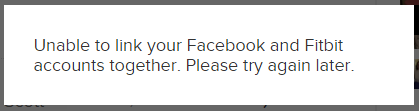
Our team is currently investigating this issue, and we're working to return this functionality to normal behavior. If you see this error, please note that there is nothing wrong with your tracker itself. We'll post another update here as soon as we have news regarding a resolution.
Sorry for the inconvenience, and thank you for your patience!
Answered! Go to the Best Answer.

@dmartell1856 wrote:
-------------- cut. ---------------
I can post all my badges to FB, but can't access my friends list. I get "Unable to link your Facebook and Fitbit accounts together. Please try again later." when I try.
There are several ways to add friends to you Fitbit account, the Facebook link is so that you can find Facebook friends thqt have linked their Fitbit accounts.
An invite will still need to be sent.
So how do you add friends, you know have fitbits. Send them a Facebook or Messenger PM with a link to your profile page, they then press add friend, you accept.
What I've done is posted a link to my profile page on Facebook.
Once they are friends on Fitbit, then you are able to follow.
 Best Answer
The only thing the Facebook connection does or make our a little easier to find friends.
If you already know of a Facebook friend with a Fitbit, then send them a PM through Facebook. Otherwise party an update stating, the Facebook connection to Fitbit is down, please add me to your Fitbit friends. Then add a link to your profile.
You want to know what your profile is click on your name in this thread, then go to profile.
Their are workarounds. I've also added twitter followers this way.

 Community Moderators ensure that conversations are friendly, factual, and on-topic. We're here to answer questions, escalate bugs, and make sure your voice is heard by the larger Fitbit team. Learn more


Matthew you guys spent so much in advertising. Downfall of a company is when you lose your customers trust.
Best Answer Community Moderators ensure that conversations are friendly, factual, and on-topic. We're here to answer questions, escalate bugs, and make sure your voice is heard by the larger Fitbit team. Learn more
This should now be resolved, and Facebook integration should now be working normally. If you are still having trouble, please consult this help article for tips on connecting with your Facebook friends. Thanks everyone for your patience while we worked to correct this issue!
Best Answer
Best Answer
Best Answer
It's now working for me as well.. Thanks... 
Best Answer
MInes not working either, given up now. Been through the help article, still not showing people who I know have fitbit and I know they have FB and fitbit app linked. Can't waste any more of my time on this, really had enough, love my Fitbit but their communication and customer service is shocking.
Best Answer

This morning that has also started working. Issue resolved completely for
me.
Best Answer