
Join us on the Community Forums!
-
Community Guidelines
The Fitbit Community is a gathering place for real people who wish to exchange ideas, solutions, tips, techniques, and insight about the Fitbit products and services they love. By joining our Community, you agree to uphold these guidelines, so please take a moment to look them over. -
Learn the Basics
Check out our Frequently Asked Questions page for information on Community features, and tips to make the most of your time here. -
Join the Community!
Join an existing conversation, or start a new thread to ask your question. Creating your account is completely free, and takes about a minute.
Not finding your answer on the Community Forums?
- Community
- Product Help Forums
- Versa 4
- Re: Google maps isn't seen on the app
- Mark Topic as New
- Mark Topic as Read
- Float this Topic for Current User
- Bookmark
- Subscribe
- Mute
- Printer Friendly Page
- Community
- Product Help Forums
- Versa 4
- Re: Google maps isn't seen on the app
Google Maps not working on Versa 4
ANSWERED- Mark Topic as New
- Mark Topic as Read
- Float this Topic for Current User
- Bookmark
- Subscribe
- Mute
- Printer Friendly Page

Hello all. I just recently saw that Google Maps got added to the Versa 4 on the Fitbit app and I have installed the google maps app on my Fitbit app. However, when I go to my google maps on my phone and begin navigating, my Versa 4 does not pick up that I am navigating. The auto-start feature and the drive feature are enabled on both the app and the watch. I am not sure what is going on and why I cannot get google maps to work on my watch. I have the Versa 4 watch, a Samsung S22 plus version 13 (tiramishu).
Any help or tips would be great! Thank you!
Answered! Go to the Best Answer.

Thank you for the additional information! That makes sense. It's very frustrating that their own support people don't know this or they don't offer the information. Why not just tell users they're working on a fix?
 Best Answer
- I have questions.
Fitbit versa 4.
I'm in the UK there is no option to download Google maps why?
When I track my exercise I don't get a map read out, I get all the stats and everything but no map, yes my GPS is on yes all the settings are permission granted blah blah why don't I get a map of my route?
Why when I set the watch brightness to full does it instantly go back to dim? Why does the spo2 function sometimes completely disappear off the app?
And the craziest thing of all why have you taken off Spotify? listen to your customers.
So far I'm not impressed.
12-30-2022
05:58
- last edited on
01-25-2023
11:08
by
DavideFitbit

12-30-2022
05:58
- last edited on
01-25-2023
11:08
by
DavideFitbit
If you could pretend to care, I would greatly appreciate it
@LizzyFitbit I have the latest firmware version installed on my versa 4. Google Maps is not on my Fitbit. Since I deleted it, how do I get it back? If it's not possible to redownload it there should have been a warning somewhere. I was hoping by reinstalling it the issues that I was having with Google Maps would fix itself. It didn't work and now I can't reinstall Google Maps. Can you please help me? Thanks. I have a Samsung Galaxy S9+.
Best Answer

 Community Moderators ensure that conversations are friendly, factual, and on-topic. We're here to answer questions, escalate bugs, and make sure your voice is heard by the larger Fitbit team. Learn more
Hi everyone, and welcome to our new members.
Thanks for getting back with the requested information, and every step tried prior to posting. I'm sorry you're having this inconvenience with the Google Maps app not showing up on your Versa 4. Let me share this situation has been reported to our team so they can further investigate.
Your feedback is truly appreciated and rest assured I'll update this tread as soon as I have more details from our team.
I had to sync my fitbit to my wife's phone. The app on my phone will not show the google maps tile but it does on her phone. Updated my device through her phone to install google maps and then set it back up with my phone. The tile does not show up on the app on my phone but is now on my fitbit. Hope that helps
@Leetrissthanks for sharing your solution. Can you please disclose your cell phone's make, model, and Android version; as well, your wife's?
Thank you, again!
Best Answer
01-06-2023
01:20
- last edited on
01-25-2023
11:08
by
DavideFitbit
01-06-2023
01:20
- last edited on
01-25-2023
11:08
by
DavideFitbit
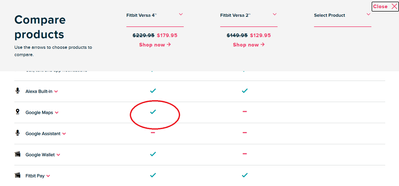
Would you agree this is false advertising then?
This is misleading and will continue to generate more fru
strated customers. Google maps simply doesn't run on the Versa 4. The fitbit store should consider removing this as a promised feature till the bugs involved are solved.

@LizzyFitbit Stop marking active open issues as solved, they CLEARLY are not and you're just trying to boost your stats from the looks of it. Do your job or don't pretend to be a community moderator!!

@Ixxtabb there is nothing in this thread showing that the issue is solved. I do see that, possibly the OP marked an answer as best answer. Currently the best answer, at bast, can explain that fitbit is aware of the issue.
Best Answer
Google 7 Pixel Pro, Google Maps on phone, but no Google Maps tile on Versa 4. Contacted customer service 4 times, deleted the app, reset the Versa 4, restarted the phone, and still Google Maps isn't even listed as an app to be added. False advertising in promoting Google Maps available on Android devices. Considering returning it altogether and switching to Galaxy 4. :star: Out of 5 🤬


SunsetRunner

A week ago; "Your feedback is truly appreciated and rest assured I'll update this tread as soon as I have more details from our team.
Happy New Year. Is there any update yet?
Correct, the app was not working as expected, and as mentioned, been removed until The kinks have been resolved.
Best Answer
The problem @Rich_Laue is that Fitbit has been completely silent about the problem and is once again showing a complete lack of respect towards the users.
Best Answer
New purchasers of the Fitbit Versa 4 are not any the wiser and won't be till Fitbit is honest about its promised features.
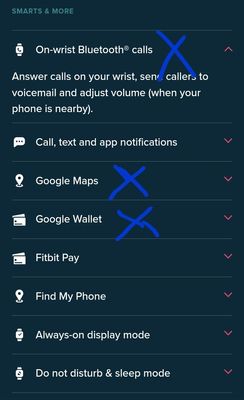
What is your issue with the Bluetooth calls? Mine works just at described, are you having issues with that?
Best Answer
@yancheng90 you should be removing your tracking info before pisting.
Phone calls work, I would suggest starring a new thread, and include the phone model.
@Dopovo this is a community forum. fitbit usually doesn't post here.
Best Answer
@Rich_Laue Exactly what I mean, Fitbit didn't post anywhere about it.
Best Answer