Join us on the Community Forums!
-
Community Guidelines
The Fitbit Community is a gathering place for real people who wish to exchange ideas, solutions, tips, techniques, and insight about the Fitbit products and services they love. By joining our Community, you agree to uphold these guidelines, so please take a moment to look them over. -
Learn the Basics
Check out our Frequently Asked Questions page for information on Community features, and tips to make the most of your time here. -
Join the Community!
Join an existing conversation, or start a new thread to ask your question. Creating your account is completely free, and takes about a minute.
Not finding your answer on the Community Forums?
- Mark Topic as New
- Mark Topic as Read
- Float this Topic for Current User
- Bookmark
- Subscribe
- Mute
- Printer Friendly Page
Add exercise option missing from app
ANSWERED- Mark Topic as New
- Mark Topic as Read
- Float this Topic for Current User
- Bookmark
- Subscribe
- Mute
- Printer Friendly Page
10-01-2019
15:13
- last edited on
10-02-2019
09:34
by
AlvaroFitbit


10-01-2019
15:13
- last edited on
10-02-2019
09:34
by
AlvaroFitbit
Since the new update yesterday I cannot add exercise manually. The + button next to exercise has vanished! Please bring it back!!
Moderator edit: updated subject for clarity
Answered! Go to the Best Answer.
 Best Answer
- Labels:
-
Inspire HR
Accepted Solutions


 Community Moderators ensure that conversations are friendly, factual, and on-topic. We're here to answer questions, escalate bugs, and make sure your voice is heard by the larger Fitbit team. Learn more
Hi everyone. It's good to see you here in the Community Forums, and I'm sorry for the delayed response.
Thanks for taking the time to share your thoughts about the Fitbit app, as well for the steps tried on your own. I see where you're coming from about the (+) sign not showing up on the Fitbit app to log your exercises, and be sure that your feedback hasn't gone unnoticed.
I've been informed that this was a bug experienced on the Fitbit app, and as of today you should start seeing the (+) sign next to the exercise tile as it was before. I'm sorry for any inconvenience this situation caused you, and we appreciated your patience. Also, if you've not done so make sure to update the Fitbit app to the latest version to ensure it's performance.
By the way, I moved your post to this new thread in the iOS board, so we can keep our forums organized.
If you need anything else, feel free to reply back.


SunsetRunner
I’ve just found this too. After numerous posts over last few days saying that logging exercise manually was crashing the App (related to latest iOS update) I strongly suspect Fitbit have removed this feature until they find out what’s happening and issue a software fix. Very annoying.
Best Answer
Mine seems to be working fine now. Even without the + I can tap on the Exercise line and it brings up the detail screen. I can manually add exercise. I don’t know why it works for me and not others. I hope you get your functionality back soon.
Best Answer
10-02-2019
09:37
- last edited on
03-07-2025
07:17
by
MarreFitbit
 Community Moderators ensure that conversations are friendly, factual, and on-topic. We're here to answer questions, escalate bugs, and make sure your voice is heard by the larger Fitbit team. Learn more
10-02-2019
09:37
- last edited on
03-07-2025
07:17
by
MarreFitbit
@AndreaBunnie Welcome! It's good that the community is growing!
Let me help you with your missing option to add exercises. Could you share a screenshot of this issue? Which phone and which OS version is it running? In the mean time try logging out from the app, restart your phone and log back in.
Let me know how it goes.
If a post helped you try voting and selecting it as a solution so other members benefit from it. Select it as Best Solution!
Best Answer
Hi there,
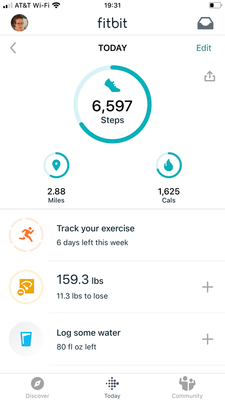
It is an iPhone 8 running iOS13. Here is a screenshot
Best Answer
Community Moderators ensure that conversations are friendly, factual, and on-topic. We're here to answer questions, escalate bugs, and make sure your voice is heard by the larger Fitbit team. Learn more
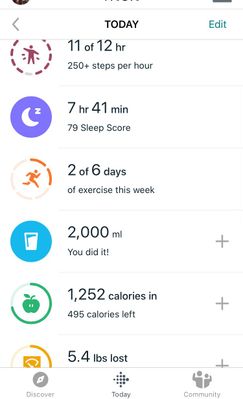
@AndreaBunnie thank you so much for the screenshot. At this time could you try tapping the exercise tile. You should be able to log your exercise from there while this is investigated by the team.
Keep me posted.
If a post helped you try voting and selecting it as a solution so other members benefit from it. Select it as Best Solution!
Best Answer
Hi again,
Thanks for this, previously you could not add exercise from within this page so it seems that now being able to is a new feature. Possibly to replace the add button on the tile?

I also noticed as of this morning I cannot manually add exercise or sleep (I choose not to wear my Inspire while I'm sleeping) from the Today screen. This little + sign is gone form the Sleep and Exercise "tiles". The little + sign is still there to manually log weight and water, however. Can you please add the + sign back to the Sleep and Exercise "tiles"? It is an extra step now to manually log these items. Thanks.
Best Answer
I have the same issue and I don't see the exercise tile you are referring to. What does this tile look like?
Best Answer
In the past day the + icon shortcut was removed from the home screen for exercise - an important shortcut, especially at the gym. (The + icon remains for tracking weight, female health, food, water, etc.) According to customer support it was removed based on customer feedback. This customer, at least, would like to see it kept for exercise.
I want the + added back into the app in the category x of y days of exercise this week so that it is easy to log weight lifting activities. It disappeared from the app without notice yesterday. I finished my gym routine, went to log it and ... GONE no + sign. I closed and reopened the app, restarted the phone, reset the Charge 3, to no avail. After almost 20 minutes of fooling around I found an obscure way to log it. This is crazy. The reason I have been a loyal fan of Fitbit with the original, Fitbit Charge 2 HR, and now a Fitbit Charge 3 is because I could see the data that was important to me. I want to track, heart rate, daily exercise including weight lifting, and nightly sleep. Don’t care about anything else. If it’s not easy to add and track activity...I’m done. I’ll find another product. At least make the logging and tracking a configuration option. Users should be able to configure the tracking app to be useful to them, not just a one size fits all.
I looked today to find and alternative app to use, but they seem to all focus on weight loss and calorie counting. So frustrating.
Anyone know of a good tracker with a decent app that tracks what’s important to you?

Please, please, please add all the +’s back on the today screen, why were they removed, it makes no sense!!

I have the iPhone 11 Pro and have been able to log once (following the suggestion in this forum for the logout, delete, etc). I now have the missing "+" after having updated my app to the most recent update.
I have been logging in a different app so I don't lose my runs, but that's not ideal.
I've even removed and re-added my One, to no avail. Plus sign still missing.
... edited to add that I notice just as it crashes that I'm getting a message that the app would like to have access to Apple Music, which I have disabled.
Best Answer