
Join us on the Community Forums!
-
Community Guidelines
The Fitbit Community is a gathering place for real people who wish to exchange ideas, solutions, tips, techniques, and insight about the Fitbit products and services they love. By joining our Community, you agree to uphold these guidelines, so please take a moment to look them over. -
Learn the Basics
Check out our Frequently Asked Questions page for information on Community features, and tips to make the most of your time here. -
Join the Community!
Join an existing conversation, or start a new thread to ask your question. Creating your account is completely free, and takes about a minute.
Not finding your answer on the Community Forums?
- Mark Topic as New
- Mark Topic as Read
- Float this Topic for Current User
- Bookmark
- Subscribe
- Mute
- Printer Friendly Page
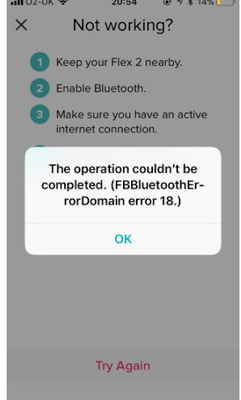
FBBluetoothErrorDomain error 18
ANSWERED- Mark Topic as New
- Mark Topic as Read
- Float this Topic for Current User
- Bookmark
- Subscribe
- Mute
- Printer Friendly Page


 Community Moderator Alumni are previous members of the Moderation Team, which ensures conversations are friendly, factual, and on-topic. Moderators are here to answer questions, escalate bugs, and make sure your voice is heard by the larger Fitbit team. Learn more
Update 1/23/2018: Thanks again everyone for your reports on this error message when updating firmware or setting up your tracker. To resolve this issue, please forget your device in Bluetooth settings. For complete instructions, please check out @Dawn126's post here. We are currently working with our team to update the error message to include the solution.
Update 10/31/2017: For those seeing this message while updating your tracker firmware, check out @Dawn126's post here on having Bluetooth forget your device. In addition, please check out this help article on troubleshooting firmware updates if you haven't already.
Hi Everyone- We're currently investigating user reports of receiving the following error: FBBluetoothErrorDomain error 18 which prevents them from updating their firmware.
Actively managing your weight? Find accountability buddies on the Manage Weight board
Answered! Go to the Best Answer.

1. When did you first see this error message? 10/19/17 @ 9:30 am CST
2. What device model do you have? iPhone 6s+, FitBit Charge HR
3. What iOS version are you currently running? 11.0.3
4. What phone provider do you have (Verizon, T-Mobile, Sprint, etc)? Verizon
Tried the temporary reset instructions and the app and Charge HR will find each other but cannot connect. Not having any success with a factory reset. Still have a "half charged bar" showing on the Charge HR.
***Followed Silver Pops steps and problem solved!

Please FitBit sort this problem out!
Sent from my iPhone


I have a Fitbit Charge HR which would not sync. It wanted me to update tracker which I started but then the actual Fitbit screen froze on a loading icon and the above msg was shown. In answer to your question:-
1) yesterday 18 Oct
2) Charge HR
3) iOS 11.0.3
4) o2
A resolution would be much appreciated.
Please note I am NOT FitBit or have anything to do with their technical side I am just a consumer who is getting increasingly angry and frustrated !!!!
Sent from my iPhone
 Best Answer
iPhone 7+
Verizon
Started 11/18 that I noticed.
--
If you come home clean, you didn't have fun! 😜
Best Answer

@Joy56 You can "opt" out of e-mail notification by going to to your settings.
It all depends on if anyone has just clicked reply to your message rather than the first post of this thread on the community.
Fit bit support won't tell you that tho as they are in free fall over the problem with this error18 issue.
Best Answer
Sent from my iPhone
Best Answer
My Blaze came up with the same problem as I posted earlier.
It it is important to follow what @Goldfish59 has written.
Bear in mind FB are blaming an IOS update I hadn't updated mine so it's not that. I see others in android are having a similar problem as well.
I followed this and it worked perfectly.
When trying to up date software
Before you do anything, follow the list below.
1.Check Bluetooth devices.
2.if your device is listed click "forget" the device.
3.Switch off Bluetooth immediately.
4. Shut the phone down
5.reset your Fitbit device (search on community if you don't know how to do it)
6.restart your phone
7. Switch Bluetooth back on (don't wait for it to connect to your device)
8.start the Fitbit app
9.install software update
You may find that it asks for pairing the device. Accept and progress though.
Now I am not a Fitbit support adviser so please don't send me questions.
I'm trying to help out with what worked for me. It might not work for your device. This was the Blaze. But I'm sure it's worth trying as I can see so many are frustrated with this problem.
Now do I update my IOS ? I don't think so yet 🙂


Sent from my iPad
Best Answer

followed the fitbit recommendation to restart my phone. After doing this
the app updated without issue and all links to my device work fine.
Best Answer