
Join us on the Community Forums!
-
Community Guidelines
The Fitbit Community is a gathering place for real people who wish to exchange ideas, solutions, tips, techniques, and insight about the Fitbit products and services they love. By joining our Community, you agree to uphold these guidelines, so please take a moment to look them over. -
Learn the Basics
Check out our Frequently Asked Questions page for information on Community features, and tips to make the most of your time here. -
Join the Community!
Join an existing conversation, or start a new thread to ask your question. Creating your account is completely free, and takes about a minute.
Not finding your answer on the Community Forums?
- Mark Topic as New
- Mark Topic as Read
- Float this Topic for Current User
- Bookmark
- Subscribe
- Mute
- Printer Friendly Page
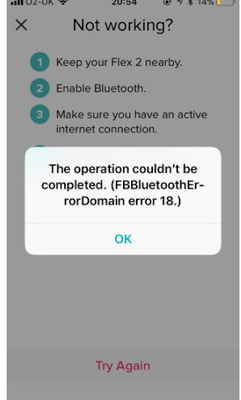
FBBluetoothErrorDomain error 18
ANSWERED- Mark Topic as New
- Mark Topic as Read
- Float this Topic for Current User
- Bookmark
- Subscribe
- Mute
- Printer Friendly Page


 Community Moderator Alumni are previous members of the Moderation Team, which ensures conversations are friendly, factual, and on-topic. Moderators are here to answer questions, escalate bugs, and make sure your voice is heard by the larger Fitbit team. Learn more
Update 1/23/2018: Thanks again everyone for your reports on this error message when updating firmware or setting up your tracker. To resolve this issue, please forget your device in Bluetooth settings. For complete instructions, please check out @Dawn126's post here. We are currently working with our team to update the error message to include the solution.
Update 10/31/2017: For those seeing this message while updating your tracker firmware, check out @Dawn126's post here on having Bluetooth forget your device. In addition, please check out this help article on troubleshooting firmware updates if you haven't already.
Hi Everyone- We're currently investigating user reports of receiving the following error: FBBluetoothErrorDomain error 18 which prevents them from updating their firmware.
Actively managing your weight? Find accountability buddies on the Manage Weight board
Answered! Go to the Best Answer.

SunsetRunner
It's been over a week since I reported this here and my device is still bricked by this update. Even a "factory reset" had no impact. Chat support offered me 25% for a new device, but if my device gets bricked within 5 months of first use, then these devices would be much more expensive for a 12-month period than it appears at the cash register.
Support also said to keep checking for a solution, but...where? We posted here, so clearly we're having problems and they have our account emails. You'd think they'd be eager to contact each of us when a solution was found by Fitbit engineers, rather than risk loosing present users.
I shared my experience with Reddit.
 Best Answer
100% fix - thank you!!
Best Answer



Sent from my iPhone
Best Answer
iOS 11 on iPhone 7. Last night i was told there is an updated for my Fitbit Charge and i proceeded to install the update. The fitbit was next to my phone the whole night. This morning, i got this error. Since then my Fitbit screen is frozen with the update showing partial completion. Reset steps are not working. Very frustrated.
Best Answer

it works
version 110 to 124 now
Best Answer
I have the same problem with the latest iOS upgrade ...the operation couldn't be completed. (com.fitbit.HTTP error 0.) I an running the 11.0.3 iOS version. My phone provider is CYTA, I am based in Cyprus. My Fitbit Charge basically stuck during the upgrade - the display had a line which looked like it had half downloaded, but with an ! in the middle, so I reset it but still have the same problem on the display. Downloaded the upgrade today 27/10/2017. Waiting for your next update. Tks.
Best Answer
I have a Fitbit charge hr. I am on iOS 11.03 and I have a iPhone 5. I have followed previous Fitbit forum advice and removed my fb from my app. In the hope that the Bluetooth error 18 would be fixed. This hasn’t worked. I understand this is now something that shouldn’t have been done. What is the fix for this and why has there been this error which has caused so many issues? A resolution for this is much required!!
Best Answer
One thing that needs to be resolved is the advice for removing the device from the App or deleting the App is a NO NO.
AND IT MUST NOT BE DONE.
Do you have the (i) on the Bluetooth settings page ?
If you do then click forget and then follow the advice of resetting your device.
I have a feeling from reading on the iOS, the android and reddit I think your device may be “defunct” until Fitbit engineers get their act together and send an update out to get people out of the glitch.
Best Answer
Thank you. I was reading a Fitbit forum page and it suggested to delete the phone from the app. I am reading a lot from the forums and a lot of people have done the same thing. I am not sure if it is a fix but some people have connected it through the pc and an app called Fitbit connect and it seems to find the Fitbit again not sure how. This seems to have affected so many people worldwide I am in the UK but people from US and other countries are having the same issue. There should have been a clear message from the beginning not to remove the device from the app.


- When did you first see this error message? About 3:00 pm 10/27/17
- What device model do you have? Charge
- What iOS version are you currently running? 11.0.3 (15A432)
- What phone provider do you have (Verizon, T-Mobile, Sprint, etc)? Consumer Cellular I tried to update, saw the bar indicating how much updating was done. Then it froze, I followed instructions and did a reset. I got the error message. I did all the steps on my iphone and no change. I tried another reset. Got the bar with an ! in the middle. Another reset, got the bar filled half way. its been stuck there. Now i have the bar with the ! again.
Best Answer
I tried to update my HR 2, tonight October 27th 2017
i have the latest version of the Fitbit app and am using an iPhone 7 with the latest version of iOS 11
i am getting the fbbluetootherrordomain error 18
my HR 2 no longer works and is stuck with a set of dots half way across the screen ending in a !
not happy nothing now working, have tried resetting phone, restarting app and restarting Bluetooth connection and I still get the Sam error
Help !!
Best Answer
Problem with the update and FBBluetoothErrorDomain error 18. Had a exclamation mark half way on the update. Tried the other suggestions, but still having no luck. As a stated fix, I took the current Fitbit HR off the app and tried to install it as new, but that didn't work either. Spent hours trying to fix this. Very disappointing. Any other suggestions?
Best Answer
When did you first see this error message? Tonight 28th Oct 2017 12.10am
What device model do you have? Charge HR and iphone 7
What iOS version are you currently running? - IOS 11.0.3 fully up to date
What phone provider do you have (Verizon, T-Mobile, Sprint, etc)? Vodafone
charge HR now not responding to anything since I’ve tried updating
Best Answer
Problem solved. 10/27/2017
Solved the lock up issue I had during an update on my Charge HR. After reading some of the posts I ended up going into the settings for Bluetooth and selected the Charge HR and "forget this device". Then plugged in the charging cord to the HR and connected it to my laptop. As soon as I did that the updated restarted and finished in about a minute and now the HR functioning as usual. Thank you for all of the feedback.
Was doing an update to my Charge HR and the update stalled mind way done and is now froze.
Happened 10/27/17
IPhone 8 ios 11.0.3 (15a432)
US Cellular
Best Answer