
Join us on the Community Forums!
-
Community Guidelines
The Fitbit Community is a gathering place for real people who wish to exchange ideas, solutions, tips, techniques, and insight about the Fitbit products and services they love. By joining our Community, you agree to uphold these guidelines, so please take a moment to look them over. -
Learn the Basics
Check out our Frequently Asked Questions page for information on Community features, and tips to make the most of your time here. -
Join the Community!
Join an existing conversation, or start a new thread to ask your question. Creating your account is completely free, and takes about a minute.
Not finding your answer on the Community Forums?
- Mark Topic as New
- Mark Topic as Read
- Float this Topic for Current User
- Bookmark
- Subscribe
- Mute
- Printer Friendly Page
FBBluetoothErrorDomain error 18
ANSWERED- Mark Topic as New
- Mark Topic as Read
- Float this Topic for Current User
- Bookmark
- Subscribe
- Mute
- Printer Friendly Page


 Community Moderator Alumni are previous members of the Moderation Team, which ensures conversations are friendly, factual, and on-topic. Moderators are here to answer questions, escalate bugs, and make sure your voice is heard by the larger Fitbit team. Learn more
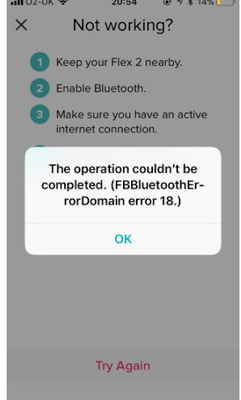
Update 1/23/2018: Thanks again everyone for your reports on this error message when updating firmware or setting up your tracker. To resolve this issue, please forget your device in Bluetooth settings. For complete instructions, please check out @Dawn126's post here. We are currently working with our team to update the error message to include the solution.
Update 10/31/2017: For those seeing this message while updating your tracker firmware, check out @Dawn126's post here on having Bluetooth forget your device. In addition, please check out this help article on troubleshooting firmware updates if you haven't already.
Hi Everyone- We're currently investigating user reports of receiving the following error: FBBluetoothErrorDomain error 18 which prevents them from updating their firmware.
Actively managing your weight? Find accountability buddies on the Manage Weight board
Answered! Go to the Best Answer.


Be found so I can not
Manually update it either.
One day at a time!
 Best Answer
 Fitbit Product Experts Alumni are retired members of the Fitbit Product Expert Program. Learn more
Try our Customer Repersetive people and see if they can get you tracking again.
See the link attached to contact them.
You can call, chat, phone, twitter or email them.
Please let us know the outcome on here.

ALAN | VAN,B.C. Canada Community Council Member
Versa, Charge, Charge HR, Ionic, Ace, Aria 2 scale, Flyer headphones - iOS
Click here Fitbit help for more solutions
>Contact
Best Answer
Thanks for posting, it fixed it. You saved me from tossing it, that was the next step I was so frustrated. Happy Holidays.
Best Answer
Darn thing still not working, after following your instructions. Any other suggestions? Driving me crazy!
Best Answer
Tried this after 48 hours of problems. The device was making some progress but upon trying this my iPhone will no longer see the device as a Bluetooth device:-( driven mad trying to troubleshoot it. Ready to chuck this out. This is my third Fitbit in 12 months 😭😭🤯
Best Answer
Beth Cantrell
Sent from Beth's IPhone
Best Answer
Best Answer
Beth Cantrell
Sent from Beth's IPhone
Best Answer
Best Answer
you, first double check your Fitbit model. If it’s not a Charge HT, seek
directions for the appropriate model.
Best Answer
Best Answer
Thank you!
After forgetting the device from bluetooth then restarting the app it immediately started loading again.
Thanks again!
Best Answer

Hello Kate, I got the same issue with my iPhone 6 and really think that my watch was unusable.The latest Fitbit App (10/12/17) doesn’t change anything but I see that this bug was address only to Apple device. With the Android smartphone of my wife I try to configure my charge Hr on it. And then, IT’S WORK !
My watch have been updated and again available with my iPhone.
The only issue that I have is to explain to my wife why I change all the setting of her phone...
Hope this can help, merry Christmas.
Pilou
Best Answer
Fixed mine today. Had to wait until my son came home from his Dad’s so I could use his laptop with Windows 10. Then I was able to update the tracker and load the updates.
Basically FitBit has a problem keeping their tech sound. My IOS update couldn’t help and then any older form of Mac or Windows was unsuccessful. I hope they get their act together. I’ve been a fan for awhile and something like this - doing their job well - is more important than a new model tracker.
Best Answer
