
Join us on the Community Forums!
-
Community Guidelines
The Fitbit Community is a gathering place for real people who wish to exchange ideas, solutions, tips, techniques, and insight about the Fitbit products and services they love. By joining our Community, you agree to uphold these guidelines, so please take a moment to look them over. -
Learn the Basics
Check out our Frequently Asked Questions page for information on Community features, and tips to make the most of your time here. -
Join the Community!
Join an existing conversation, or start a new thread to ask your question. Creating your account is completely free, and takes about a minute.
Not finding your answer on the Community Forums?
- Mark Topic as New
- Mark Topic as Read
- Float this Topic for Current User
- Bookmark
- Subscribe
- Mute
- Printer Friendly Page
Fitbit app won't let me sign in
ANSWERED- Mark Topic as New
- Mark Topic as Read
- Float this Topic for Current User
- Bookmark
- Subscribe
- Mute
- Printer Friendly Page
- « Previous
-
- 1
- 2
- Next »

Answered! Go to the Best Answer.
 Best Answer
Unable to sign in to my fitbit app or join again with a new email - keeps saying something about the connection but my wifi is working.
Best Answer


 Community Moderator Alumni are previous members of the Moderation Team, which ensures conversations are friendly, factual, and on-topic. Moderators are here to answer questions, escalate bugs, and make sure your voice is heard by the larger Fitbit team. Learn more
Hello @DANIELLE2014X, thanks for joining the conversation and the Fitbit Community, it's great to have you on board. 
I appreciate you have brought this to my attention and for letting me know you have already tried some troubleshooting steps. At this moment I would like to ask you to turn off WiFi on your phone and then try to log in again using your cellular data. Once you're able to log in, turn WiFi again. If this doesn't seem to work, please let me know so I can check this further.
I hope this can be helpful, if there's anything else I can do for you, please feel free to reply.
 Best Answer
Hello, I have tried this as well as deleting the app and reinstalling it twice, restarting my phone in between and resetting my password. I also tried logging in with both the WiFi and Bluetooth turned off after the app was reinstalled and phone restarted. I have also force closed the app and tried the above but no luck.
Best Answer
Community Moderator Alumni are previous members of the Moderation Team, which ensures conversations are friendly, factual, and on-topic. Moderators are here to answer questions, escalate bugs, and make sure your voice is heard by the larger Fitbit team. Learn more
Hello @Nicole1212, have a warm welcome to the Fitbit Community, thanks for joining us!
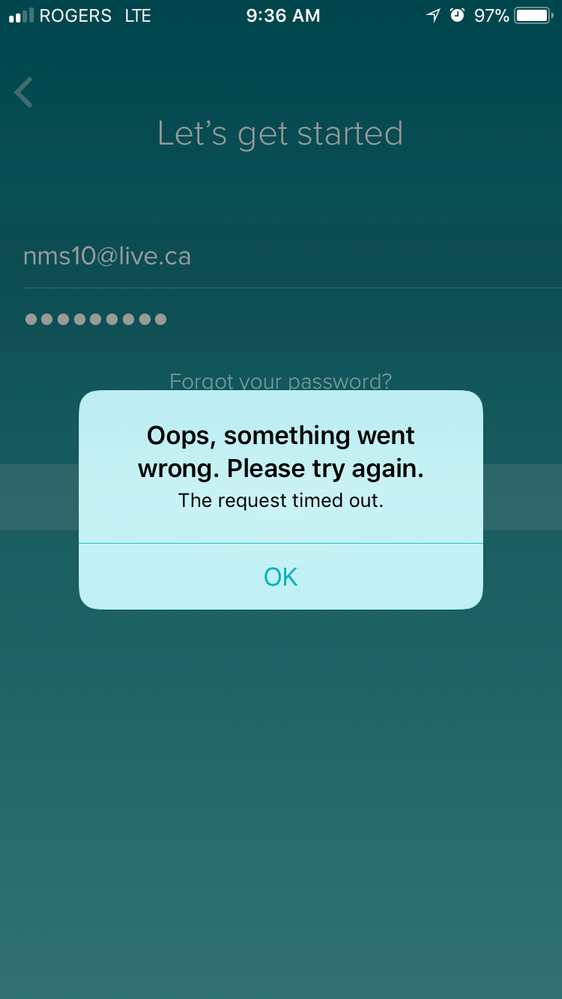
I appreciate you have taken the time to share your experience with me and for sharing the troubleshooting steps you've tried so far. Tell me, are you getting an error message when trying to log in to your account? Have you updated the Fitbit app recently? We have just released a new version.
If you're getting an error message, please take a screenshot and reply to me with it, this will be very helpful for me to determine which troubleshooting steps should we take next.
Thanks for your patience and understanding, I'll be waiting to hear from you.
Best Answer
Hello and Thank you! I was experiencing this problem both before and now after updating the app. The error message is that it has timed out. Here is a screenshot.
Best Answer
Community Moderator Alumni are previous members of the Moderation Team, which ensures conversations are friendly, factual, and on-topic. Moderators are here to answer questions, escalate bugs, and make sure your voice is heard by the larger Fitbit team. Learn more
Hello @Nicole1212, I hope you're doing well, thanks for taking the time to reply.
I appreciate you have come back with a screenshot of the error you're getting when trying to log in to your account. With the information you had provided earlier and the screenshot, I will forward this to our development team so they can take a better look at this situation, as you have already uninstalled/reinstalled the app and tried to log in with WiFi and cellular data.
Thanks for your patience and understanding, once I have more information to share with you about this issue, I'll make sure to update this thread to let you know.
Happy stepping!
Best Answer
SunsetRunner
Add me to the list of not being able to log into the app. Ever since the 2.76 update I havent been able to sync/re-add my device/login. Ive tried all of the suggestions on this and other threads.
Is there an update for the app on the near horizon?
Best Answer
Add me to that list as well. Ever since the update, it works about 10% of the time. I even tried reloading the app, no luck.
Best Answer
Community Moderator Alumni are previous members of the Moderation Team, which ensures conversations are friendly, factual, and on-topic. Moderators are here to answer questions, escalate bugs, and make sure your voice is heard by the larger Fitbit team. Learn more
Hello @markguzzo and @SunsetRunner, thanks for joining the Fitbit Community, it's great to have you on board.
I appreciate you have taken the time to share your experience with me. At this moment I would like to gather some information from your so I can forward it to our team. This information will be very helpful for them to check this further:
- iPhone model you're using.
- OS version running on your iPhone
- App version currently installed on your phone. (go to the App Store to check it)
Thanks for your patience and understanding, I'll be waiting for your reply.
Best Answer
Community Moderator Alumni are previous members of the Moderation Team, which ensures conversations are friendly, factual, and on-topic. Moderators are here to answer questions, escalate bugs, and make sure your voice is heard by the larger Fitbit team. Learn more
Hello @markguzzo, I appreciate you have come back and let me know that after syncing with your laptop the app works again, thanks for letting me know!
In case you have some spare time, I would like to invite you to visit our Discussions board where you will find great tips and encouragement from other members and if there's anything else I can do for you, please keep me posted!
Best Answer
Best Answer
Community Moderator Alumni are previous members of the Moderation Team, which ensures conversations are friendly, factual, and on-topic. Moderators are here to answer questions, escalate bugs, and make sure your voice is heard by the larger Fitbit team. Learn more
Hello @Nicole1212, I hope you're doing well, thanks for taking the time to reply and let me know @markguzzo's instructions were able to resolve your issue, I'm very glad!
If there's anything else I can do for you, please feel free to reply, I'll be happy to help.
Best Answer
Once I took Fitbit out of my Bluetooth and shut off my vpn. It let me sign in then I started from the beginning and added to Bluetooth again. No problem since

How do you turn on set automatically for date and time when you can’t get in then a little thing keeps spinning?
Best Answer
- « Previous
-
- 1
- 2
- Next »