
Join us on the Community Forums!
-
Community Guidelines
The Fitbit Community is a gathering place for real people who wish to exchange ideas, solutions, tips, techniques, and insight about the Fitbit products and services they love. By joining our Community, you agree to uphold these guidelines, so please take a moment to look them over. -
Learn the Basics
Check out our Frequently Asked Questions page for information on Community features, and tips to make the most of your time here. -
Join the Community!
Join an existing conversation, or start a new thread to ask your question. Creating your account is completely free, and takes about a minute.
Not finding your answer on the Community Forums?
- Mark Topic as New
- Mark Topic as Read
- Float this Topic for Current User
- Bookmark
- Subscribe
- Mute
- Printer Friendly Page
Resolved: FBBluetoothErrorDomain error 18
- Mark Topic as New
- Mark Topic as Read
- Float this Topic for Current User
- Bookmark
- Subscribe
- Mute
- Printer Friendly Page
08-14-2017
15:19
- last edited on
09-12-2017
14:20
by
KateFitbit


 Community Moderator Alumni are previous members of the Moderation Team, which ensures conversations are friendly, factual, and on-topic. Moderators are here to answer questions, escalate bugs, and make sure your voice is heard by the larger Fitbit team. Learn more
08-14-2017
15:19
- last edited on
09-12-2017
14:20
by
KateFitbit
Fitbit Update 9/12/2017: This issue was resolved in the new app update version 2.40 released yesterday. If you are still experiencing this issue, please update your app. Thanks for your patience!
Fitbit Update 8/24/2017: Thanks again for reporting this issue, at this time we have all the information needed and our team is still reviewing. I'll update this thread once we learn more. Your patience is truly appreciated.
Fitbit Update 08/14/2017: Everyone -- Several iOS users have reported receiving the FBBluetoothErrorDomain error 18 when attempting to update their trackers on the latest version of the Fitbit app for iOS, version 2.39. Our team is currently aware of this issue and working on a fix for this. I appreciate you taking the time to report this issue.
As @Rich_Laue asked here, can someone please share a screenshot of the error message as well as letting me know the following details:
- What is your Fitbit app version (account > help)?
- What version of iOS are you on?
- Have you tried what worked for @ReneRobles and continue to hit the try again button?
I will pass this information along to our Product Specialist who will provide me with an update and I will make sure to convey that to you all. Thanks again for your reports. More information coming soon!
08-13-2017
15:04
- last edited on
08-14-2017
14:00
by
ErickFitbit

08-13-2017
15:04
- last edited on
08-14-2017
14:00
by
ErickFitbit
Trying to update my Blaze as I recently decided to start using it again. I tried to update my Blaze, but I get this message at the start each time. What can be done to correct this error? Bluetooth shows connected in my settings. Blaze is sitting in the charger with a full charge. The moment I take it out of the charger, the screen goes black and no button will work to get it to turn on. It will then not remain connected in Bluetooth.
iPhone 6 with OS 10.3.3
Moderator edit: Subject for clarity
I am receiving the same problem.
@BlazeJeff12 wrote:Trying to update my Blaze as I recently decided to start using it again. I tried to update my Blaze, but I get this message at the start each time. What can be done to correct this error?
Bluetooth shows connected in my settings. Blaze is sitting in the charger with a full charge. The moment I take it out of the charger, the screen goes black and no button will work to get it to turn on. It will then not remain connected in Bluetooth.
iPhone 6 with OS 10.3.3

 Community Moderator Alumni are previous members of the Moderation Team, which ensures conversations are friendly, factual, and on-topic. Moderators are here to answer questions, escalate bugs, and make sure your voice is heard by the larger Fitbit team. Learn more
A warm welcome to the Community @BlazeJeff12 and @Glyngineer.
To be honest, I haven't heard of an error 18 before. Could you please both, provide me with a screenshot of this error? Where are you seeing it, in the tracker or in the app?
Hope to hear from you soon. 

Hi
im receivng this error too. It's my first day and trying to set up and get going. Please help and restore my faith in Fitbit.
Hey Guy's,
This morning I'm receiving a FBBluetoothErrorDomain error 18 notification when truing to set up my brand new Charge 2. The device is not giving me the charging icon when plugged in either.
Is there a fix for these issues?
I no longer have this error, I kept hitting the try again button and it pushed through. I am now updating.
Hi
I just bought a FitBit Flex 2 this morning and I keep getting this error code. Majorly bummed because I want to get out and start stepping but I need to update. What is the problem?
 Best Answer
Since we have not seen this error code, please would somebody answee @AlejandraFitbit and post a screen shot?
Unable to update/sync and getting error 18
Best Answer
Community Moderator Alumni are previous members of the Moderation Team, which ensures conversations are friendly, factual, and on-topic. Moderators are here to answer questions, escalate bugs, and make sure your voice is heard by the larger Fitbit team. Learn more
Everyone -- I have merged a couple of posts into this thread as you all have reported the same error code. I appreciate you taking the time to report this issue.
As @Rich_Laue asked above, can someone please share a screenshot of the error message as well as letting me know the following details:
- What is your Fitbit app version (account > help)?
- What version of iOS are you on?
- Have you tried what worked for @ReneRobles and continue to hit the try again button?
I will pass this information along to our Product Specialist who will provide me with an update and I will make sure to convey that to you all. Thanks again for your reports. More information coming soon!
I plugged my Fitbit in and pressed the button on charger 3 times quickly. It resets the Bluetooth.
All set up 😀😀😀
Gill
Sent from my iPhone

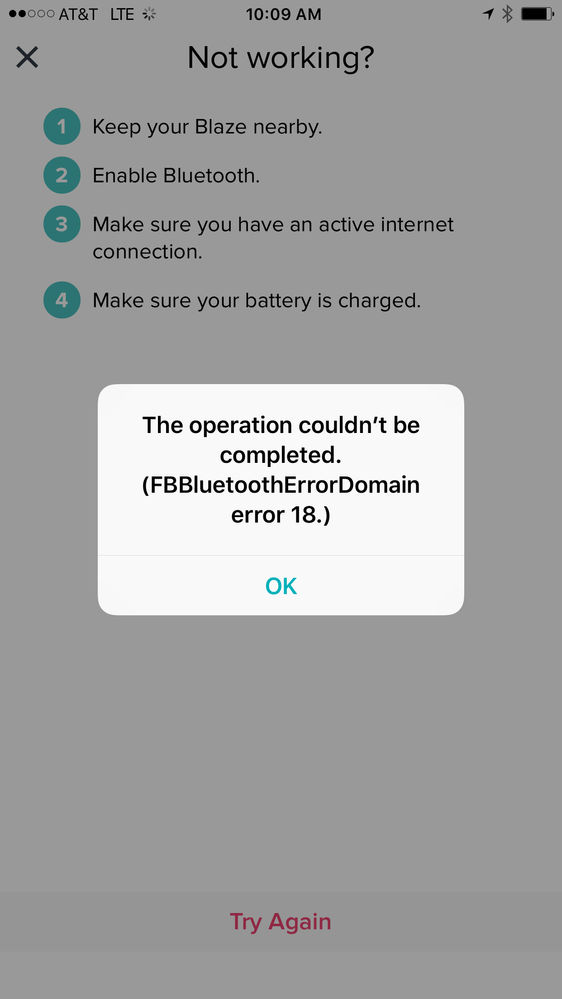
This same error message was received by my sister, after not using her fitbit for a while. I have a screenshot of the error that I uploaded below this reply. One of my sister's co-workers ended up fixing hers by disconnecting it from her bluetooth and then reconnecting, and so far she has not received the error message and her fitbit is working fine. Hope this might help others having the same/similar issue.
Hi all,
I just bought a fitbit flex 2 yesterday, but can't get it working because of this issue.
In response to the questions below:
- I can't seem to attach an image here, but do have a screen shot that I can send by email, if useful.
- App version: Fitbit 2.39 (691) - just downloaded yesterday.
- The "try again" button doesn't work. I've tried this multiple times.
Any timeline on resolving this issue? I have a limited time for getting a refund on my purchase.
K.
As a follow-up to my initial message, the problem comes when I try to update my tracker.
I now get a different message that says "Firmware Update Error: There was a problem communicating with your tracker. Please try again."
K.
Best Answer
I am having the same issue. No need for me to screenshot because there is already one above. This has been happening for 3 months now for me.
