
Join us on the Community Forums!
-
Community Guidelines
The Fitbit Community is a gathering place for real people who wish to exchange ideas, solutions, tips, techniques, and insight about the Fitbit products and services they love. By joining our Community, you agree to uphold these guidelines, so please take a moment to look them over. -
Learn the Basics
Check out our Frequently Asked Questions page for information on Community features, and tips to make the most of your time here. -
Join the Community!
Join an existing conversation, or start a new thread to ask your question. Creating your account is completely free, and takes about a minute.
Not finding your answer on the Community Forums?
- Mark Topic as New
- Mark Topic as Read
- Float this Topic for Current User
- Bookmark
- Subscribe
- Mute
- Printer Friendly Page
Resolved: FBBluetoothErrorDomain error 18
- Mark Topic as New
- Mark Topic as Read
- Float this Topic for Current User
- Bookmark
- Subscribe
- Mute
- Printer Friendly Page
08-14-2017
15:19
- last edited on
09-12-2017
14:20
by
KateFitbit


 Community Moderator Alumni are previous members of the Moderation Team, which ensures conversations are friendly, factual, and on-topic. Moderators are here to answer questions, escalate bugs, and make sure your voice is heard by the larger Fitbit team. Learn more
08-14-2017
15:19
- last edited on
09-12-2017
14:20
by
KateFitbit
Fitbit Update 9/12/2017: This issue was resolved in the new app update version 2.40 released yesterday. If you are still experiencing this issue, please update your app. Thanks for your patience!
Fitbit Update 8/24/2017: Thanks again for reporting this issue, at this time we have all the information needed and our team is still reviewing. I'll update this thread once we learn more. Your patience is truly appreciated.
Fitbit Update 08/14/2017: Everyone -- Several iOS users have reported receiving the FBBluetoothErrorDomain error 18 when attempting to update their trackers on the latest version of the Fitbit app for iOS, version 2.39. Our team is currently aware of this issue and working on a fix for this. I appreciate you taking the time to report this issue.
As @Rich_Laue asked here, can someone please share a screenshot of the error message as well as letting me know the following details:
- What is your Fitbit app version (account > help)?
- What version of iOS are you on?
- Have you tried what worked for @ReneRobles and continue to hit the try again button?
I will pass this information along to our Product Specialist who will provide me with an update and I will make sure to convey that to you all. Thanks again for your reports. More information coming soon!

Thanks guys, I reset it a few times and it came right.
 Best Answer
 Fitbit Product Experts Alumni are retired members of the Fitbit Product Expert Program. Learn more
@PottyPenny wrote:
I resolved my issues the same day and posted this too.
I wish I could I unsubscribe to this post
Gill
Sent from my iPhone
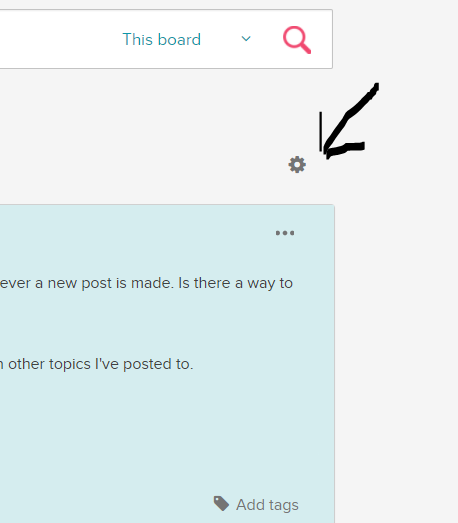
You can unsubscribe from this thread by clicking the "gear" icon at the top right of the page and selecting "unsubscribe" from the drop down menu

Any news on the error 18?
Best Answer

This is beyond a joke. The device won't sync on anything. Phones. Computers. Nothing. And because I bought this overseas I can't even return the device. Will you exchange it in the UK if it was purchased in Australia??
Best Answer
For those who've lost all hope, I stopped getting the error after doing nothing in particular today other than keep trying occasionally.
I did get a new error before it started working - com.fitbit.HTTP error 0
After a couple of failed attempts It updated the firmware to the latest version and now is syncing fine.
Sorry I can't offer any advise at all as to specific steps that fixed it other than multiple resets, multiple phone restarts, and multiple attempts to update and sync.
Good luck.
Best Answer Community Moderator Alumni are previous members of the Moderation Team, which ensures conversations are friendly, factual, and on-topic. Moderators are here to answer questions, escalate bugs, and make sure your voice is heard by the larger Fitbit team. Learn more
Hi Everyone,
This issue was resolved in the new app update version 2.40 released yesterday. If you are still experiencing this issue, please update your app. Thanks for your patience!
Actively managing your weight? Find accountability buddies on the Manage Weight board
Best Answer
This issue was resolved in the new app update version 2.40 released yesterday. If you are still experiencing this issue, please update your app. Thanks for your patience!
The problem has not been resolved. I updated the app and deleted and reloaded it and I am still receiving the same error message. I am working with a Blaze and iOS. Please tell the engineers that the problem persists.
Best Answer


For those people that are still having the problem even after updating the app, I suggest chatting with a Fitbit support staffer -- http://help.fitbit.com/?l=en_US&cu=1&fs=ContactUs . They were able to talk me though a fix that involved deleting the tracker from my phone's bluetooth list and then re-connecting them together. It took about 10 minutes. I don't remember the exact sequence of steps, but I highly recommend contacting them to resolve this issue.

I was previously receiving the FBBluetoothErrorDomain error 18 and updated my app based on the note above that says it was fixed in the update released yesterday. I am now getting error FBBluetoothErrorDomain error 8 and can confirm that I did update my app to 2.40.
Best Answer

Sent from my iPhone
Best Answer