
Join us on the Community Forums!
-
Community Guidelines
The Fitbit Community is a gathering place for real people who wish to exchange ideas, solutions, tips, techniques, and insight about the Fitbit products and services they love. By joining our Community, you agree to uphold these guidelines, so please take a moment to look them over. -
Learn the Basics
Check out our Frequently Asked Questions page for information on Community features, and tips to make the most of your time here. -
Join the Community!
Join an existing conversation, or start a new thread to ask your question. Creating your account is completely free, and takes about a minute.
Not finding your answer on the Community Forums?
- Community
- Product Help Forums
- Alta & Alta HR
- Re: Text message notifications no longer working
- Mark Topic as New
- Mark Topic as Read
- Float this Topic for Current User
- Bookmark
- Subscribe
- Mute
- Printer Friendly Page
- Community
- Product Help Forums
- Alta & Alta HR
- Re: Text message notifications no longer working
Alta Notifications
ANSWERED- Mark Topic as New
- Mark Topic as Read
- Float this Topic for Current User
- Bookmark
- Subscribe
- Mute
- Printer Friendly Page
03-10-2016
10:22
- last edited on
08-20-2020
18:43
by
MatthewFitbit


 Community Moderator Alumni are previous members of the Moderation Team, which ensures conversations are friendly, factual, and on-topic. Moderators are here to answer questions, escalate bugs, and make sure your voice is heard by the larger Fitbit team. Learn more
03-10-2016
10:22
- last edited on
08-20-2020
18:43
by
MatthewFitbit
Alta comes with the ability to set up and receive call, text, and calendar notifications on iOS and Android.
This post will provide instructions on how to setup your alerts so that you can see who's texting you, the 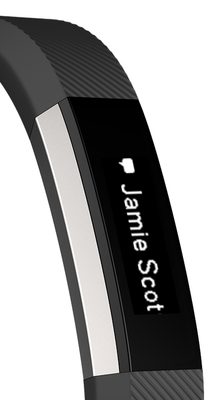
- How do I set up call/text/calendar notifications on Alta?
- Make sure that your mobile device is compatible with our notifications feature by visiting http://www.fitbit.com/devices.
- On your mobile device, make sure Bluetooth is enabled, and make sure your device is nearby!
- Open the Fitbit app on your mobile device and tap your tracker tile at the top of your mobile Dashboard.
- Tap your tracker tile a second time, tap "Notifications" (iOS) or "Call and Text Notifications (Android) and then turn on call/text/calendar notifications.
- To verify that set up was successful, check out the list of Bluetooth connected devices on your mobile device. Your Alta should appear.
- How do I view call/text/calendar notifications on Alta?
You can view your notifications when they come in by using Quick View or by double-tapping the Alta where the band and tracker meet.
Notes:
- For Android users, please ensure that you've turned notification access on in your settings and enabled each notification in the Fitbit App.
- Calendar notifications use the native calendar app in iOS, and the native or selected 3rd party app on Android.
- Windows Phones do not support alerts at this time.
Answered! Go to the Best Answer.

Check the list of supported devices first. Yours may not be in it. If it
is...try hooking it up to your charger and computer, then click the little
button on the usb end to reset. You won't lose data.
 Best Answer
I charged my Alta for the first time since its initial charge yesterday and after it charged it stopped notifying me of messages (I don't know if the two are linked or if its just a coincidence). I have the setting turned "on" in the FitBit app and have tried turning it off and back on several times. I really like how it notifies me of text messages and I want this feature back! Any suggestions/help?
Best Answer Best Answer

My recommendation is to use the stock app on most non samsung phones and if you have samsung and having issues download Google launcher and then use its stock message app.
Best Answer
I am having problems with my new Fitbit Alta recieving text notifications. I did all the suggestions myself and then called customer service. The steps they guided me through did not work either. They said they will talk to the engineering team. Has this happened to anyone else? What did they do? The text notifications is part of the reason I got this tracker so I'm very upset. I am using the iPhone 6s+, anyone else and has it working?
Best Answer
What's the difference between Hangouts and Messaging when you're setting up the text alerts on an Android phone?
Best Answer
compared to messages might as well be eBay. If you understand what I
mean. It's a different application period.
Best Answer
the reminder to move started working 24 hours after set up and then just
stopped working a day later. There appears to be major problems with the
Alta with absolutely no communication coming from Fitbit that they are
working on a fix. I'm waiting one week and plan on returning the Alta if
the deafening silence continues.


I've read the same issue over and over again, that the notifications were not displaying. Through reading through multiple threads, I just found that when the Alta is vibrating with an incoming text or call, you must tap it to see the notification. This was not the case with my Charge, so I'm a bit confused why you must now tap.
Is anyone else having similar experiences?
Best Answer
Best Answer
I am in the same boat as you. Same phone and what not... I am able to get phone call notifications, but not text. If you find a solution please let me know. It is aggravating. I have done everything that the site suggests to solve the issue.
Best Answer
Melanie Rogers
513.370.0771
Best Answer

 Fitbit Product Experts Alumni are retired members of the Fitbit Product Expert Program. Learn more
@cassiegage There is not a way to change notifications to alert you by sound - the device does not have that capacity.
Kelly | Oklahoma
Alta HR, Blaze, Flex 2, Charge 2, Charge, and Aria * IPhone 7+
