
Join us on the Community Forums!
-
Community Guidelines
The Fitbit Community is a gathering place for real people who wish to exchange ideas, solutions, tips, techniques, and insight about the Fitbit products and services they love. By joining our Community, you agree to uphold these guidelines, so please take a moment to look them over. -
Learn the Basics
Check out our Frequently Asked Questions page for information on Community features, and tips to make the most of your time here. -
Join the Community!
Join an existing conversation, or start a new thread to ask your question. Creating your account is completely free, and takes about a minute.
Not finding your answer on the Community Forums?
- Community
- Product Help Forums
- Blaze
- Re: Blaze Music Control Information Post
- Mark Topic as New
- Mark Topic as Read
- Float this Topic for Current User
- Bookmark
- Subscribe
- Mute
- Printer Friendly Page
- Community
- Product Help Forums
- Blaze
- Re: Blaze Music Control Information Post
Blaze Music Control Information Post
ANSWERED- Mark Topic as New
- Mark Topic as Read
- Float this Topic for Current User
- Bookmark
- Subscribe
- Mute
- Printer Friendly Page
02-22-2016
09:45
- last edited on
03-28-2016
07:40
by
AndreaFitbit


 Community Moderator Alumni are previous members of the Moderation Team, which ensures conversations are friendly, factual, and on-topic. Moderators are here to answer questions, escalate bugs, and make sure your voice is heard by the larger Fitbit team. Learn more
02-22-2016
09:45
- last edited on
03-28-2016
07:40
by
AndreaFitbit
Music Control gets a facelift with Blaze! Learn more about your power to control music below. For a more detailed look at Music Control on your Blaze, please see this help article.
Music Control:
With Blaze, you can control your music with the touch of a button! To access Music Control, simply swipe downward on your home screen. Improvements to this feature include a Bluetooth Low Energy (BTLE) connection for iOS instead of BT Classic. We've also added the ability to rewind and increase/decrease the volume of the song, in addition to fast forwarding and play/pause.
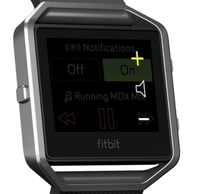
Notes:
- Android and Windows phones will still use BT Classic for using Music Control.
- While in exercise mode, press/hold Blaze's top-right button for 2 seconds to bring Music Control up.
- You'll use both buttons on the right to control volume on Blaze. See image to the right.
- As with most other Bluetooth devices, if you connect another Bluetooth device and disconnect your Blaze, you will have to connect it again the next time you want to use it to control music.
No matter what you're rocking out to, we're sure you'll love using Music Control on Blaze!

Answered! Go to the Best Answer.


I have a GalaxyJ7 and can't connect my music to my Blaze. I have MP3 music downloads on my phone. I go to Settings/Bluetooth Classic and the only I options I see are Pair and Off. When I swipe down on main screen it says Not Connected? How do I get this to connect so I can adjust volume or skip songs?
 Best Answer
@KAP1970 to control the volume, go to the music screen on the Blaze. Now press either of the right buttons. Top is volume uo, booty volume down.
@K-Walls the reason you only have off and pair is because your Blaze Classic is not Paired to your phone.
Set tit to pair, then go to the phones BT settings, tell it to search, and follow prompts.. Once paired you'll see the on.
Best Answer
Hi I was able to pair my blaze with my phone, S4 and the music controls show up but when I click on the pause, rewind, or forward it doesn't do anything? I'm using music play on S4. Help!
@EmersonFitbit wrote:Music Control gets a facelift with Blaze! Learn more about your power to control music below. For a more detailed look at Music Control on your Blaze, please see this help article.
Music Control:
With Blaze, you can control your music with the touch of a button! To access Music Control, simply swipe downward on your home screen. Improvements to this feature include a Bluetooth Low Energy (BTLE) connection for iOS instead of BT Classic. We've also added the ability to rewind and increase/decrease the volume of the song, in addition to fast forwarding and play/pause.
Notes:
- Android and Windows phones will still use BT Classic for using Music Control.
- While in exercise mode, press/hold Blaze's top-right button for 2 seconds to bring Music Control up.
- You'll use both buttons on the right to control volume on Blaze. See image to the right.
- As with most other Bluetooth devices, if you connect another Bluetooth device and disconnect your Blaze, you will have to connect it again the next time you want to use it to control music.
No matter what you're rocking out to, we're sure you'll love using Music Control on Blaze!
Best Answer
@zzcatch could it be that the music player is not compatable with AVRCP?
You might want to try a different player.
- Fitbit trackers use the AVRCP Bluetooth profile. If your music streaming app doesn't support AVRCP, music control won't work with your Fitbit tracker.
Best Answer
I have it paired and it displays the control button. However, what I want to know if you have multiple bluetooth devices (example beats headphones) why doesn't the music control buttons work on the blaze?
Best Answer
Simple answer BY device interferance.
I have 1 headphone and 2 wireless speakers, all three have music control and the blaze controls music fine. With the second headphone I can't get the Blaze to control the music.
Best Answer
I had the problem that my music controls wouldn't work while using bluetooth headphones. The problem was fixed after I turned off the headphones and then the music could be controlled by my blaze. The music was playing out of my phone speaker for a few seconds. Then, I turned the headphones on last and the blaze was showing my music and would control the volume in my bluetooth headphones. Problem solved! Galaxy Note 5, Skull Candy Headphones, Blaze 17.8.301.7
My Moto X Pure Edition (XT1575) isn't working for this as well. When will it become compatible with this feature? I just got this phone, and I'm not looking forward to buying a $700 phone when I just bought this phone. I don't understand why it would not work.
After waiting a while for Blaze (Classic) to appear on the list of devices, I click it to pair, and it pops up immediately "Couldn't pair with Blaze (Classic) because of an incorrect PIN or passkey."
No pass key even popped up.
Best Answer

I know Blaze has a list of devices that can be paired with. I was just wondering if anyone has tried pairing with an iPod Nano or any other mp3 players that has bluetooth capability to ONLY control music? I am hoping to use that to teach my classes and my music is all sitting in my iPod Nano. Apparently iPod Nano does use AVRCP for controlling playback on Bluetooth devices.
Best Answer
Does the nano have Bluetooth, and can it act as a server? Have your tried? I was able to control volume on a kindle once.
Best Answer
SunsetRunner
Best Answer
Best Answer
SunsetRunner
Now for the real Stupid question #2: Can the Blaze be connected to two devices at same time? I have both an iPad tablet (the third gen) and an Android phone (LG v10)....I use the iPad for everything I do (emailing, texting, calendar, etc) but all my music is on the phone since it has the memory card that has all my music (over 90 GB) and I was wanting to connect Blaze to phone GPS as well. I am getting the notifications and emails on the Blaze from the iPad just fine...just can't get to control music on phone.
Best Answer