
Join us on the Community Forums!
-
Community Guidelines
The Fitbit Community is a gathering place for real people who wish to exchange ideas, solutions, tips, techniques, and insight about the Fitbit products and services they love. By joining our Community, you agree to uphold these guidelines, so please take a moment to look them over. -
Learn the Basics
Check out our Frequently Asked Questions page for information on Community features, and tips to make the most of your time here. -
Join the Community!
Join an existing conversation, or start a new thread to ask your question. Creating your account is completely free, and takes about a minute.
Not finding your answer on the Community Forums?
- Community
- Product Help Forums
- Blaze
- Extended Notifications for Blaze
- Mark Topic as New
- Mark Topic as Read
- Float this Topic for Current User
- Bookmark
- Subscribe
- Mute
- Printer Friendly Page
- Community
- Product Help Forums
- Blaze
- Extended Notifications for Blaze
Extended Notifications for Blaze
- Mark Topic as New
- Mark Topic as Read
- Float this Topic for Current User
- Bookmark
- Subscribe
- Mute
- Printer Friendly Page


 Community Moderator Alumni are previous members of the Moderation Team, which ensures conversations are friendly, factual, and on-topic. Moderators are here to answer questions, escalate bugs, and make sure your voice is heard by the larger Fitbit team. Learn more
More notifications are here!
You can now receive notifications from email and other apps on your Blaze! Common emojis are also supported. Please keep in mind that you will need to have the latest Fitbit app version as well as the latest Blaze firmware update (17.8.301.7).
Using Notifications:
When you receive a notification, your Fitbit Blaze vibrates. Depending on the type of notification and your mobile device's operating system, the following information may appear on your screen:
- Phone call—Caller's name, if in the contacts list on your mobile device, or phone number.
- Text message—Sender's name (if in your phone's contacts) or phone number, and the contents of the text message.
- Calendar event—Name, location, and time of the event.
- Email—Sender’s name, subject, and contents of the message.
- App notification—App name and contents of the message. App-specific icons may also be displayed.
Keep in mind your tracker can only display notifications from third-party apps if you already receive notifications from these apps on your paired iOS or Android mobile device. Make sure notifications are turned on for these apps in your mobile device's settings, and in your Blaze's device settings.
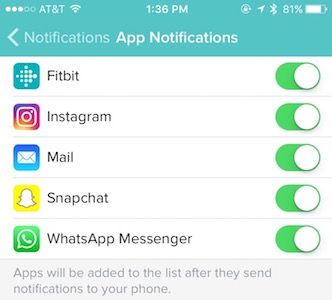
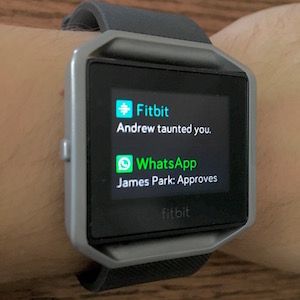
You can see all your notifications by swiping up from the home screen. You'll see previous calls, texts, calendar, email, and app notifications as well. You may delete these notifications either individually by swiping right, or all at once by scrolling down and tapping "Clear All" on the display.
For detailed information and setup instructions, check out our help page about notifications.


SunsetRunner
@AndrewFitbit Is there a complete list of apps that are covered under the new notifications? And I do not yet see Instagram on my Fitbit app. Is that because I have not received a notification yet from Instagram after doing the update?
 Best Answer
@SunsetRunner wrote:@AndrewFitbit Is there a complete list of apps that are covered under the new notifications? And I do not yet see Instagram on my Fitbit app. Is that because I have not received a notification yet from Instagram after doing the update?
Looks like almost any app you have, I clicked on the "app notification" and every single app I have is listed there, if this works as intended it is beautiful.
One question though, is there a silent period that can be set here so my American Airlines (or any other) reminder won't wake me up with a vibration at 2am?


I believe you will need to wait for the next time the app sends a notification.
Best Answer
SunsetRunner
That's what I thought as well. Loving the new clock faces. I aminly bought this primarily for text notifications the day it was released but this makes $200 watch an even better deal than it already is. Almost bought a Pebble Time until I found it doesn't work that well with iPhones
Best Answer

I was able to update and change the clock face, but when going to add app notifications, no apps are available in the list to add. I'm guessing this is a glitch?

SunsetRunner
For the App Notification, it's not recognizing Facebook or any of the e-mail (Yahoo/Gmail) apps. I verified the notications were set correctly on my iPhone and in the Fitbit app. So far it's only found the Fitbit and Instagram apps.

Your are able to sense the vibration alert so well that it wakes you up?? That's pretty good. Many of us, myself included, feel nothing or next to nothing. You must have a special edition LOL, or very sensitive nerves in your wrist. Something to research either way. 🙂
Best Answer
So, with the new update on Blaze, will we able to get e-mail notifications from GMAIL, for example?
Thanks
Best Answer
Sorry that I did not read the other messages.
So then, it seems that yes, we can get GMAIL notifications.
Regards
Best Answer
I can't speak go any platform other then Android, of which i am able to setup and receive notifacations from any and every app on my phone? If i so choose.