
Join us on the Community Forums!
-
Community Guidelines
The Fitbit Community is a gathering place for real people who wish to exchange ideas, solutions, tips, techniques, and insight about the Fitbit products and services they love. By joining our Community, you agree to uphold these guidelines, so please take a moment to look them over. -
Learn the Basics
Check out our Frequently Asked Questions page for information on Community features, and tips to make the most of your time here. -
Join the Community!
Join an existing conversation, or start a new thread to ask your question. Creating your account is completely free, and takes about a minute.
Not finding your answer on the Community Forums?
- Community
- Product Help Forums
- Flex & Flex 2
- Re: Flashing lights
- Mark Topic as New
- Mark Topic as Read
- Float this Topic for Current User
- Bookmark
- Subscribe
- Mute
- Printer Friendly Page
- Community
- Product Help Forums
- Flex & Flex 2
- Re: Flashing lights
two spaced lights alternating, what does it mean?
ANSWERED- Mark Topic as New
- Mark Topic as Read
- Float this Topic for Current User
- Bookmark
- Subscribe
- Mute
- Printer Friendly Page
05-18-2015
11:39
- last edited on
08-20-2020
16:59
by
MatthewFitbit


05-18-2015
11:39
- last edited on
08-20-2020
16:59
by
MatthewFitbit
When I tap it My wrist flex has a flashing pattern of 2 spaced lights alternating over one position with 2 spaced lights. E.g. lights in position 1 and 3 alternate with positions 2 and 4.
Any idea what this means?
Moderator edit: subject updated for clarity
Answered! Go to the Best Answer.
Accepted Solutions

When you tap your Flex rapidly for one or two seconds to enter sleep mode, it will vibrate and display two slowly dimming lights. During sleep mode, two blinking lights alternate. After you tap your Flex rapidly to exit sleep mode, it will vibrate and flash all five lights three times and then display a spinning light pattern.


 Community Moderator Alumni are previous members of the Moderation Team, which ensures conversations are friendly, factual, and on-topic. Moderators are here to answer questions, escalate bugs, and make sure your voice is heard by the larger Fitbit team. Learn more
@tambo2274 Welcome to the Fitbit Community! I have seen this problem before. Usually, this happens when your daily step goal is accidentally changed. I would believe that the goal you have set up right now on your dashboard is more than 10,000 steps. Make sure to double check it on the app by going to your account and advanced settings or on the online Dashboard by going to the "goals" tile and checking on the settings. I will leave a picture for you to check how it looks like on the online Dashboard:
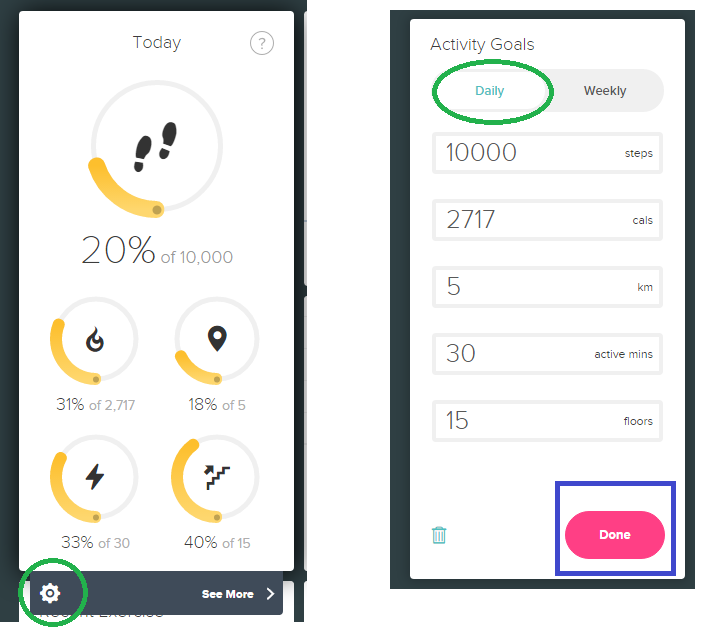
Hope this helps. Let me know how it goes! 
When you tap your Flex rapidly for one or two seconds to enter sleep mode, it will vibrate and display two slowly dimming lights. During sleep mode, two blinking lights alternate. After you tap your Flex rapidly to exit sleep mode, it will vibrate and flash all five lights three times and then display a spinning light pattern.
 Community Moderator Alumni are previous members of the Moderation Team, which ensures conversations are friendly, factual, and on-topic. Moderators are here to answer questions, escalate bugs, and make sure your voice is heard by the larger Fitbit team. Learn more
Welcome to the forums @CarpeDiem59!
If your Flex is displaying a pattern with two lights switching back and forth, your Flex is on Activity mode. Please hold your finger close to the band, tap rapidly (or about 5 taps shortly after each other) until it buzzes so it goes off sleep mode. When double tapping off sleep mode, you will see a spinning light pattern and then your actual step progress.
Let me know if you have any questions and I'll be glad to help 


Mine is doing the same thing, don't know why.
@CarpeDiem59 wrote:
When I tap it My wrist flex has a flashing pattern of 2 spaced lights alternating over one position with 2 spaced lights. E.g. lights in position 1 and 3 alternate with positions 2 and 4.
Any idea what this means?
 Best Answer
Community Moderator Alumni are previous members of the Moderation Team, which ensures conversations are friendly, factual, and on-topic. Moderators are here to answer questions, escalate bugs, and make sure your voice is heard by the larger Fitbit team. Learn more
Best Answer
Community Moderator Alumni are previous members of the Moderation Team, which ensures conversations are friendly, factual, and on-topic. Moderators are here to answer questions, escalate bugs, and make sure your voice is heard by the larger Fitbit team. Learn more
Welcome to the forums @GolferDi! If you are having the same problem, this means that your Flex is on Activity mode.
Please hold your finger close to the band, tap rapidly (or about 5 taps shortly after each other) until it buzzes so it goes off sleep mode. When double tapping off sleep mode, you will see a spinning light pattern and then your actual step progress.
Let me know if you have any questions!
Best Answer
Yes and you can delete that sleep from the dashboard!

My flex tracks my steps but only flashes one light even though I have met my goal of 10,000 steps. It also has stopped buzzing when I reach my goal. I have tried resetting and setting it up as a new one. Nothing has worked
Best Answer
Community Moderator Alumni are previous members of the Moderation Team, which ensures conversations are friendly, factual, and on-topic. Moderators are here to answer questions, escalate bugs, and make sure your voice is heard by the larger Fitbit team. Learn more
@tambo2274 Welcome to the Fitbit Community! I have seen this problem before. Usually, this happens when your daily step goal is accidentally changed. I would believe that the goal you have set up right now on your dashboard is more than 10,000 steps. Make sure to double check it on the app by going to your account and advanced settings or on the online Dashboard by going to the "goals" tile and checking on the settings. I will leave a picture for you to check how it looks like on the online Dashboard:
Hope this helps. Let me know how it goes!
 Community Moderator Alumni are previous members of the Moderation Team, which ensures conversations are friendly, factual, and on-topic. Moderators are here to answer questions, escalate bugs, and make sure your voice is heard by the larger Fitbit team. Learn more
Hello there @tambo2274! It's nice to see that everything is working fine now! You can help other friends by marking @SantiR's post as the Solution. By doing this, his response will be more visible for other friends that may be having the same experience.
Happy stepping!


 Community Moderator Alumni are previous members of the Moderation Team, which ensures conversations are friendly, factual, and on-topic. Moderators are here to answer questions, escalate bugs, and make sure your voice is heard by the larger Fitbit team. Learn more
Welcome to the forums @schase @SunsetRunner @JennMV13!
I am very glad to hear you are now back on track with the information posted above, keep me posted if you have any questions!
@SunsetRunner If your Flex is displaying a pattern with two lights switching back and forth, your Flex is on Activity mode. Please hold your finger close to the band, tap rapidly (or about 5 taps shortly after each other) until it buzzes so it goes off sleep mode. When double tapping off sleep mode, you will see a spinning light pattern and then your actual step progress.
Let me know if you have any questions! Happy stepping. 

Is there anyway to disable going to sleep from the band? I keep putting myself to sleep when I want to see how many steps I have.

Thanks, that answered my question
Best Answer