
Join us on the Community Forums!
-
Community Guidelines
The Fitbit Community is a gathering place for real people who wish to exchange ideas, solutions, tips, techniques, and insight about the Fitbit products and services they love. By joining our Community, you agree to uphold these guidelines, so please take a moment to look them over. -
Learn the Basics
Check out our Frequently Asked Questions page for information on Community features, and tips to make the most of your time here. -
Join the Community!
Join an existing conversation, or start a new thread to ask your question. Creating your account is completely free, and takes about a minute.
Not finding your answer on the Community Forums?
- Community
- Product Help Forums
- Other Charge Trackers
- Re: Charge 3 display corrupted
- Mark Topic as New
- Mark Topic as Read
- Float this Topic for Current User
- Bookmark
- Subscribe
- Mute
- Printer Friendly Page
- Community
- Product Help Forums
- Other Charge Trackers
- Re: Charge 3 display corrupted
Charge 3 display corrupted
- Mark Topic as New
- Mark Topic as Read
- Float this Topic for Current User
- Bookmark
- Subscribe
- Mute
- Printer Friendly Page
07-18-2019
08:18
- last edited on
11-17-2020
10:55
by
MatthewFitbit


07-18-2019
08:18
- last edited on
11-17-2020
10:55
by
MatthewFitbit
I have barely had my Fitbit 3 a month, and there is a black line going down the center of the screen. Anyone know what to do about this?
Moderator edit: subject for clarity

Sent from my iPhone
 Best Answer
Sent from my iPhone
Best Answer
Sent from my iPhone
Best Answer
Sent from my iPhone
Best Answer
Sent from my iPhone
Best Answer
Sent from my iPhone
Best Answer
Having the same issue with my Charge 3 HR, tough not as severe as others, still bothersome though. I tried the instructions given at the beginning of this thread, but to no avail. I've owned the original HR, and version 2, and everyone else at home wears a fitbit ... though the Charge is the only one showing such issue. Manufacturing defect possibly?
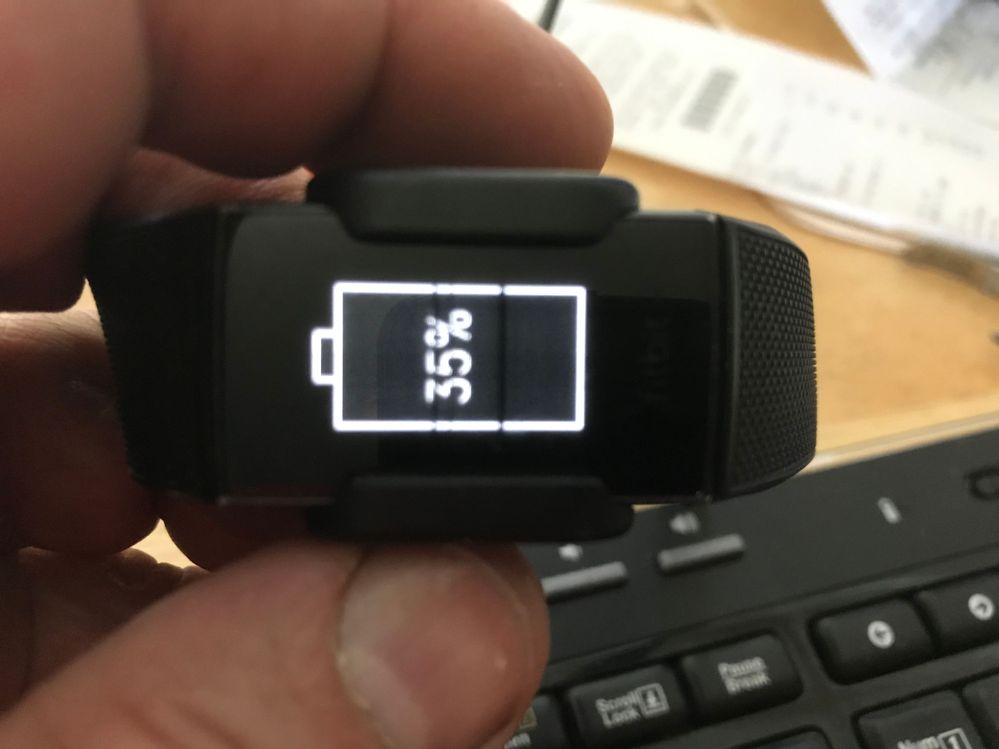
Sent from my iPhone
Best Answer
Certainly beats trying to get anywhere with online purchases!
Best Answer
Hi, I also have the same issue. Have tried all suggestions but issue remains. I’ve had Fitbits previously and have had no issue. I would like to remain a fitbit user, but am now considering switching to Garmin if this cannot be resolved. Please advise. Thanks.
Best Answer
Sent from my iPhone
Best Answer09-02-2020 12:11 - last edited on 09-02-2020 14:51 by LiliyaFitbit
09-02-2020 12:11 - last edited on 09-02-2020 14:51 by LiliyaFitbit
Thanks but how do I return it? I tried emailing support but got an auto
response back saying queries are only answered via the forums 😢
--
Moderator edit: personal info removed
Best Answer
Sent from my iPhone
Best Answer
I tried to do these instructions but it wouldn’t turn off. Can’t see the screen.
Best Answer
Tried this and ot didn't work. Mine seems to have dimmed agter doing a fitbit update that tok 30 minutes 4 or 5 days ago. Bummer.
Best Answer
Sent from my iPhone
Best Answer
11-16-2020
06:41
- last edited on
11-06-2025
07:21
by
MarreFitbit


 Community Moderators ensure that conversations are friendly, factual, and on-topic. We're here to answer questions, escalate bugs, and make sure your voice is heard by the larger Fitbit team. Learn more
11-16-2020
06:41
- last edited on
11-06-2025
07:21
by
MarreFitbit
@Viv80 It's great to see that you've visited the Fitbit Community!
Let me help you with your unresponsive Charge 3 and thank you for troubleshooting this issue. I noticed that you already have a ticket with our Support team so keep working with the team to find a solution.
Let me know how it goes.
If a post helped you try voting and selecting it as a solution so other members benefit from it. Select it as Best Solution!
Best Answer
3.i had it less than a month before that quit working.i sent it back & it
was received on 10/30. Since I've had no response. I've contacted customer
service twice with the tracking# to see if a new one has been sent with no
response either time. Can you assist. I'm getting super frustrated. I have
a brand new $100 fitbit that I've never used & can't seem to get it
replaced.
Best Answer
Hello, I too have been receiving the issue with display and have been living with it for some time before I have attempting resolution reboots which initially resolved it but the time between it coming back continued to be shorter. Now it will not go away. What can be done to resolve? Thanks in advance for your response.
Best Answer