
Join us on the Community Forums!
-
Community Guidelines
The Fitbit Community is a gathering place for real people who wish to exchange ideas, solutions, tips, techniques, and insight about the Fitbit products and services they love. By joining our Community, you agree to uphold these guidelines, so please take a moment to look them over. -
Learn the Basics
Check out our Frequently Asked Questions page for information on Community features, and tips to make the most of your time here. -
Join the Community!
Join an existing conversation, or start a new thread to ask your question. Creating your account is completely free, and takes about a minute.
Not finding your answer on the Community Forums?
- Mark Topic as New
- Mark Topic as Read
- Float this Topic for Current User
- Bookmark
- Subscribe
- Mute
- Printer Friendly Page
FBBluetoothErrorDomain error 18
ANSWERED- Mark Topic as New
- Mark Topic as Read
- Float this Topic for Current User
- Bookmark
- Subscribe
- Mute
- Printer Friendly Page

 Community Moderator Alumni are previous members of the Moderation Team, which ensures conversations are friendly, factual, and on-topic. Moderators are here to answer questions, escalate bugs, and make sure your voice is heard by the larger Fitbit team. Learn more
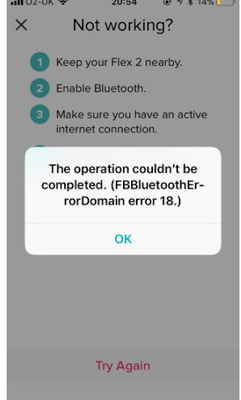
Update 1/23/2018: Thanks again everyone for your reports on this error message when updating firmware or setting up your tracker. To resolve this issue, please forget your device in Bluetooth settings. For complete instructions, please check out @Dawn126's post here. We are currently working with our team to update the error message to include the solution.
Update 10/31/2017: For those seeing this message while updating your tracker firmware, check out @Dawn126's post here on having Bluetooth forget your device. In addition, please check out this help article on troubleshooting firmware updates if you haven't already.
Hi Everyone- We're currently investigating user reports of receiving the following error: FBBluetoothErrorDomain error 18 which prevents them from updating their firmware.
Actively managing your weight? Find accountability buddies on the Manage Weight board
Answered! Go to the Best Answer.

Many thanks for trying, but I can’t slide it over to turn green (as per below), and I have turned all notification options on. Do, I’m not getting the pop-up message to link to my iPhone. Do you have any other ideas?
many thanks 🙏🏽
Tap Notifications; move the slide over till it turns green, then a pop-up message should appear requesting permission to set up your tracker to your iPhone's
 Best Answer
 Fitbit Product Experts Alumni are retired members of the Fitbit Product Expert Program. Learn more
Try this from this guy

ALAN | VAN,B.C. Canada Community Council Member
Versa, Charge, Charge HR, Ionic, Ace, Aria 2 scale, Flyer headphones - iOS
Click here Fitbit help for more solutions
>Contact
Best Answer
This youtube video had a couple of ideas. They worked for me:) https://www.youtube.com/watch?v=iHRMIN7BQlw
@AliFitality wrote:
Going nowhere with support. I’d like a refund. 😝
 Best Answer
Thank you. It worked for me. And I am very happy to hear that you run with your German Shepard. Keep the bad people away.
Best Answer
Fitbit Product Experts Alumni are retired members of the Fitbit Product Expert Program. Learn more
Your Welcome @heydeb
ALAN | VAN,B.C. Canada Community Council Member
Versa, Charge, Charge HR, Ionic, Ace, Aria 2 scale, Flyer headphones - iOS
Click here Fitbit help for more solutions
>Contact
Best Answer
Tried the following from all these other users having similar problems. Using Fitbit Charge 2 and Iphone 6S. iOS is updated. Initially got "FBBluetoothErrorDomain error 18" after pairing device.
- "Forgot" device, and reset bluetooth. Then it just locks up after inputting 4 digits when we try to pair.
- Re-downloaded iOS app. Still wont pair.
- Reset tracker with UL listed charger, still wont pair.
- Reset tracker with PC, still wont pair.
- Reset everything, downloaded PC app to try and pair through dongle. App crashes when we try to sync.
- Re-downloaded PC app and it still crashes every time we try to sync
- About to head back to Costco for refund.
Best Answer
Fitbit Product Experts Alumni are retired members of the Fitbit Product Expert Program. Learn more
Hello @SFBrown
Please get in touch with Fitbit Support directly at contact.fitbit.com or by calling (877) 623-4997 between the hours of 4am-9pm PST every day.
Also, you can click on the link below in my signature and then select "let's talk" with a Fitbit representative.
ALAN | VAN,B.C. Canada Community Council Member
Versa, Charge, Charge HR, Ionic, Ace, Aria 2 scale, Flyer headphones - iOS
Click here Fitbit help for more solutions
>Contact
Best Answer
Best Answer
Best Answer
I solved the issue by connecting the usb fitbit base in one port on my computer and the charge HR on other usb port on the computer. i open the dashboard on fitbit base and update from there. it worked
Best Answer
01-08-2018
14:50
- last edited on
01-09-2018
06:23
by
MarcoGFitbit


01-08-2018
14:50
- last edited on
01-09-2018
06:23
by
MarcoGFitbit
I've tried everything to update on my iPhone and I keep getting this error message!
FB Bluetooth Error Domain error 18
Somebody please help me!
Moderator Edit: Clarified Subject.
Best Answer
I'm having the same problem! Just happened today.
Best Answer
Thanks Alan - you're a device saver!
Fitbit Product Experts Alumni are retired members of the Fitbit Product Expert Program. Learn more
Your Welcome, glad it worked out for you.
ALAN | VAN,B.C. Canada Community Council Member
Versa, Charge, Charge HR, Ionic, Ace, Aria 2 scale, Flyer headphones - iOS
Click here Fitbit help for more solutions
>Contact
