
Join us on the Community Forums!
-
Community Guidelines
The Fitbit Community is a gathering place for real people who wish to exchange ideas, solutions, tips, techniques, and insight about the Fitbit products and services they love. By joining our Community, you agree to uphold these guidelines, so please take a moment to look them over. -
Learn the Basics
Check out our Frequently Asked Questions page for information on Community features, and tips to make the most of your time here. -
Join the Community!
Join an existing conversation, or start a new thread to ask your question. Creating your account is completely free, and takes about a minute.
Not finding your answer on the Community Forums?
- Mark Topic as New
- Mark Topic as Read
- Float this Topic for Current User
- Bookmark
- Subscribe
- Mute
- Printer Friendly Page
FBBluetoothErrorDomain error 18
ANSWERED- Mark Topic as New
- Mark Topic as Read
- Float this Topic for Current User
- Bookmark
- Subscribe
- Mute
- Printer Friendly Page


 Community Moderator Alumni are previous members of the Moderation Team, which ensures conversations are friendly, factual, and on-topic. Moderators are here to answer questions, escalate bugs, and make sure your voice is heard by the larger Fitbit team. Learn more
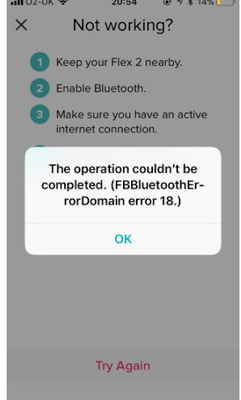
Update 1/23/2018: Thanks again everyone for your reports on this error message when updating firmware or setting up your tracker. To resolve this issue, please forget your device in Bluetooth settings. For complete instructions, please check out @Dawn126's post here. We are currently working with our team to update the error message to include the solution.
Update 10/31/2017: For those seeing this message while updating your tracker firmware, check out @Dawn126's post here on having Bluetooth forget your device. In addition, please check out this help article on troubleshooting firmware updates if you haven't already.
Hi Everyone- We're currently investigating user reports of receiving the following error: FBBluetoothErrorDomain error 18 which prevents them from updating their firmware.
Actively managing your weight? Find accountability buddies on the Manage Weight board
Answered! Go to the Best Answer.

SunsetRunner
- Louise
 Best Answer
SunsetRunner
Same here. It ticks me off that it was working fine untilI tried to update and now it wont work at all. I can't even turn it on.
Best Answer
Don’t know if this works with any model except Charge HR
Best Answer
SunsetRunner
- Louise
Best Answer
In my case I wasn't trying to upgrade the FW, I am trying to perform the original set up. In addition to this error, during setup I do get a 4 digit code but my IOS appears to lock at this point with my having to turn off the phone and re-start to be able to do anything with my Apple. I assume both problems are related.
Best Answer
I encountered this issue with error 18 message while trying to update a Charge. I tried many of the suggestions but nothing seemed to work.
Then I found a tip to go to bluetooth settings on iPhone and "Forget Device". After doing this I went back into the FB App and selected Update again. The firmware update recommenced and the Charge is now working correctly.
Thanks to whoever originally posted that tip. It did the trick!
Best Answer
Same thing has happened to me. My Charge HR is now completely dead - won't turn on, even after I have charged it overnight.
Best Answer
Worked for me! Thank you.
Best Answer
Thank you! I've been unable to use my Charge HR for almost a week now due to a frozen update and this fixed it
Best Answer
Thank you!!! It worked 🙂
Best Answer
Thank you for posting this solution. I’ve been without my Fitbit for two days because it was stuck. Your solution worked for me. I was getting increasingly frustrated.
Best Answer


Worked for me! Thank you so much, i thought my Fitbit was good for the garbage about 2 weeks ago when I first did the update and it kept failing.
Best Answer
This worked for my Charge HR! Thanks!
Best Answer
The solution of forgetting the HR Charge in my iOS paired blue tooth devices worked for me Thanks
iPhone 7 plus iOS 11.2 Beta2
Best Answer
Stuck 1/2 way through download.
Fitbit Charge
iPhone 6s
iOS 11.1
Verizon
Tried resetting phone and Charge
No Bluetooth connection
Best Answer
This worked on my charge:
Then I found a tip to go to bluetooth settings on iPhone and "Forget Device". After doing this I went back into the FB App and selected Update again. The firmware update recommenced and the Charge is now working correctly.