
Join us on the Community Forums!
-
Community Guidelines
The Fitbit Community is a gathering place for real people who wish to exchange ideas, solutions, tips, techniques, and insight about the Fitbit products and services they love. By joining our Community, you agree to uphold these guidelines, so please take a moment to look them over. -
Learn the Basics
Check out our Frequently Asked Questions page for information on Community features, and tips to make the most of your time here. -
Join the Community!
Join an existing conversation, or start a new thread to ask your question. Creating your account is completely free, and takes about a minute.
Not finding your answer on the Community Forums?
- Community
- Product Help Forums
- Other Versa Smartwatches
- Re: Bitmoji won't connect
- Mark Topic as New
- Mark Topic as Read
- Float this Topic for Current User
- Bookmark
- Subscribe
- Mute
- Printer Friendly Page
- Community
- Product Help Forums
- Other Versa Smartwatches
- Re: Bitmoji won't connect
Bitmoji won't connect
ANSWERED- Mark Topic as New
- Mark Topic as Read
- Float this Topic for Current User
- Bookmark
- Subscribe
- Mute
- Printer Friendly Page

I got everything ready and connected my Fitbit to my snapchat/bitmoji. Now it is stuck at 0% teleporting. It has been stuck for over 30 min. I have turned my phone and device off then back on. I have a strong internet connection. My watch face just has the "thinking" circle on it now. Please help. The progress is still updating on the app so I know they are connected.
Answered! Go to the Best Answer.

 Best Answer
Yep mine finally did too. I deleted my Versa, unlinked bitmoji account, did a new bitmoji account, paired my versa, changed to bitmoji face and lo and behold it started working. Totally random because I've tried that and other combinations of install/uninstall/link/unlink before multiple times and it didn't work but I'm not gonna question it lol
Best Answer
Does your bitmoji move? I get different views throughout the day, but it doesn't move. I thought it was supposed to.
Best Answer
pajamas but I've been at work for over an hour lol
Best Answer
my bitmoji did nothing but stare at me and covered the time, steps, etc. So i deleted it because i couldn't see anything--disappointing!
Best Answer

Mel
Melissa
Best Answer
I miss the battery percentage too, but I'm not complaining. It's cute to watch what my bitmoji is up to. If it's working leave it be, u never know. Lol
Best Answer
Turns out it randomly worked last night by itself! My watch face was just my bit peering over the bottom. Instead of changing it when it didn't load all the way, I left her there. Well sometime last night it loaded the rest and I see different faces. Woo!
Best Answer
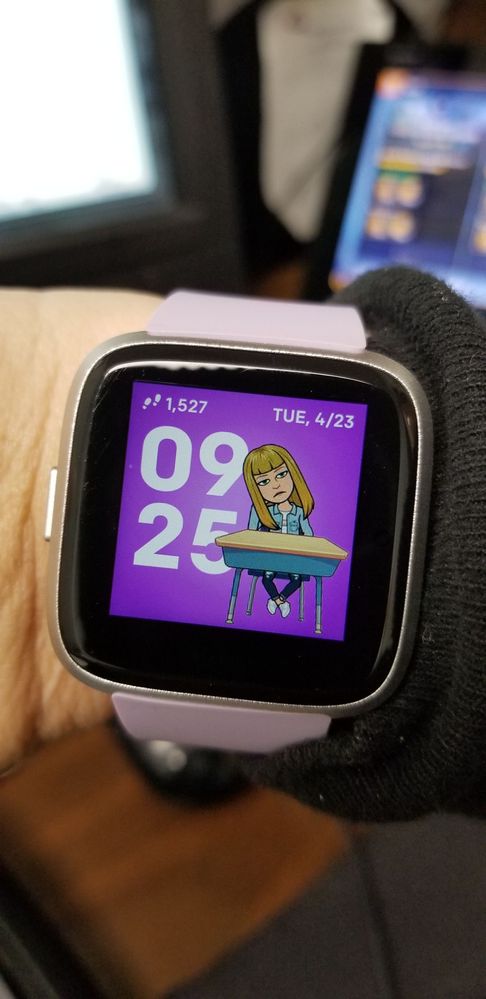
It's cute but I wish I could change some of the "settings" I find myself in lol
Best Answer
Finally! It works. It loaded up last night!
I disconnect my versa and then re connected to my Fitbit app. After that it started to load and connected.
Best Answer



 Community Moderator Alumni are previous members of the Moderation Team, which ensures conversations are friendly, factual, and on-topic. Moderators are here to answer questions, escalate bugs, and make sure your voice is heard by the larger Fitbit team. Learn more
Hello @SunsetRunner, @AmyHarC, @Sabriyah, @Mard21 and @Urghh thanks for joining the Fitbit Community, it's great to have you on board. I hope you're doing well @Pascale1, @SunsetRunner, @conn1e, @the9th1, @Dannys-Hart, @7bebe2, @MOM-E, @Mizmelzy, @losthoughts, @cls103058 it's nice to see you around.
First of all, I would like to apologize for the delay in the response. At this moment our team has solved this issue and the Bitmoji clock-face should work without inconveniences. If you come across any error, please restart your Versa by pressing and holding the Back and Select buttons (left and bottom right) until you see the Fitbit logo on the screen, change your clock-face to a different one and change it back to Bitmoji.
@Urghh as @Sabriyah mentioned, if you'd like to remove Bitmoji, please change your clock-face to a different one.
I appreciate many of you have come back letting us know your issue has now been resolved. In case you have some spare time, I would like to invite you to visit our Discussions board where you will find great tips and encouragement from other members and if there's anything else I can do for you, please keep me posted!


It took me removing the app and reinstalling it on my phone - I had to do all the steps. A frustrating process, but actually worth it - it's a lot of fun!
Best Answer
I had the same error message, then I updated my Fitbit versa and I was able to connect to bitmoji after that ! 🙂
Best Answer Community Moderator Alumni are previous members of the Moderation Team, which ensures conversations are friendly, factual, and on-topic. Moderators are here to answer questions, escalate bugs, and make sure your voice is heard by the larger Fitbit team. Learn more
Fitbit Update: 5/2
Hi everyone!
Many of you had previously reported having issues downloading the Bitmoji clockface and getting stuck at a 2% download. We released a permanent fix for this issue with an updated version of the clock face. Please make sure you are downloading the latest version: 1.2.0, which is the newest version and contains this fix.
Since we've reached a resolution for the main topic on this thread, I'm now going to close this thread from further comments. If you come across any new issues with the Bitmoji clockface or anything else with your Versa, please start and open a new discussion to report.
We're happy to hear from you all that you're enjoying this fun and exciting clockface. See you all around the forums!
Want to get more steps? Visit Get Moving in the Health & Wellness Discussion Forum.
